

画像認識と物体検出を学び直す Log#6 | 重心・面積・外接矩形・円形度 ― 紙を回すと壊れるのはどれか
円形度は丸さを測っていなかった。輪郭が画素の格子に沿って走っているかどうかを測っていた。
先に結論を4つ置く。ひとつ、完全な円の円形度は 0.8975 になり、解像度を13倍にしても 1.0 に近づかない。これは精度の問題ではなく原理的な上限になる。ふたつ、軸に平行な正方形の contourArea は画素数から計算した (n−1)² と小数以下まで一致する。みっつ、小さい対象で面積が足りなくなる原因は画素の粗さではなくカメラのボケになる。よっつ、紙を43度回すと boundingRect の面積は1.75倍に膨らみ、minAreaRect は0.3%しか動かない。
Log#5 までで、色で拾った白黒のマスクから小さい粒と小さい穴を消すところまで進んだ。今回はそのマスクから輪郭を取り出し、4つの数字にする。使うのは寸法が計算で分かる印刷図形20個と、それを上カメラで撮った実写になる。
Log#5 で使った connectedComponentsWithStats は周囲長を返さない
Log#5 のコードは、白い塊を数えるのに cv2.connectedComponentsWithStats を使っていた。この関数は塊ごとに面積・外接矩形・重心を返す。実際に出ていた行がこれになる。
--- 青 S>=60 ---
   面積=  861  bbox=(608,308, 32, 29)  重心=( 623.7, 322.0)
   面積=   63  bbox=(465,289,  9,  9)  重心=( 468.9, 293.2)
面積も重心も外接矩形も、すでに出ている。ではこの回で何が増えるのか。
cv2.findContours との違いは、塊を何として扱うかになる。connectedComponentsWithStats は塊を「画素の集まり」として扱う。どの画素がどのラベルに属するかを持っているだけで、縁の画素がどういう順番で並んでいるかは持っていない。findContours は塊の縁を一周した点の列を返す。点が順番に並んでいるので、隣り合う点の距離を足し上げれば周囲長が出る。
量 | connectedComponentsWithStats | findContours |
|---|---|---|
面積 | 画素数( |
|
重心 |
|
|
外接矩形 | 軸に平行なものだけ |
|
周囲長 | 取れない |
|
円形度 | 取れない | 周囲長から計算できる |
新しいのは下2行になる。そしてこの2行が、Log#5 で残った誤検出を形で切るための唯一の材料になる。
findContours が実装しているのは Suzuki-Abe の境界追跡になる。白い塊の縁の画素を、隣を辿りながら一周して座標の並びを作る。引数の cv2.RETR_EXTERNAL は外側の輪郭だけを返す指定で、穴の輪郭は無視される。cv2.CHAIN_APPROX_NONE は縁の画素を全部返す指定になる。cv2.CHAIN_APPROX_SIMPLE を指定すると直線部分の中間点が省かれ、軸に平行な正方形なら4点だけになる。
周囲長は隣り合う点のユークリッド距離の合計になる。縦横の移動が1、斜めの移動が √2 ≈ 1.414 として足される。「縁の画素を数える」のとは違う値になる。
円形度の式は次になる。
円形度 = 4π × 面積 ÷ 周囲長²同じ周囲長で囲める面積は円が最大になる(等周不等式)。だから連続な図形では必ず 1 以下で、円のときだけ 1 になる。面積は長さの2乗、周囲長は長さの1乗でスケールするので、この比は理屈の上では大きさに依存しない。
面積が計算で分かる図形を A4 に印刷する
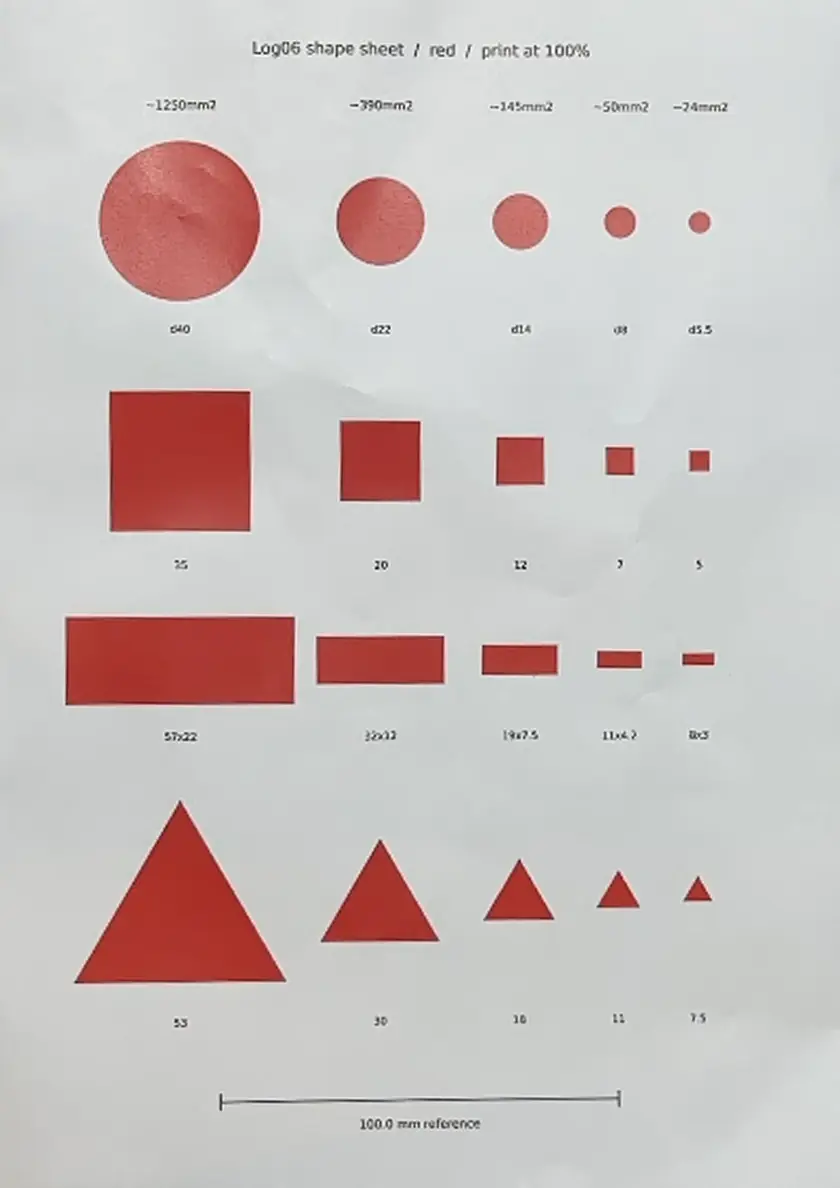
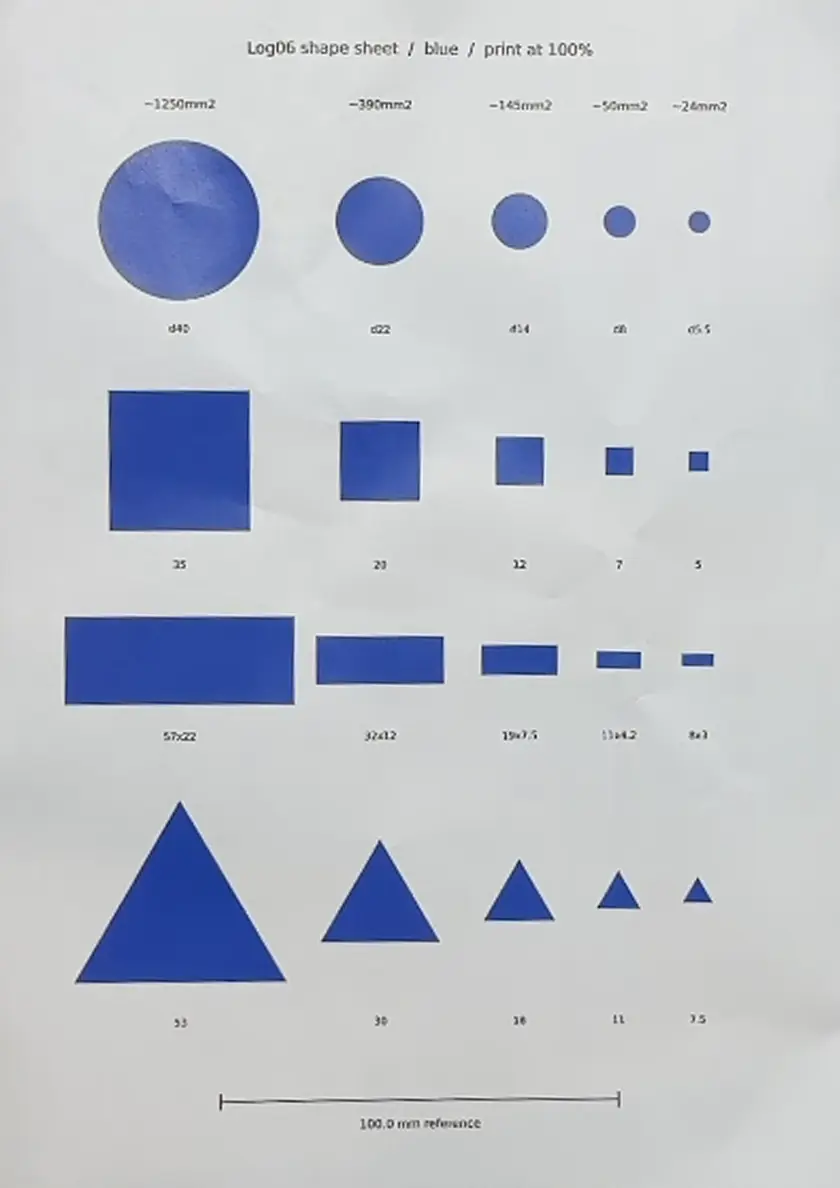
実物のブロックやシールには真値がない。「面積 741px は正しいのか」を判定する基準が手元にないと、測定結果が合っているかどうかを言えない。
そこで、寸法が計算で分かる図形を自分で作る。円・正方形・長方形・正三角形の4種類を、面積が5段階になるサイズで並べたシートを作り、A4に100%で印刷した。
サイズは実物に合わせて刻んだ。Pick&Place の現場で扱っている対象は、960×540 換算で赤ブロックが 741px、青ブロックが 861px、グリッパーの青シールが 56px になる。教科書的な大きい図形だけで測ると、実物の帯で何が起きるかが出ない。
形 | サイズ(mm) |
|---|---|
円 | 直径 40 / 22 / 14 / 8 / 5.5 |
正方形 | 一辺 35 / 20 / 12 / 7 / 5 |
長方形 2.6:1 | 57×22 / 32×12 / 19×7.5 / 11×4.2 / 8×3 |
正三角形 | 一辺 53 / 30 / 18 / 11 / 7.5 |
面積の段は約 1250 / 390 / 145 / 50 / 24 mm² になる。長方形の比 2.6:1 は、マットに印刷された OLFA ロゴ(34×13)と同じ縦横比を選んだ。理論円形度が長方形 0.6312、正三角形 0.6046 と 0.03 しか離れていないので、円形度だけでは切れない組み合わせを最初から入れてある。
用紙は普通紙を使う。光沢紙は反射で彩度が落ち、Log#5 で確定した閾値を通らなくなる。印刷倍率が狂うと真値が全部ずれるので、シート下端に 100.0mm の基準線を入れて、刷った後に定規で実測した。実測 100.0mm だった。
図形シートを生成するコード
シートは PIL で描いた。300dpi の A4(2480×3508px)に、mm 指定の座標で図形を配置する。縁のギザギザを抑えるため4倍のスーパーサンプリングで描いてから縮小している。
python
#!/usr/bin/env python3
# -*- coding: utf-8 -*-
"""Log#6 用 図形シート生成 (A4 / 300dpi / 背景白)

赤シート・青シートの2枚を出力する。
図形は 4 種類 x 5 サイズ。寸法は mm 指定で、印刷倍率 100% なら実寸で刷られる。
"""

import math
from PIL import Image, ImageDraw, ImageFont

DPI = 300
SS = 4                       # スーパーサンプリング倍率 (縁のギザギザを抑える)
MM = DPI / 25.4              # 1mm あたりの画素数 = 11.811
A4_W_MM, A4_H_MM = 210.0, 297.0

COLORS = {
    "red":  (220, 30, 30),
    "blue": (30, 60, 200),
}

FONT_PATH = "/usr/share/fonts/truetype/dejavu/DejaVuSans.ttf"

# 列: 面積の段 (約 mm^2) と、その列の中心 X 座標 (mm)
COL_X_MM   = [45.0, 95.0, 130.0, 155.0, 175.0]
COL_AREA   = ["~1250mm2", "~390mm2", "~145mm2", "~50mm2", "~24mm2"]

# 行ごとの中心 Y 座標 (mm) とラベル Y 座標 (mm)
ROW_CIRCLE   = (55.0,  82.0)
ROW_SQUARE   = (115.0, 141.0)
ROW_RECT     = (165.0, 184.0)
ROW_TRIANGLE = (223.0, 256.0)

CIRCLE_D  = [40.0, 22.0, 14.0, 8.0, 5.5]
SQUARE_A  = [35.0, 20.0, 12.0, 7.0, 5.0]
RECT_WH   = [(57.0, 22.0), (32.0, 12.0), (19.0, 7.5), (11.0, 4.2), (8.0, 3.0)]
TRI_A     = [53.0, 30.0, 18.0, 11.0, 7.5]


def mm2px(v_mm):
    """mm を スーパーサンプリング後の画素座標に変換する."""
    return v_mm * MM * SS


def draw_sheet(color_name):
    rgb = COLORS[color_name]
    w = int(round(A4_W_MM * MM * SS))
    h = int(round(A4_H_MM * MM * SS))
    img = Image.new("RGB", (w, h), (255, 255, 255))
    d = ImageDraw.Draw(img)

    f_label = ImageFont.truetype(FONT_PATH, int(2.6 * MM * SS))
    f_head  = ImageFont.truetype(FONT_PATH, int(3.0 * MM * SS))
    f_title = ImageFont.truetype(FONT_PATH, int(4.0 * MM * SS))

    def text_c(x_mm, y_mm, s, font, fill=(0, 0, 0)):
        d.text((mm2px(x_mm), mm2px(y_mm)), s, font=font, fill=fill, anchor="mm")

    # ---- タイトルと倍率確認用の定規 --------------------------------------
    text_c(105.0, 12.0, "Log06 shape sheet  /  %s  /  print at 100%%" % color_name,
           f_title)

    # 100mm の基準線. 印刷後に定規で測り 100.0mm でなければ倍率が狂っている.
    y_r = 276.0
    d.line([mm2px(55.0), mm2px(y_r), mm2px(155.0), mm2px(y_r)],
           fill=(0, 0, 0), width=int(0.4 * MM * SS))
    for x_end in (55.0, 155.0):
        d.line([mm2px(x_end), mm2px(y_r - 2.0), mm2px(x_end), mm2px(y_r + 2.0)],
               fill=(0, 0, 0), width=int(0.4 * MM * SS))
    text_c(105.0, y_r + 6.0, "100.0 mm reference", f_head)

    # ---- 列見出し (面積の段) ---------------------------------------------
    for cx, area in zip(COL_X_MM, COL_AREA):
        text_c(cx, 26.0, area, f_head)

    # ---- 円 ---------------------------------------------------------------
    cy, ly = ROW_CIRCLE
    for cx, dia in zip(COL_X_MM, CIRCLE_D):
        r = dia / 2.0
        d.ellipse([mm2px(cx - r), mm2px(cy - r), mm2px(cx + r), mm2px(cy + r)],
                  fill=rgb)
        text_c(cx, ly, "d%.4g" % dia, f_label)

    # ---- 正方形 -----------------------------------------------------------
    cy, ly = ROW_SQUARE
    for cx, a in zip(COL_X_MM, SQUARE_A):
        hh = a / 2.0
        d.rectangle([mm2px(cx - hh), mm2px(cy - hh),
                     mm2px(cx + hh), mm2px(cy + hh)], fill=rgb)
        text_c(cx, ly, "%.4g" % a, f_label)

    # ---- 長方形 (2.6:1) ----------------------------------------------------
    cy, ly = ROW_RECT
    for cx, (rw, rh) in zip(COL_X_MM, RECT_WH):
        d.rectangle([mm2px(cx - rw / 2.0), mm2px(cy - rh / 2.0),
                     mm2px(cx + rw / 2.0), mm2px(cy + rh / 2.0)], fill=rgb)
        text_c(cx, ly, "%.4gx%.4g" % (rw, rh), f_label)

    # ---- 正三角形 ---------------------------------------------------------
    cy, ly = ROW_TRIANGLE
    for cx, a in zip(COL_X_MM, TRI_A):
        ht = a * math.sqrt(3.0) / 2.0
        top    = (mm2px(cx), mm2px(cy - ht / 2.0))
        left   = (mm2px(cx - a / 2.0), mm2px(cy + ht / 2.0))
        right  = (mm2px(cx + a / 2.0), mm2px(cy + ht / 2.0))
        d.polygon([top, right, left], fill=rgb)
        text_c(cx, ly, "%.4g" % a, f_label)

    out = img.resize((int(round(A4_W_MM * MM)), int(round(A4_H_MM * MM))),
                     Image.LANCZOS)
    path = "/mnt/user-data/outputs/log06_shapes_%s.png" % color_name
    out.save(path, dpi=(DPI, DPI))
    return path, out.size


if __name__ == "__main__":
    for name in ("red", "blue"):
        p, size = draw_sheet(name)
        print(p, size)

    # 真値テーブルも同時に出す (測定時の照合用)
    import csv
    rows = []
    for i, area in enumerate(COL_AREA):
        dia = CIRCLE_D[i]
        rows.append(["circle", "d=%.4g" % dia,
                     round(math.pi * (dia / 2.0) ** 2, 3),
                     round(math.pi * dia, 3), 1.0])
        a = SQUARE_A[i]
        rows.append(["square", "a=%.4g" % a, round(a * a, 3),
                     round(4 * a, 3), round(math.pi / 4, 4)])
        rw, rh = RECT_WH[i]
        A = rw * rh
        P = 2 * (rw + rh)
        rows.append(["rect", "%.4gx%.4g" % (rw, rh), round(A, 3),
                     round(P, 3), round(4 * math.pi * A / P ** 2, 4)])
        ta = TRI_A[i]
        A = math.sqrt(3.0) / 4.0 * ta * ta
        P = 3 * ta
        rows.append(["triangle", "a=%.4g" % ta, round(A, 3),
                     round(P, 3), round(4 * math.pi * A / P ** 2, 4)])

    csv_path = "/mnt/user-data/outputs/log06_shapes_truth.csv"
    with open(csv_path, "w", newline="") as fp:
        wtr = csv.writer(fp)
        wtr.writerow(["shape", "size_mm", "true_area_mm2",
                      "true_perimeter_mm", "true_circularity"])
        wtr.writerows(rows)
    print(csv_path)
このスクリプトは Claude の実行環境で走らせ、出力された log06_shapes_red.png log06_shapes_blue.png log06_shapes_truth.csv を Mac の ~/Downloads/ にダウンロードして使った。
20図形の真値
同時に出力した真値CSVが照合の基準になる。面積は面積の公式、周囲長は辺の長さの合計、円形度は 4πA/P² に真値を入れた結果になる。
shape,size_mm,true_area_mm2,true_perimeter_mm,true_circularity
circle,d=40,1256.637,125.664,1.0
square,a=35,1225.0,140.0,0.7854
rect,57x22,1254.0,158.0,0.6312
triangle,a=53,1216.333,159.0,0.6046
circle,d=22,380.133,69.115,1.0
square,a=20,400.0,80.0,0.7854
rect,32x12,384.0,88.0,0.6231
triangle,a=30,389.711,90.0,0.6046
circle,d=14,153.938,43.982,1.0
square,a=12,144.0,48.0,0.7854
rect,19x7.5,142.5,53.0,0.6375
triangle,a=18,140.296,54.0,0.6046
circle,d=8,50.265,25.133,1.0
square,a=7,49.0,28.0,0.7854
rect,11x4.2,46.2,30.4,0.6282
triangle,a=11,52.395,33.0,0.6046
circle,d=5.5,23.758,17.279,1.0
square,a=5,25.0,20.0,0.7854
rect,8x3,24.0,22.0,0.6231
triangle,a=7.5,24.357,22.5,0.6046
長方形の円形度が段ごとに 0.6231〜0.6375 と揺れているのは、mm を丸めた寸法にしたためになる。厳密な 2.6:1 なら全段 0.6231 になる。真値は実際の寸法から計算しているので、そのまま使える。
上カメラで撮る。アームは電源を切ったまま
撮影は Mac につながった iPhone 14 Pro Max(Continuity Camera)で行う。OpenCV がカメラを開くだけなので、Pi にも daemon にもシリアルにも接続しない。アームの電源は落としたままになる。
既存の capture_top_frames.py は保存先が Log05 に決め打ちされていたため、Log06 用のコピーを作った。元のファイルは前回の記録なので触らない。印刷倍率の実測値を meta.json に残す引数を足してある。後から「あの紙は本当に100%だったか」を確認できなくなるのを防ぐためになる。
python
# capture_top_frames_log06.py - 上カメラから連続5フレームをPNGで保存する
# capture_top_frames.py の Log06 版。保存先と印刷倍率の記録だけが違う。
# アーム・daemon には触らない読み取り専用スクリプト

import cv2, json, sys, os, time
from datetime import datetime

SAVE_DIR = "/Volumes/KIOXIA/r2r2r-data/vision/captured/Log06"
WARMUP_FRAMES = 60
N_SAVE = 5
LABEL = sys.argv[1] if len(sys.argv) > 1 else "shapes_red_white"
PRINT_REF_MM = sys.argv[2] if len(sys.argv) > 2 else ""

def ensure_ssd_mounted():
    if not os.path.ismount("/Volumes/KIOXIA"):
        sys.exit("[ABORT] KIOXIA が未マウント。ローカルには書きません。")

ensure_ssd_mounted()
os.makedirs(SAVE_DIR, exist_ok=True)

sys.path.insert(0, os.path.expanduser("~/r2r2r-scripts/dynamic_tracking_limits/place/place_modules"))
import camera_resolver
index = camera_resolver.find_camera_index(camera_resolver.TOP_NAME_KEYS)

cap = cv2.VideoCapture(index, cv2.CAP_AVFOUNDATION)
if not cap.isOpened():
    sys.exit("[ABORT] カメラを開けません index=" + str(index))

backend = cap.getBackendName()

for _ in range(WARMUP_FRAMES):
    cap.read()
    time.sleep(0.03)

stem_base = LABEL + "_" + datetime.now().strftime("%Y%m%d_%H%M%S")
saved = []
frame = None
for i in range(N_SAVE):
    ok, frame = cap.read()
    if not ok:
        cap.release()
        sys.exit("[ABORT] フレーム取得失敗 i=" + str(i))
    png = os.path.join(SAVE_DIR, stem_base + "_f" + str(i) + ".png")
    if os.path.exists(png):
        cap.release()
        sys.exit("[ABORT] 同名ファイルが既にあります: " + png)
    cv2.imwrite(png, frame)
    saved.append(os.path.basename(png))
    time.sleep(0.2)

cap.release()

meta = {
    "label": LABEL,
    "files": saved,
    "camera_index_resolved": index,
    "backend": backend,
    "frame_width": int(frame.shape[1]),
    "frame_height": int(frame.shape[0]),
    "channels": int(frame.shape[2]),
    "dtype": str(frame.dtype),
    "warmup_frames": WARMUP_FRAMES,
    "captured_at": datetime.now().isoformat(),
    "arm_pose": "power off / physical pose unchanged (not commanded)",
    "sheet": "log06_shapes A4 300dpi 4shapes x 5sizes",
    "print_ref_mm_nominal": 100.0,
    "print_ref_mm_measured": PRINT_REF_MM,
    "note": "cv2.VideoCapture から取得した BGR フレームを PNG 無圧縮で保存。カメラアプリ経由ではない。",
}
with open(os.path.join(SAVE_DIR, stem_base + "_meta.json"), "w") as f:
    json.dump(meta, f, ensure_ascii=False, indent=2)

print("[OK] " + str(len(saved)) + " 枚保存: " + SAVE_DIR)
print("[OK] 解像度 " + str(frame.shape[1]) + "x" + str(frame.shape[0]) + "  backend=" + backend)
print("[OK] 印刷基準線の実測 " + str(PRINT_REF_MM) + " mm (公称 100.0)")
実行と結果が次になる。
python3 ~/r2r2r-scripts/capture_top_frames_log06.py shapes_red_white 100.0
[OK] 5 枚保存: /Volumes/KIOXIA/r2r2r-data/vision/captured/Log06
[OK] 解像度 1920x1080  backend=AVFOUNDATION
[OK] 印刷基準線の実測 100.0 mm (公称 100.0)
赤ブロックが 3121px の塊として写り込んでいた
1回目の撮影は測定に使えなかった。グリッパーが赤ブロックを咥えたままだったためになる。
Log#5 の赤閾値(H≤12 または H≥168、S≥90、V≥50)をそのまま当てて塊を数えると、1920幅で23個出た。20図形に対して3個多い。
  #     面積px      x      y     w     h
  0     4374    971    692    43   107
  1     4307    749    712    73    75
  2     4278    866    714    66    66
  3     4219   1063    695    82    95
  4     3121    349    240    64    65
  5     1384    879    634    37    38
  6     1322   1079    624    45    51
  7     1303    980    622    23    59
  8     1270    764    635    41    41
  9      494    885    577    23    22
 10      486    983    569    14    35
 11      460    772    578    24    23
 12      454   1087    570    26    28
 13      154   1093    530    13    15
 14      144    890    535    12    12
 15      144    777    536    13    13
 16      140    986    530     7    20
 17       71    891    500     9     8
 18       70    986    496     5    14
 19       53   1095    497     7     8
 20       51    779    502     8     7
 21       40   1507    888     6     7
 22       25   1488    887     5     5
#4 の 3121px が赤ブロックになる。B段の図形(1270〜1384px)より大きい。#21 と #22 は OLFA ロゴが2つに割れたものになる。25px と 40px という値は、最小段の図形(51〜71px)より小さい帯に入る。
穴の検査はゼロだった。紙のシワと光沢はマスクを貫通していない。フレーム間の面積の揺れは 4369px の塊で最大11px、割合にして 0.25% になる。撮影条件そのものは問題なかった。
グリッパーからブロックを外して撮り直すと、塊はちょうど20個になった。
確認項目 | 結果 |
|---|---|
検出された塊 | 20個 |
穴あき | ゼロ |
フレーム間の面積の揺れ | 4387px の塊で 4px(0.09%) |
段の分離 | 4389〜4227 / 1394〜1271 / 483〜452 / 159〜144 / 80〜51 |
OLFA ロゴだけ挙動が変わった。5フレーム中2枚にしか出ない。閾値の境目にいて点滅している。
青シートも同じ位置に置いて撮った。こちらは閾値が S≥60 と緩いので、混入物が増える。
塊 | 面積(1920幅) | 正体 |
|---|---|---|
4個 | 4258〜4456px | A段の図形 |
4個 | 1311〜1410px | B段 |
4個 | 467〜509px | C段 |
3個 | 207〜223px | グリッパーの青シール |
4個 | 157〜169px | D段 |
4個 | 53〜86px | E段 |
3個 | 40 / 71 / 120px | アーム土台の紺色プレート |
青シールは隠さずに撮った。これは邪魔ではなく材料になる。切り分けたい実物そのものが、寸法既知の印刷図形と同じ1枚に、同じ照明・同じレンズで写ることになるからになる。
青シールの実測値は 207〜223px。960幅に直すと 52〜56px で、Log#5 の実測 55〜63px と一致する。同じ物を測って同じ数字が出ている。
図形の同定に、測る量を使ってはいけない
輪郭を20本取り出した後、どれがどの図形かを決める必要がある。ここで円形度や形の判定を使うと、測ろうとしている量で対象を決めることになり、実験が成立しない。
位置だけで決める。シート上の設計座標は分かっているので、mm から px への変換さえ求まれば、20点の予測位置が出る。あとは予測位置に最も近い輪郭を割り当てればよい。
変換を求める基準点には、面積上位の塊を使う。実測で上位4個は 4227〜4456px、5番目は 1410px 以下で3倍離れており、取り違える余地がない。
一直線に並んだ4点からアフィン変換は決まらない
最初の実装指示では、この基準点を「面積上位4個」とした。走らせると即座に止まった。
[ABORT] generated_11.811: アフィン推定失敗
  検出輪郭数: 20
    area=174855.0 px_count=175524 cx=530.9 cy=649.2
    area=174048.0 px_count=174980 cx=531.0 cy=1948.5
    area=169744.0 px_count=170569 cx=531.0 cy=1358.0
    area=168832.0 px_count=169681 cx=530.9 cy=2723.7
cx を見ると、上位4個すべてが 530.9〜531.0 になっている。シートの設計上、最大サイズの4図形は X=45mm の1列に縦に並んでいる。一直線に並んだ4点からアフィン変換は決まらない。 線に垂直な方向の情報がゼロだからになる。cv2.estimateAffine2D は None を返す。
指示のほうが壊れていた。修正は、基準点を上位8個に増やすことになる。上位4個が X=45mm 列、次の4個が X=95mm 列で、2列にまたがるので一直線ではなくなる。
ただし8点の対応は事前に分からない。4個ずつの列に分けた後、次の手順で順序を決めた。
上位4個をA段、次の4個をB段とする。分離は面積で確認する(min(A) が max(B) の2倍以上)
A段の重心の平均からB段の重心の平均へ向かうベクトルを、設計上の +X 方向とする
A段4点の主軸(特異値分解の第1主成分)を取る。符号は不定なので、+X 方向との外積が正になる向きを選んで +Y 方向とする
+Y 方向への射影で各段の4点を並べる
これで8組の対応が決まり、アフィン変換が求まる。
割り当ての距離判定にも修正が要った。最初の実装は20個を割り当て終えてから距離を検査していたため、図形が1個消えたときに、その穴を埋めるように別の輪郭が引きずられて、1個の欠落が2個の誤りに波及した。割り当ての最中に距離を見て、許容を超えたらその図形を未対応として飛ばす形に変えた。許容は「最大辺長の半分」または3pxの大きいほうとした。
もうひとつ、1つの条件で中止すると残りの条件が走らなくなる問題があった。各条件を try/except で包み、中止したものは飛ばして次へ進むようにした。
測定スクリプトの全文
生成画像とカメラ画像を同じロジックで測る。生成側は px/mm が 11.811 / 3.70 / 1.85 / 0.925 の4段、カメラ側は 1920幅と 960幅の2段になる。1.85 と 0.925 はカメラの実測倍率に合わせてある。
python
#!/usr/bin/env python3
# Log06 輪郭抽出+特徴量測定スクリプト(読み取り専用)
# generated / camera_red / camera_blue の3系統を同じロジックで測る
# アーム・daemon・シリアルには一切触れない

import os
import sys
import csv
import math

import cv2
import numpy as np

# --- 入出力パス ---
TRUTH_CSV = "/Users/shimazueiichi/Downloads/log06_shapes_truth.csv"
GEN_IMG   = "/Users/shimazueiichi/Downloads/log06_shapes_red.png"
CAM_RED   = "/Volumes/KIOXIA/r2r2r-data/vision/captured/Log06/shapes_red_clean_20260731_184301_f0.png"
CAM_BLUE  = "/Volumes/KIOXIA/r2r2r-data/vision/captured/Log06/shapes_blue_clean_20260731_184635_f0.png"

MOUNT_POINT = "/Volumes/KIOXIA"
OUT_DIR     = "/Volumes/KIOXIA/r2r2r-data/vision/measurements/Log06"

# --- 設計座標(A4 210x297 左上原点・mm)---
# 列は面積の大きい順(X=45 が最大寸法列)
COL_X_MM = [45.0, 95.0, 130.0, 155.0, 175.0]
# 行は figures ごとに固定
ROW_Y_MM = {"circle": 55.0, "square": 115.0, "rect": 165.0, "triangle": 223.0}
SHAPES_ORDER = ["circle", "square", "rect", "triangle"]  # 真値CSV 4行ごとの順

# 生成画像の px/mm(A4 300dpi)
GEN_SRC_PX_PER_MM = 11.811


def read_truth():
    """真値CSVを読み込む。20行。"""
    rows = []
    with open(TRUTH_CSV, newline="") as f:
        for row in csv.DictReader(f):
            rows.append(row)
    if len(rows) != 20:
        print(f"[FATAL] 真値CSVは20行必要: {len(rows)}")
        sys.exit(1)
    return rows


def build_design_points():
    """20点の設計座標を返す。CSVの並びは 面積段(col) x 4形状。"""
    truth = read_truth()
    pts = []
    for i, row in enumerate(truth):
        col_idx = i // 4
        shape_idx = i % 4
        shape = SHAPES_ORDER[shape_idx]
        if shape != row["shape"]:
            print(f"[FATAL] 真値CSV並び不整合: idx={i} expect={shape} got={row['shape']}")
            sys.exit(1)
        pts.append({
            "index": i,
            "shape": row["shape"],
            "size_mm": row["size_mm"],
            "true_area_mm2": float(row["true_area_mm2"]),
            "true_perimeter_mm": float(row["true_perimeter_mm"]),
            "true_circularity": float(row["true_circularity"]),
            "x_mm": COL_X_MM[col_idx],
            "y_mm": ROW_Y_MM[shape],
            "col_idx": col_idx,
            "shape_idx": shape_idx,
        })
    return pts


def max_edge_mm(p):
    """図形の最大辺長 (mm) を size_mm から取り出す。"""
    s = p["size_mm"]
    shape = p["shape"]
    if shape == "circle":
        return float(s.split("=")[1])  # 直径
    if shape == "square":
        return float(s.split("=")[1])
    if shape == "triangle":
        return float(s.split("=")[1])
    if shape == "rect":
        a, b = s.split("x")
        return max(float(a), float(b))
    return 0.0


def make_mask_red(bgr):
    """赤マスク: H<=12 または H>=168、S>=90、V>=50"""
    hsv = cv2.cvtColor(bgr, cv2.COLOR_BGR2HSV)
    h, s, v = cv2.split(hsv)
    m = (((h <= 12) | (h >= 168)) & (s >= 90) & (v >= 50)).astype(np.uint8) * 255
    return m


def make_mask_blue(bgr):
    """青マスク: H 85〜130、S>=60、V>=40"""
    hsv = cv2.cvtColor(bgr, cv2.COLOR_BGR2HSV)
    h, s, v = cv2.split(hsv)
    m = ((h >= 85) & (h <= 130) & (s >= 60) & (v >= 40)).astype(np.uint8) * 255
    return m


def morph(mask, img_w):
    """矩形カーネルで OPEN → CLOSE。k は画像幅に比例。"""
    k = int(round(11 * img_w / 4032))
    if k % 2 == 0:
        k += 1
    if k < 3:
        k = 3
    kernel = cv2.getStructuringElement(cv2.MORPH_RECT, (k, k))
    m = cv2.morphologyEx(mask, cv2.MORPH_OPEN, kernel)
    m = cv2.morphologyEx(m, cv2.MORPH_CLOSE, kernel)
    return m, k


def extract_features(mask):
    """輪郭抽出と特徴量計算。輪郭1本 = feats の1要素。"""
    contours_none, _ = cv2.findContours(mask, cv2.RETR_EXTERNAL, cv2.CHAIN_APPROX_NONE)
    contours_simple, _ = cv2.findContours(mask, cv2.RETR_EXTERNAL, cv2.CHAIN_APPROX_SIMPLE)
    num_cc, _labels, stats, centroids = cv2.connectedComponentsWithStats(mask, connectivity=8)

    # CC 情報(背景を除く)
    cc_list = []
    for lab in range(1, num_cc):
        cc_list.append({
            "px_count": int(stats[lab, cv2.CC_STAT_AREA]),
            "cx_pixel": float(centroids[lab, 0]),
            "cy_pixel": float(centroids[lab, 1]),
        })

    def nearest_by_moment(target_cx, target_cy, pool):
        """pool から重心が最も近い要素を返す。"""
        best, best_d = None, 1e18
        for e in pool:
            if "cx" in e:
                dx = e["cx"] - target_cx
                dy = e["cy"] - target_cy
            else:
                dx = e["cx_pixel"] - target_cx
                dy = e["cy_pixel"] - target_cy
            d = dx * dx + dy * dy
            if d < best_d:
                best_d = d
                best = e
        return best

    # simple 側は moments キャッシュを付ける
    simple_cache = []
    for cs in contours_simple:
        Ms = cv2.moments(cs)
        if Ms["m00"] == 0:
            continue
        simple_cache.append({
            "cx": Ms["m10"] / Ms["m00"],
            "cy": Ms["m01"] / Ms["m00"],
            "contour": cs,
        })

    feats = []
    for c in contours_none:
        area = float(cv2.contourArea(c))
        peri_none = float(cv2.arcLength(c, True))
        M = cv2.moments(c)
        if M["m00"] != 0:
            cxm = M["m10"] / M["m00"]
            cym = M["m01"] / M["m00"]
        else:
            # 面積0の輪郭はスキップ
            continue
        x, y, bw, bh = cv2.boundingRect(c)
        (mcx, mcy), (mw, mh), mang = cv2.minAreaRect(c)

        # simple 側の対応輪郭を重心で探す
        peri_simple = 0.0
        if simple_cache:
            s = nearest_by_moment(cxm, cym, simple_cache)
            if s is not None:
                peri_simple = float(cv2.arcLength(s["contour"], True))

        # CC 側の対応
        px_count, cx_px, cy_px = 0, float("nan"), float("nan")
        if cc_list:
            cc = nearest_by_moment(cxm, cym, cc_list)
            if cc is not None:
                px_count = cc["px_count"]
                cx_px = cc["cx_pixel"]
                cy_px = cc["cy_pixel"]

        circ_none = (4.0 * math.pi * area / (peri_none ** 2)) if peri_none > 0 else None
        circ_simple = (4.0 * math.pi * area / (peri_simple ** 2)) if peri_simple > 0 else None

        feats.append({
            "px_count": px_count,
            "contour_area": area,
            "perimeter_none": peri_none,
            "perimeter_simple": peri_simple,
            "circularity_none": circ_none,
            "circularity_simple": circ_simple,
            "cx_moment": cxm,
            "cy_moment": cym,
            "cx_pixel": cx_px,
            "cy_pixel": cy_px,
            "brect_w": int(bw),
            "brect_h": int(bh),
            "mrect_w": float(mw),
            "mrect_h": float(mh),
            "mrect_angle": float(mang),
            "contour_points": int(len(c)),
        })
    return feats


def affine_scale(M):
    """アフィン行列の平均スケール(px/mm)"""
    a, b = M[0, 0], M[0, 1]
    c, d = M[1, 0], M[1, 1]
    return math.sqrt((a * a + c * c + b * b + d * d) / 2.0)


def identify(feats, design_pts, label):
    """位置だけで同定。上位8個(2列)でアフィンを決める。"""
    if len(feats) < 8:
        print(f"[ABORT] {label}: 検出輪郭が8個未満 ({len(feats)})")
        _dump_feats(feats)
        sys.exit(1)

    order_area = sorted(range(len(feats)), key=lambda k: -feats[k]["contour_area"])
    colA_idx, colB_idx = order_area[:4], order_area[4:8]
    aA = [feats[k]["contour_area"] for k in colA_idx]
    aB = [feats[k]["contour_area"] for k in colB_idx]
    if min(aA) < 2.0 * max(aB):
        print(f"[ABORT] {label}: A段B段が面積で分離不能 min(A)={min(aA):.1f} max(B)={max(aB):.1f}")
        _dump_feats(feats)
        sys.exit(1)

    pA = np.array([[feats[k]["cx_moment"], feats[k]["cy_moment"]] for k in colA_idx])
    pB = np.array([[feats[k]["cx_moment"], feats[k]["cy_moment"]] for k in colB_idx])
    cA, cB = pA.mean(axis=0), pB.mean(axis=0)
    u = cB - cA
    nu = float(np.linalg.norm(u))
    if nu < 1e-6:
        print(f"[ABORT] {label}: A段B段の重心が一致")
        sys.exit(1)
    u = u / nu
    dA = pA - cA
    _u, _s, Vt = np.linalg.svd(dA, full_matrices=False)
    v = Vt[0]
    if u[0] * v[1] - u[1] * v[0] < 0:
        v = -v
    ordA = sorted(range(4), key=lambda t: float(dA[t] @ v))
    ordB = sorted(range(4), key=lambda t: float((pB[t] - cB) @ v))

    col0 = sorted([p for p in design_pts if p["col_idx"] == 0], key=lambda p: p["y_mm"])
    col1 = sorted([p for p in design_pts if p["col_idx"] == 1], key=lambda p: p["y_mm"])
    src_l, dst_l = [], []
    for k in range(4):
        src_l.append([col0[k]["x_mm"], col0[k]["y_mm"]]); dst_l.append(pA[ordA[k]])
    for k in range(4):
        src_l.append([col1[k]["x_mm"], col1[k]["y_mm"]]); dst_l.append(pB[ordB[k]])
    src_mm = np.array(src_l, dtype=np.float32)
    dst_px = np.array(dst_l, dtype=np.float32)

    M, _inl = cv2.estimateAffine2D(src_mm, dst_px, method=cv2.LMEDS)
    if M is None:
        print(f"[ABORT] {label}: アフィン推定失敗")
        _dump_feats(feats)
        sys.exit(1)
    scale = affine_scale(M)

    all_mm = np.array([[p["x_mm"], p["y_mm"]] for p in design_pts], dtype=np.float32)
    all_pred = (M[:, :2] @ all_mm.T + M[:, 2:3]).T

    used, assignments = set(), []
    order = sorted(range(len(design_pts)), key=lambda i: -design_pts[i]["true_area_mm2"])
    for i in order:
        px_p, py_p = all_pred[i]
        best_j, best_d = -1, 1e30
        for j, f in enumerate(feats):
            if j in used:
                continue
            dx = f["cx_moment"] - px_p
            dy = f["cy_moment"] - py_p
            dd = dx * dx + dy * dy
            if dd < best_d:
                best_d, best_j = dd, j
        tol_i = max(max_edge_mm(design_pts[i]) * scale / 2.0, 3.0)
        if best_j < 0 or math.sqrt(best_d) > tol_i:
            continue
        used.add(best_j)
        assignments.append((i, best_j, math.sqrt(best_d)))
    assignments.sort(key=lambda t: t[0])

    matched_ids = {i for i, _, _ in assignments}
    missing = [i for i in range(len(design_pts)) if i not in matched_ids]
    if missing:
        print(f"  [MISSING] {label}: {len(missing)} 個が未対応")
        for i in missing:
            p = design_pts[i]
            print(f"    idx={i:2d} {p['shape']:8s} {p['size_mm']:8s}")

    if len({j for _, j, _ in assignments}) != len(assignments):
        print(f"[ABORT] {label}: 1対1割当失敗")
        sys.exit(1)

    unassigned = [j for j in range(len(feats)) if j not in used]
    return M, assignments, scale, unassigned


def _dump_feats(feats):
    print(f"  検出輪郭数: {len(feats)}")
    for f in sorted(feats, key=lambda x: -x["contour_area"])[:12]:
        print(f"    area={f['contour_area']:.1f} px_count={f['px_count']} "
              f"cx={f['cx_moment']:.1f} cy={f['cy_moment']:.1f}")


def _dump_assignments(assignments, feats, design_pts, all_pred):
    print("  割り当て表:")
    for i, j, d in sorted(assignments, key=lambda t: t[0]):
        p = design_pts[i]
        f = feats[j]
        px_p, py_p = all_pred[i]
        print(f"    idx={i:2d} {p['shape']:8s} {p['size_mm']:8s} "
              f"pred=({px_p:.1f},{py_p:.1f}) got=({f['cx_moment']:.1f},{f['cy_moment']:.1f}) d={d:.1f}px")


# --- CSV 出力 ---

FEATURE_COLS = [
    "index", "shape", "size_mm",
    "true_area_mm2", "true_perimeter_mm", "true_circularity",
    "x_mm", "y_mm",
    "px_count", "contour_area",
    "perimeter_none", "perimeter_simple",
    "circularity_none", "circularity_simple",
    "cx_moment", "cy_moment", "cx_pixel", "cy_pixel",
    "brect_w", "brect_h",
    "mrect_w", "mrect_h", "mrect_angle",
    "contour_points",
    "px_per_mm",
    "area_ratio_px", "area_ratio_contour", "circ_ratio_none",
]

UNASSIGNED_COLS = [
    "feat_index",
    "px_count", "contour_area",
    "perimeter_none", "perimeter_simple",
    "circularity_none", "circularity_simple",
    "cx_moment", "cy_moment", "cx_pixel", "cy_pixel",
    "brect_w", "brect_h",
    "mrect_w", "mrect_h", "mrect_angle",
    "contour_points",
    "px_per_mm",
]

SUMMARY_COLS = ["variant", "px_per_mm"] + [c for c in FEATURE_COLS if c not in ("px_per_mm",)]


def _row_for_feature(p, fe, ppm):
    true_area_px = p["true_area_mm2"] * (ppm ** 2)
    area_ratio_px = fe["px_count"] / true_area_px if true_area_px > 0 else ""
    area_ratio_contour = fe["contour_area"] / true_area_px if true_area_px > 0 else ""
    if fe["circularity_none"] is not None and p["true_circularity"] > 0:
        circ_ratio_none = fe["circularity_none"] / p["true_circularity"]
    else:
        circ_ratio_none = ""
    return {
        "index": p["index"], "shape": p["shape"], "size_mm": p["size_mm"],
        "true_area_mm2": p["true_area_mm2"], "true_perimeter_mm": p["true_perimeter_mm"],
        "true_circularity": p["true_circularity"],
        "x_mm": p["x_mm"], "y_mm": p["y_mm"],
        "px_count": fe["px_count"], "contour_area": fe["contour_area"],
        "perimeter_none": fe["perimeter_none"], "perimeter_simple": fe["perimeter_simple"],
        "circularity_none": fe["circularity_none"] if fe["circularity_none"] is not None else "",
        "circularity_simple": fe["circularity_simple"] if fe["circularity_simple"] is not None else "",
        "cx_moment": fe["cx_moment"], "cy_moment": fe["cy_moment"],
        "cx_pixel": fe["cx_pixel"], "cy_pixel": fe["cy_pixel"],
        "brect_w": fe["brect_w"], "brect_h": fe["brect_h"],
        "mrect_w": fe["mrect_w"], "mrect_h": fe["mrect_h"], "mrect_angle": fe["mrect_angle"],
        "contour_points": fe["contour_points"],
        "px_per_mm": ppm,
        "area_ratio_px": area_ratio_px,
        "area_ratio_contour": area_ratio_contour,
        "circ_ratio_none": circ_ratio_none,
    }


def _row_for_unassigned(j, fe, ppm):
    return {
        "feat_index": j,
        "px_count": fe["px_count"], "contour_area": fe["contour_area"],
        "perimeter_none": fe["perimeter_none"], "perimeter_simple": fe["perimeter_simple"],
        "circularity_none": fe["circularity_none"] if fe["circularity_none"] is not None else "",
        "circularity_simple": fe["circularity_simple"] if fe["circularity_simple"] is not None else "",
        "cx_moment": fe["cx_moment"], "cy_moment": fe["cy_moment"],
        "cx_pixel": fe["cx_pixel"], "cy_pixel": fe["cy_pixel"],
        "brect_w": fe["brect_w"], "brect_h": fe["brect_h"],
        "mrect_w": fe["mrect_w"], "mrect_h": fe["mrect_h"], "mrect_angle": fe["mrect_angle"],
        "contour_points": fe["contour_points"],
        "px_per_mm": ppm,
    }


def write_csv(path, cols, rows):
    if os.path.exists(path):
        print(f"[FATAL] 既存ファイル: {path}")
        sys.exit(1)
    with open(path, "w", newline="") as f:
        w = csv.DictWriter(f, fieldnames=cols)
        w.writeheader()
        for r in rows:
            w.writerow(r)


def print_table(label, feats, assignments, design_pts, ppm):
    print(f"\n=== {label}  px/mm={ppm:.4f} ===")
    print(f"{'idx':>3} {'shape':<9} {'size':<10} "
          f"{'true_A_mm2':>10} {'px_cnt':>8} {'cnt_A':>10} "
          f"{'A%px':>7} {'A%cnt':>7} {'circ_n':>7} {'circ%':>7}")
    for i, j, d in assignments:
        p = design_pts[i]
        fe = feats[j]
        true_area_px = p["true_area_mm2"] * (ppm ** 2)
        arp = (fe["px_count"] / true_area_px * 100.0) if true_area_px > 0 else float("nan")
        arc = (fe["contour_area"] / true_area_px * 100.0) if true_area_px > 0 else float("nan")
        circ_n = fe["circularity_none"] if fe["circularity_none"] is not None else float("nan")
        crn = (circ_n / p["true_circularity"] * 100.0) if (fe["circularity_none"] is not None and p["true_circularity"] > 0) else float("nan")
        print(f"{i:>3} {p['shape']:<9} {p['size_mm']:<10} "
              f"{p['true_area_mm2']:>10.2f} {fe['px_count']:>8d} {fe['contour_area']:>10.1f} "
              f"{arp:>7.2f} {arc:>7.2f} {circ_n:>7.4f} {crn:>7.2f}")


# --- 系統ごとの処理 ---

def resize_gen_variants(gen_bgr):
    """generated 系: (label, image, px_per_mm) のリスト"""
    out = []
    for tgt in [11.811, 3.70, 1.85, 0.925]:
        if abs(tgt - GEN_SRC_PX_PER_MM) < 1e-6:
            img = gen_bgr
        else:
            fx = tgt / GEN_SRC_PX_PER_MM
            new_w = max(1, int(round(gen_bgr.shape[1] * fx)))
            new_h = max(1, int(round(gen_bgr.shape[0] * fx)))
            img = cv2.resize(gen_bgr, (new_w, new_h), interpolation=cv2.INTER_AREA)
        out.append((f"{tgt:.3f}", img, tgt))
    return out


def resize_cam_variants(cam_bgr):
    """camera 系: 1920幅そのまま + 960幅"""
    out = []
    src_w = cam_bgr.shape[1]
    for target_w in [1920, 960]:
        if target_w == src_w:
            img = cam_bgr
        else:
            fx = target_w / src_w
            new_h = max(1, int(round(cam_bgr.shape[0] * fx)))
            img = cv2.resize(cam_bgr, (target_w, new_h), interpolation=cv2.INTER_AREA)
        out.append((f"w{target_w}", img))
    return out


def run_variant(variant_name, tag, img, ppm_hint, mask_fn, design_pts, summary_rows):
    """1バリアントを処理して CSV を書き、summary_rows に追記する。
       ppm_hint が None のときはアフィンから算出した scale を採用。"""
    label = f"{variant_name}_{tag}"
    mask = mask_fn(img)
    mask, _k = morph(mask, img.shape[1])
    feats = extract_features(mask)
    M, assignments, scale, unassigned = identify(feats, design_pts, label)
    ppm = ppm_hint if ppm_hint is not None else scale
    # ファイル名は実測 px/mm を反映
    tag_ppm = f"{ppm:.3f}"
    feat_path = os.path.join(OUT_DIR, f"contour_features_{variant_name}_{tag_ppm}.csv")
    un_path = os.path.join(OUT_DIR, f"contour_unassigned_{variant_name}_{tag_ppm}.csv")

    feat_rows = [_row_for_feature(design_pts[i], feats[j], ppm) for i, j, _ in assignments]
    un_rows = [_row_for_unassigned(j, feats[j], ppm) for j in unassigned]

    write_csv(feat_path, FEATURE_COLS, feat_rows)
    write_csv(un_path, UNASSIGNED_COLS, un_rows)

    print_table(label, feats, assignments, design_pts, ppm)
    print(f"  [OUT] {feat_path}")
    print(f"  [OUT] {un_path}  (unassigned={len(unassigned)})")

    for r in feat_rows:
        row = {"variant": f"{variant_name}_{tag}", "px_per_mm": ppm}
        for c in SUMMARY_COLS:
            if c in ("variant", "px_per_mm"):
                continue
            row[c] = r.get(c, "")
        summary_rows.append(row)


def main():
    # KIOXIA マウント確認
    if not os.path.ismount(MOUNT_POINT):
        print(f"[FATAL] {MOUNT_POINT} が未マウント")
        sys.exit(1)
    os.makedirs(OUT_DIR, exist_ok=True)

    # summary のファイルは最後に書く。ここで既存チェックだけ先に行う。
    summary_path = os.path.join(OUT_DIR, "contour_summary.csv")
    if os.path.exists(summary_path):
        print(f"[FATAL] 既存ファイル: {summary_path}")
        sys.exit(1)

    design_pts = build_design_points()
    summary_rows = []

    # --- generated ---
    gen = cv2.imread(GEN_IMG)
    if gen is None:
        print(f"[FATAL] 読み込み失敗: {GEN_IMG}")
        sys.exit(1)
    for tag, img, ppm in resize_gen_variants(gen):
        try:
            run_variant("generated", tag, img, ppm, make_mask_red, design_pts, summary_rows)
        except SystemExit:
            print(f"[SKIP] generated_{tag} は中止。次へ進む")

    # --- camera_red ---
    cam_r = cv2.imread(CAM_RED)
    if cam_r is None:
        print(f"[FATAL] 読み込み失敗: {CAM_RED}")
        sys.exit(1)
    for tag, img in resize_cam_variants(cam_r):
        try:
            run_variant("camera_red", tag, img, None, make_mask_red, design_pts, summary_rows)
        except SystemExit:
            print(f"[SKIP] camera_red_{tag} は中止。次へ進む")

    # --- camera_blue ---
    cam_b = cv2.imread(CAM_BLUE)
    if cam_b is None:
        print(f"[FATAL] 読み込み失敗: {CAM_BLUE}")
        sys.exit(1)
    for tag, img in resize_cam_variants(cam_b):
        try:
            run_variant("camera_blue", tag, img, None, make_mask_blue, design_pts, summary_rows)
        except SystemExit:
            print(f"[SKIP] camera_blue_{tag} は中止。次へ進む")

    # --- summary ---
    write_csv(summary_path, SUMMARY_COLS, summary_rows)
    print(f"\n[OK] summary: {summary_path}")


if __name__ == "__main__":
    main()
測定の実行ログ全文
=== generated_11.811 px/mm=11.8110 ===
idx shape size true_A_mm2 px_cnt cnt_A A%px A%cnt circ_n circ%
0 circle d=40 1256.64 175524 174855.0 100.13 99.75 0.8975 89.75
1 square a=35 1225.00 170569 169744.0 99.81 99.33 0.7854 100.00
2 rect 57x22 1254.00 174980 174048.0 100.03 99.49 0.6308 99.94
3 triangle a=53 1216.33 169681 168832.0 100.00 99.50 0.5582 92.33
4 circle d=22 380.13 53191 52823.0 100.31 99.61 0.8977 89.77
5 square a=20 400.00 55932 55460.0 100.24 99.39 0.7854 100.00
6 rect 32x12 384.00 53676 53157.0 100.20 99.23 0.6224 99.88
7 triangle a=30 389.71 54592 54113.0 100.42 99.54 0.5652 93.49
8 circle d=14 153.94 21566 21331.5 100.43 99.33 0.8988 89.88
9 square a=12 144.00 20163 19880.5 100.37 98.97 0.7870 100.21
10 rect 19x7.5 142.50 19800 19488.0 99.60 98.03 0.6330 99.29
11 triangle a=18 140.30 19561 19277.0 99.95 98.50 0.5769 95.41
12 circle d=8 50.27 7073 6939.0 100.87 98.96 0.8983 89.83
13 square a=7 49.00 6889 6724.0 100.78 98.37 0.7854 100.00
14 rect 11x4.2 46.20 6550 6370.0 101.63 98.84 0.6246 99.42
15 triangle a=11 52.40 7276 7105.0 99.55 97.21 0.5929 98.07
16 circle d=5.5 23.76 3348 3255.5 101.02 98.23 0.8997 89.97
17 square a=5 25.00 3481 3364.0 99.81 96.46 0.7854 100.00
18 rect 8x3 24.00 3420 3290.0 102.15 98.27 0.6211 99.68
19 triangle a=7.5 24.36 3343 3229.0 98.39 95.03 0.6160 101.89
[OUT] /Volumes/KIOXIA/r2r2r-data/vision/measurements/Log06/contour_features_generated_11.811.csv
[OUT] /Volumes/KIOXIA/r2r2r-data/vision/measurements/Log06/contour_unassigned_generated_11.811.csv (unassigned=0)
=== generated_3.700 px/mm=3.7000 ===
idx shape size true_A_mm2 px_cnt cnt_A A%px A%cnt circ_n circ%
0 circle d=40 1256.64 17253 17044.0 100.29 99.07 0.8961 89.61
1 square a=35 1225.00 16641 16384.0 99.23 97.70 0.7854 100.00
2 rect 57x22 1254.00 17091 16800.0 99.56 97.86 0.6276 99.43
3 triangle a=53 1216.33 16652 16387.0 100.00 98.41 0.5594 92.53
4 circle d=22 380.13 5228 5113.0 100.46 98.25 0.9073 90.73
5 square a=20 400.00 5621 5474.0 102.65 99.96 0.7977 101.56
6 rect 32x12 384.00 5355 5192.0 101.86 98.76 0.6215 99.75
7 triangle a=30 389.71 5318 5170.0 99.68 96.90 0.5718 94.57
8 circle d=14 153.94 2125 2051.0 100.83 97.32 0.8916 89.16
9 square a=12 144.00 1980 1892.0 100.44 95.97 0.7853 99.99
10 rect 19x7.5 142.50 1960 1863.0 100.47 95.50 0.6351 99.62
11 triangle a=18 140.30 1921 1833.0 100.02 95.44 0.5825 96.35
12 circle d=8 50.27 694 651.5 100.85 94.68 0.9069 90.69
13 square a=7 49.00 725 674.0 108.08 100.48 0.8196 104.35
14 rect 11x4.2 46.20 615 560.0 97.24 88.54 0.6033 96.04
15 triangle a=11 52.40 729 675.0 101.63 94.10 0.5802 95.96
16 circle d=5.5 23.76 335 306.0 103.00 94.08 0.8843 88.43
17 square a=5 25.00 361 324.0 105.48 94.67 0.7854 100.00
18 rect 8x3 24.00 319 280.0 97.09 85.22 0.6092 97.76
19 triangle a=7.5 24.36 328 293.0 98.37 87.87 0.6192 102.41
[OUT] /Volumes/KIOXIA/r2r2r-data/vision/measurements/Log06/contour_features_generated_3.700.csv
[OUT] /Volumes/KIOXIA/r2r2r-data/vision/measurements/Log06/contour_unassigned_generated_3.700.csv (unassigned=0)
=== generated_1.850 px/mm=1.8500 ===
idx shape size true_A_mm2 px_cnt cnt_A A%px A%cnt circ_n circ%
0 circle d=40 1256.64 4307 4202.5 100.14 97.71 0.9002 90.02
1 square a=35 1225.00 4224 4095.5 100.75 97.68 0.7889 100.45
2 rect 57x22 1254.00 4240 4095.0 98.79 95.41 0.6204 98.29
3 triangle a=53 1216.33 4196 4064.0 100.80 97.62 0.5670 93.79
4 circle d=22 380.13 1311 1253.5 100.77 96.35 0.8977 89.77
5 square a=20 400.00 1369 1296.0 100.00 94.67 0.7854 100.00
6 rect 32x12 384.00 1298 1218.0 98.76 92.68 0.6131 98.40
7 triangle a=30 389.71 1322 1249.0 99.12 93.64 0.5785 95.69
8 circle d=14 153.94 531 494.5 100.79 93.86 0.9018 90.18
9 square a=12 144.00 506 462.0 102.67 93.74 0.7850 99.95
10 rect 19x7.5 142.50 490 442.0 100.47 90.63 0.6286 98.60
11 triangle a=18 140.30 490 447.0 102.05 93.09 0.6146 101.66
12 circle d=8 50.27 178 157.0 103.47 91.26 0.9075 90.75
13 square a=7 49.00 169 144.0 100.77 85.87 0.7854 100.00
14 rect 11x4.2 46.20 168 140.0 106.25 88.54 0.6033 96.04
15 triangle a=11 52.40 175 150.0 97.59 83.65 0.6513 107.72
16 circle d=5.5 23.76 81 66.5 99.62 81.78 0.8850 88.50
17 square a=5 25.00 81 64.0 94.67 74.80 0.7854 100.00
18 rect 8x3 24.00 90 70.0 109.57 85.22 0.6092 97.76
19 triangle a=7.5 24.36 77 61.0 92.37 73.17 0.6907 114.24
[OUT] /Volumes/KIOXIA/r2r2r-data/vision/measurements/Log06/contour_features_generated_1.850.csv
[OUT] /Volumes/KIOXIA/r2r2r-data/vision/measurements/Log06/contour_unassigned_generated_1.850.csv (unassigned=0)
=== generated_0.925 px/mm=0.9250 ===
idx shape size true_A_mm2 px_cnt cnt_A A%px A%cnt circ_n circ%
0 circle d=40 1256.64 1080 1028.0 100.45 95.61 0.9062 90.62
1 square a=35 1225.00 1087 1023.0 103.71 97.60 0.7992 101.76
2 rect 57x22 1254.00 1060 988.0 98.79 92.08 0.6157 97.55
3 triangle a=53 1216.33 1056 991.0 101.47 95.22 0.5824 96.33
4 circle d=22 380.13 326 297.0 100.23 91.31 0.9031 90.31
5 square a=20 400.00 359 323.0 104.89 94.38 0.8091 103.02
6 rect 32x12 384.00 330 290.0 100.44 88.26 0.5990 96.13
7 triangle a=30 389.71 344 308.0 103.16 92.37 0.6184 102.28
8 circle d=14 153.94 129 110.0 97.94 83.51 0.8944 89.44
9 square a=12 144.00 132 110.0 107.13 89.28 0.7836 99.77
10 rect 19x7.5 142.50 126 102.0 103.34 83.66 0.6058 95.02
11 triangle a=18 140.30 118 98.0 98.30 81.64 0.6934 114.69
12 circle d=8 50.27 43 32.0 99.98 74.40 0.8574 85.74
13 square a=7 49.00 47 35.0 112.10 83.48 0.8440 107.46
14 rect 11x4.2 46.20 40 27.0 101.19 68.30 0.5890 93.77
15 triangle a=11 52.40 42 30.5 93.69 68.03 0.7201 119.10
16 circle d=5.5 23.76 16 9.0 78.71 44.27 0.7854 78.54
17 square a=5 25.00 25 16.0 116.87 74.80 0.7854 100.00
18 rect 8x3 24.00 21 12.0 102.26 58.44 0.5890 94.54
19 triangle a=7.5 24.36 21 13.0 100.77 62.38 0.7430 122.88
[OUT] /Volumes/KIOXIA/r2r2r-data/vision/measurements/Log06/contour_features_generated_0.925.csv
[OUT] /Volumes/KIOXIA/r2r2r-data/vision/measurements/Log06/contour_unassigned_generated_0.925.csv (unassigned=0)
=== camera_red_w1920 px/mm=1.8809 ===
idx shape size true_A_mm2 px_cnt cnt_A A%px A%cnt circ_n circ%
0 circle d=40 1256.64 4316 4209.0 97.09 94.68 0.8802 88.02
1 square a=35 1225.00 4306 4176.5 99.36 96.37 0.7820 99.56
2 rect 57x22 1254.00 4389 4243.0 98.94 95.64 0.6233 98.74
3 triangle a=53 1216.33 4227 4096.5 98.23 95.20 0.5848 96.73
4 circle d=22 380.13 1271 1213.0 94.51 90.20 0.8829 88.29
5 square a=20 400.00 1394 1321.5 98.51 93.39 0.7891 100.47
6 rect 32x12 384.00 1309 1229.0 96.36 90.47 0.6122 98.25
7 triangle a=30 389.71 1320 1248.5 95.74 90.56 0.6156 101.82
8 circle d=14 153.94 475 439.5 87.22 80.70 0.8770 87.70
9 square a=12 144.00 483 440.5 94.81 86.47 0.7956 101.29
10 rect 19x7.5 142.50 478 431.5 94.82 85.59 0.6373 99.96
11 triangle a=18 140.30 452 411.5 91.07 82.91 0.6598 109.13
12 circle d=8 50.27 144 124.5 80.98 70.01 0.9060 90.60
13 square a=7 49.00 155 131.5 89.42 75.86 0.8012 102.01
14 rect 11x4.2 46.20 159 132.5 97.28 81.07 0.6299 100.27
15 triangle a=11 52.40 154 131.5 83.08 70.94 0.7568 125.17
16 circle d=5.5 23.76 51 39.0 60.68 46.40 0.8757 87.57
17 square a=5 25.00 80 63.5 90.45 71.80 0.8086 102.95
18 rect 8x3 24.00 70 52.0 82.45 61.25 0.5653 90.72
19 triangle a=7.5 24.36 57 43.5 66.15 50.48 0.7938 131.29
[OUT] /Volumes/KIOXIA/r2r2r-data/vision/measurements/Log06/contour_features_camera_red_1.881.csv
[OUT] /Volumes/KIOXIA/r2r2r-data/vision/measurements/Log06/contour_unassigned_camera_red_1.881.csv (unassigned=0)
[MISSING] camera_red_w960: 1 個が未対応
idx=18 rect 8x3
=== camera_red_w960 px/mm=0.9436 ===
idx shape size true_A_mm2 px_cnt cnt_A A%px A%cnt circ_n circ%
0 circle d=40 1256.64 1080 1027.5 96.52 91.83 0.8969 89.69
1 square a=35 1225.00 1056 992.0 96.81 90.95 0.7551 96.14
2 rect 57x22 1254.00 1091 1018.5 97.71 91.22 0.6152 97.46
3 triangle a=53 1216.33 1055 991.0 97.41 91.50 0.5987 99.02
4 circle d=22 380.13 313 285.0 92.47 84.20 0.8991 89.91
5 square a=20 400.00 346 310.0 97.15 87.04 0.7765 98.87
6 rect 32x12 384.00 328 289.0 95.93 84.52 0.6153 98.74
7 triangle a=30 389.71 331 295.5 95.39 85.16 0.6022 99.60
8 circle d=14 153.94 112 95.0 81.71 69.31 0.9139 91.39
9 square a=12 144.00 116 96.0 90.47 74.87 0.7671 97.67
10 rect 19x7.5 142.50 115 92.5 90.63 72.90 0.6167 96.74
11 triangle a=18 140.30 108 89.0 86.45 71.25 0.6941 114.80
12 circle d=8 50.27 33 23.5 73.73 52.51 0.8874 88.74
13 square a=7 49.00 36 25.0 82.51 57.30 0.7854 100.00
14 rect 11x4.2 46.20 30 18.0 72.93 43.76 0.4673 74.39
15 triangle a=11 52.40 39 28.0 83.60 60.02 0.7502 124.08
16 circle d=5.5 23.76 9 4.0 42.54 18.91 0.7854 78.54
17 square a=5 25.00 19 11.5 85.35 51.66 0.8031 102.26
19 triangle a=7.5 24.36 15 8.5 69.16 39.19 0.8199 135.60
[OUT] /Volumes/KIOXIA/r2r2r-data/vision/measurements/Log06/contour_features_camera_red_0.944.csv
[OUT] /Volumes/KIOXIA/r2r2r-data/vision/measurements/Log06/contour_unassigned_camera_red_0.944.csv (unassigned=2)
=== camera_blue_w1920 px/mm=1.8815 ===
idx shape size true_A_mm2 px_cnt cnt_A A%px A%cnt circ_n circ%
0 circle d=40 1256.64 4344 4237.5 97.65 95.25 0.8904 89.04
1 square a=35 1225.00 4367 4236.5 100.70 97.69 0.7762 98.82
2 rect 57x22 1254.00 4456 4309.0 100.37 97.06 0.6209 98.37
3 triangle a=53 1216.33 4258 4128.0 98.88 95.86 0.5916 97.85
4 circle d=22 380.13 1311 1253.0 97.42 93.11 0.9006 90.06
5 square a=20 400.00 1410 1337.0 99.57 94.42 0.7919 100.83
6 rect 32x12 384.00 1346 1265.5 99.01 93.09 0.6130 98.37
7 triangle a=30 389.71 1338 1266.5 96.98 91.80 0.6181 102.23
8 circle d=14 153.94 509 473.0 93.40 86.79 0.9111 91.11
9 square a=12 144.00 492 450.0 96.51 88.27 0.8080 102.88
10 rect 19x7.5 142.50 493 445.5 97.72 88.31 0.6303 98.87
11 triangle a=18 140.30 467 426.5 94.02 85.87 0.6839 113.11
12 circle d=8 50.27 157 136.5 88.23 76.71 0.9041 90.41
13 square a=7 49.00 169 144.0 97.42 83.01 0.7854 100.00
14 rect 11x4.2 46.20 160 133.0 97.82 81.32 0.6181 98.39
15 triangle a=11 52.40 166 142.5 89.49 76.82 0.7292 120.60
16 circle d=5.5 23.76 53 40.5 63.01 48.15 0.8660 86.60
17 square a=5 25.00 86 69.0 97.17 77.96 0.8046 102.44
18 rect 8x3 24.00 83 64.5 97.69 75.91 0.6463 103.72
19 triangle a=7.5 24.36 54 41.0 62.62 47.55 0.8358 138.24
[OUT] /Volumes/KIOXIA/r2r2r-data/vision/measurements/Log06/contour_features_camera_blue_1.882.csv
[OUT] /Volumes/KIOXIA/r2r2r-data/vision/measurements/Log06/contour_unassigned_camera_blue_1.882.csv (unassigned=6)
[MISSING] camera_blue_w960: 1 個が未対応
idx=18 rect 8x3
=== camera_blue_w960 px/mm=0.9408 ===
idx shape size true_A_mm2 px_cnt cnt_A A%px A%cnt circ_n circ%
0 circle d=40 1256.64 1092 1039.0 98.17 93.40 0.8860 88.60
1 square a=35 1225.00 1086 1022.0 100.15 94.25 0.7881 100.34
2 rect 57x22 1254.00 1117 1044.0 100.63 94.05 0.6184 97.97
3 triangle a=53 1216.33 1064 999.5 98.82 92.83 0.5922 97.94
4 circle d=22 380.13 325 296.5 96.59 88.12 0.8949 89.49
5 square a=20 400.00 347 311.5 98.00 87.98 0.7934 101.01
6 rect 32x12 384.00 340 300.0 100.03 88.26 0.6067 97.37
7 triangle a=30 389.71 332 296.5 96.24 85.95 0.6042 99.94
8 circle d=14 153.94 124 106.0 91.00 77.79 0.9156 91.56
9 square a=12 144.00 121 100.0 94.93 78.45 0.7854 100.00
10 rect 19x7.5 142.50 132 108.5 104.65 86.02 0.6376 100.02
11 triangle a=18 140.30 118 98.5 95.02 79.31 0.7168 118.55
12 circle d=8 50.27 39 29.5 87.65 66.30 0.9362 93.62
13 square a=7 49.00 42 30.0 96.83 69.17 0.7789 99.17
14 rect 11x4.2 46.20 41 29.0 100.25 70.91 0.6512 103.66
15 triangle a=11 52.40 40 29.0 86.24 62.53 0.7770 128.51
16 circle d=5.5 23.76 15 8.5 71.33 40.42 0.8199 81.99
17 square a=5 25.00 23 15.0 103.93 67.78 0.8573 109.15
19 triangle a=7.5 24.36 12 6.0 55.66 27.83 0.7540 124.71
[OUT] /Volumes/KIOXIA/r2r2r-data/vision/measurements/Log06/contour_features_camera_blue_0.941.csv
[OUT] /Volumes/KIOXIA/r2r2r-data/vision/measurements/Log06/contour_unassigned_camera_blue_0.941.csv (unassigned=6)
[OK] summary: /Volumes/KIOXIA/r2r2r-data/vision/measurements/Log06/contour_summary.csv8条件すべてが完走した。生成画像の4段はいずれも20個対応・対象外0。カメラ赤の1920幅は20個対応・対象外0。カメラ青の1920幅は20個対応・対象外6で、この6個が青シール3個とアーム土台3個になる。事前に予告した内訳と一致した。
960幅では赤・青とも 8×3mm の長方形が1個未対応になった。幅3mm が約2.8px にしかならず、k=3 のオープニングが削り切っている。これは不具合ではなく測定結果になる。
contourArea は画素数から計算した (n−1)² に一致した
実行前に3つの予測を固定してあった。ひとつ、contourArea は画素数より小さい。輪郭点が画素の中心を通るためになる。ふたつ、軸に平行な w×h の矩形では contourArea が (w−1)(h−1) に一致する。みっつ、面積の誤差率は図形が小さいほど大きい。
2番目が丸め誤差ゼロで当たった。
一辺 | 画素数 | √画素数 | contourArea | (√−1)² |
|---|---|---|---|---|
35mm | 170569 | 413.00 | 169744.0 | 169744.0 |
20mm | 55932 | 236.50 | 55460.0 | 55460.0 |
12mm | 20163 | 142.00 | 19880.5 | 19880.0 |
7mm | 6889 | 83.00 | 6724.0 | 6724.0 |
5mm | 3481 | 59.00 | 3364.0 | 3364.0 |
画素数が完全平方数になった4件(413² / 142² / 83² / 59²)は、contourArea が (n−1)² と小数以下まで一致した。輪郭が塊の内側を通っているという説明が、そのまま数字で出ている。
1番目と3番目も全条件で成立した。生成画像 11.811 px/mm での A%cnt(contourArea ÷ 真値)は、最大段の 99.75% から最小段の 95.03% まで単調に下がる。
円の円形度は 0.898 で頭打ちになる
円形度については予測を立てなかった。その値を測ることが目的だったためになる。
px/mm | 円の直径 | 円形度 |
|---|---|---|
11.811 | 471.8px | 0.8975 |
3.700 | 147.3px | 0.8961 |
1.850 | 73.1px | 0.9002 |
0.925 | 36.2px | 0.9062 |
直径472pxの円でも 0.8975。解像度を13倍にしても 1.0 に近づかない。これは精度の問題ではなく原理的な上限になる。
理由は周囲長の足し方にある。滑らかな曲線を画素の階段で近似すると、縦横1・斜め√2 の足し算は真の長さより長く出る。角度 θ の直線を1画素ずつ辿るとき、chain code の長さは真の長さの cos θ + (√2−1) sin θ 倍になる。これを円の全周で平均すると、
(4/π) ∫[0→π/4] (cos θ + (√2−1) sin θ) dθ = (8/π)(√2−1) = 1.0548円形度は周囲長の2乗で割るので、1 ÷ 1.0548² = 0.8988 に落ち着く。実測 0.8975 との差は 0.14% になる。
同じ理由で、周囲長を近似モードで測り分けたときも値が変わる。CHAIN_APPROX_NONE と CHAIN_APPROX_SIMPLE は、軸に平行な正方形では一致するが、曲線や斜めの辺では一致しない。どちらで測ったかを記録しないと、円形度の値は比較できない。
円形度が下がるのは丸いからではない
形ごとに並べると、何が起きているかがはっきりする。生成画像 11.811 px/mm の最大サイズになる。
形 | 真値 | 実測 | 比 | 輪郭の走り方 |
|---|---|---|---|---|
正方形 | 0.7854 | 0.7854 | 100.00% | 全辺が画素の格子と平行 |
長方形 | 0.6312 | 0.6308 | 99.94% | 全辺が格子と平行 |
正三角形 | 0.6046 | 0.5582 | 92.33% | 2辺が斜め |
円 | 1.0000 | 0.8975 | 89.75% | 全周が曲線 |
格子と平行な辺は正確に測れ、斜めと曲線は測れない。円形度が下がるのは丸いからではなく、輪郭が格子から外れているからになる。
正方形の 0.7854 は π/4 の値そのもので、サイズを変えても動かない。面積も周囲長も同じ「1画素縮んだ正方形」から出るため、比を取ると縮みが打ち消し合うからになる。
小さい図形で面積が足りなくなる原因はカメラだった
生成画像とカメラ画像を、ほぼ同じ px/mm で並べる。値は画素数を真値で割った残存率になる。
図形 | 生成 1.850 | カメラ赤 1.881 | 差 |
|---|---|---|---|
円 d40 | 100.1% | 97.1% | −3.1pt |
正方形 a35 | 100.7% | 99.4% | −1.4pt |
長方形 57×22 | 98.8% | 98.9% | +0.1pt |
正三角形 a53 | 100.8% | 98.2% | −2.6pt |
円 d22 | 100.8% | 94.5% | −6.3pt |
円 d14 | 100.8% | 87.2% | −13.6pt |
円 d8 | 103.5% | 81.0% | −22.5pt |
円 d5.5 | 99.6% | 60.7% | −38.9pt |
生成画像は最小サイズでも 99.6% を保っている。画素化そのものは面積をほとんど削っていない。 39ポイントの損失は全部カメラ側になる。レンズのボケが、5.5mm の円の縁を閾値の下へ押し下げている。
2系統を用意した理由がここで回収された。小さい対象で面積が足りなくなる原因は、画素の粗さではなくカメラの解像限界になる。解像度を上げても直らないが、対象を大きく写せば直る。
赤と青で同じ図形の面積が変わる
同じ紙・同じ寸法・同じカメラ・同じ位置で、閾値だけが違う2枚を比べる。赤は S≥90、青は S≥60 になる。
段 | 赤 実測合計 | 赤 比 | 青 実測合計 | 青 比 | 差 |
|---|---|---|---|---|---|
40mm | 17238 | 1.014 | 17425 | 1.018 | +0.4% |
22mm | 5294 | 0.992 | 5405 | 1.007 | +1.4% |
14mm | 1888 | 0.947 | 1961 | 0.977 | +3.2% |
8mm | 612 | 0.901 | 652 | 0.954 | +5.8% |
5.5mm | 258 | 0.774 | 276 | 0.822 | +6.3% |
青のほうが緩いので、縁の薄い画素まで拾って面積が大きく出る。そして小さい図形ほど差が開く。40mm で 0.4%、5.5mm で 6.3% になる。
面積という数字は、形だけでなく閾値の産物でもある。Log#5 で決めた「面積300px以上をブロック」という閾値は、赤と青で同じ物理サイズを指していないことになる。
グリッパーの青シールは印刷した円と同じ帯に入った
青1920幅の対象外6件が、そのまま実物への当てはめになる。
対象 | 画素数 | 円形度 |
|---|---|---|
青シール | 223 | 0.9029 |
青シール | 211 | 0.8758 |
青シール | 207 | 0.9259 |
アーム土台 | 120 | 0.6461 |
アーム土台 | 71 | 0.6897 |
アーム土台 | 40 | 0.7810 |
シール3個は 0.876〜0.926、土台は 0.646〜0.781。印刷した円(同じ画像の d14 で 0.9111、d8 で 0.9041)と同じ帯にシールが入り、非円形の混入物とは分離できている。
ただし限界も出ている。同じ画像の最小段4図形は次になる。
形 | 寸法 | 画素数 | 円形度 |
|---|---|---|---|
円 | d=5.5 | 53 | 0.8660 |
正方形 | a=5 | 86 | 0.8046 |
長方形 | 8×3 | 83 | 0.6463 |
正三角形 | a=7.5 | 54 | 0.8358 |
円 0.866 と正三角形 0.836 が重なっている。50px 前後まで小さくなると、円形度は形を分けられない。使える下限は、シールのサイズにあたる 200px 前後になる。
紙を15度・30度・45度回して撮る
ここまでの測定では、シートはマットの上で90度回して置いてあった。90度は軸に平行なので、正方形も長方形も格子と平行なままになる。「格子と平行な辺は正確」という結論は、0度と90度についてしか言えていない。
紙を回して3セット追加で撮った。撮影は同じスクリプトで、ラベルだけ変えている。
python3 ~/r2r2r-scripts/capture_top_frames_log06.py shapes_red_rot15 100.0
python3 ~/r2r2r-scripts/capture_top_frames_log06.py shapes_red_rot30 100.0
python3 ~/r2r2r-scripts/capture_top_frames_log06.py shapes_red_rot45 100.0
手で回したので、角度はラベルの数字そのものではない。アフィン行列から実測する。
セット | シート傾き | rot00からの差 |
|---|---|---|
rot00 | −90.77° | 0° |
rot15 | −105.44° | 14.67° |
rot30 | −120.21° | 29.44° |
rot45 | −134.20° | 43.43° |
以降はこの実測値で読む。
回転解析のコードと実行ログ
測定スクリプトを exec で読み込んで関数だけを使い、4セットに同じ処理を当てる。
python
#!/usr/bin/env python3
# -*- coding: utf-8 -*-
# analyze_rotation_log06.py - 回転セットの測定(読み取り専用)
# measure_contours_log06.py の関数をそのまま読み込んで使う。
# アーム・daemon・シリアルには一切触れない。

import math
import os
import sys

import cv2
import numpy as np

MEASURE = os.path.expanduser("~/r2r2r-scripts/measure_contours_log06.py")
CAP_DIR = "/Volumes/KIOXIA/r2r2r-data/vision/captured/Log06"

# measure_contours_log06.py を main() を走らせずに読み込む
_src = open(MEASURE).read().replace('if __name__ == "__main__":\n    main()', "")
ns = {}
exec(compile(_src, MEASURE, "exec"), ns)

design_pts = ns["build_design_points"]()

SETS = [
    ("rot00", os.path.join(CAP_DIR, "shapes_red_clean_20260731_184301_f0.png")),
    ("rot15", os.path.join(CAP_DIR, "shapes_red_rot15_20260731_190751_f0.png")),
    ("rot30", os.path.join(CAP_DIR, "shapes_red_rot30_20260731_190825_f0.png")),
    ("rot45", os.path.join(CAP_DIR, "shapes_red_rot45_20260731_190852_f0.png")),
]

results = {}
for name, path in SETS:
    bgr = cv2.imread(path)
    if bgr is None:
        print("[FATAL] 読み込み失敗: " + path)
        sys.exit(1)
    mask, k = ns["morph"](ns["make_mask_red"](bgr), bgr.shape[1])
    feats = ns["extract_features"](mask)
    M, assign, scale, unass = ns["identify"](feats, design_pts, name)
    # シートの傾き = アフィン行列の回転角
    ang = math.degrees(math.atan2(M[1, 0], M[0, 0]))
    results[name] = (feats, assign, scale, ang, len(unass))
    print("%s  輪郭=%2d  対応=%2d  対象外=%d  px/mm=%.4f  シート傾き=%.2f度"
          % (name, len(feats), len(assign), len(unass), scale, ang))

print()
print("### 正方形 a=35 の見え方(idx=1)")
print("%-7s %8s %8s %10s %10s %10s %9s"
      % ("セット", "bRect", "mRect", "bRect面積", "mRect面積", "画素数", "円形度"))
for name, _ in SETS:
    feats, assign, scale, ang, _u = results[name]
    j = [b for a, b, _ in assign if a == 1][0]
    f = feats[j]
    ba = f["brect_w"] * f["brect_h"]
    ma = f["mrect_w"] * f["mrect_h"]
    print("%-7s %3dx%-4d %5.1fx%-5.1f %10d %10.0f %10d %9.4f"
          % (name, f["brect_w"], f["brect_h"], f["mrect_w"], f["mrect_h"],
             ba, ma, f["px_count"], f["circularity_none"]))

print()
print("### 円形度(最大サイズ4形状)真値 円1.0 / 正方0.7854 / 長方0.6312 / 三角0.6046")
print("%-7s %9s %9s %9s %9s" % ("セット", "円", "正方形", "長方形", "三角形"))
for name, _ in SETS:
    feats, assign, scale, ang, _u = results[name]
    row = []
    for i in range(4):
        j = [b for a, b, _ in assign if a == i]
        row.append(feats[j[0]]["circularity_none"] if j else float("nan"))
    print("%-7s %9.4f %9.4f %9.4f %9.4f" % (name, row[0], row[1], row[2], row[3]))

print()
print("### 外接矩形の膨らみ  bRect面積 ÷ mRect面積(最大サイズ4形状)")
print("%-7s %9s %9s %9s %9s" % ("セット", "円", "正方形", "長方形", "三角形"))
for name, _ in SETS:
    feats, assign, scale, ang, _u = results[name]
    row = []
    for i in range(4):
        j = [b for a, b, _ in assign if a == i]
        if j:
            f = feats[j[0]]
            row.append(f["brect_w"] * f["brect_h"] / (f["mrect_w"] * f["mrect_h"]))
        else:
            row.append(float("nan"))
    print("%-7s %9.3f %9.3f %9.3f %9.3f" % (name, row[0], row[1], row[2], row[3]))

print()
print("### 面積は回転で変わるか(画素数 ÷ 真値px・最大サイズ4形状)")
print("%-7s %9s %9s %9s %9s" % ("セット", "円", "正方形", "長方形", "三角形"))
for name, _ in SETS:
    feats, assign, scale, ang, _u = results[name]
    row = []
    for i in range(4):
        j = [b for a, b, _ in assign if a == i]
        if j:
            t = design_pts[i]["true_area_mm2"] * scale ** 2
            row.append(feats[j[0]]["px_count"] / t * 100)
        else:
            row.append(float("nan"))
    print("%-7s %8.1f%% %8.1f%% %8.1f%% %8.1f%%" % (name, row[0], row[1], row[2], row[3]))
rot00 輪郭=20 対応=20 対象外=0 px/mm=1.8809 シート傾き=-90.77度
rot15 輪郭=21 対応=20 対象外=1 px/mm=1.8884 シート傾き=-105.44度
[MISSING] rot30: 1 個が未対応
idx=18 rect 8x3
rot30 輪郭=21 対応=19 対象外=2 px/mm=1.8885 シート傾き=-120.21度
[MISSING] rot45: 1 個が未対応
idx=18 rect 8x3
rot45 輪郭=20 対応=19 対象外=1 px/mm=1.8881 シート傾き=-134.20度
### 正方形 a=35 の見え方(idx=1)
セット bRect mRect bRect面積 mRect面積 画素数 円形度
rot00 66x67 66.0x65.0 4422 4290 4306 0.7820
rot15 79x79 65.9x65.7 6241 4330 4315 0.7018
rot30 86x87 66.0x65.9 7482 4344 4317 0.7222
rot45 88x88 65.8x65.1 7744 4278 4315 0.8319
### 円形度(最大サイズ4形状)真値 円1.0 / 正方0.7854 / 長方0.6312 / 三角0.6046
セット 円 正方形 長方形 三角形
rot00 0.8802 0.7820 0.6233 0.5848
rot15 0.8954 0.7018 0.5575 0.5881
rot30 0.9042 0.7222 0.5734 0.5865
rot45 0.9006 0.8319 0.6451 0.5869
### 外接矩形の膨らみ bRect面積 ÷ mRect面積(最大サイズ4形状)
セット 円 正方形 長方形 三角形
rot00 1.028 1.031 1.051 1.031
rot15 1.027 1.441 1.688 1.073
rot30 1.027 1.722 2.096 1.023
rot45 1.027 1.810 2.268 1.070
### 面積は回転で変わるか(画素数 ÷ 真値px・最大サイズ4形状)
セット 円 正方形 長方形 三角形
rot00 97.1% 99.4% 98.9% 98.2%
rot15 99.2% 98.8% 98.5% 97.4%
rot30 99.7% 98.8% 98.0% 97.2%
rot45 100.0% 98.8% 98.2% 96.9%boundingRect は1.75倍に膨らみ minAreaRect は0.3%しか動かない
正方形 35mm を回していったときの見え方になる。
セット | boundingRect | minAreaRect | bRect面積 | mRect面積 |
|---|---|---|---|---|
rot00 | 66×67 | 66.0×65.0 | 4422 | 4290 |
rot15 | 79×79 | 65.9×65.7 | 6241 | 4330 |
rot30 | 86×87 | 66.0×65.9 | 7482 | 4344 |
rot45 | 88×88 | 65.8×65.1 | 7744 | 4278 |
boundingRect の面積は 4422 から 7744 へ、1.75倍に膨らんだ。minAreaRect は 4290 から 4278 へ、0.3% しか動いていない。
形ごとに膨らみ率(bRect面積 ÷ mRect面積)を並べる。
形 | rot00 | rot15 | rot30 | rot45 |
|---|---|---|---|---|
円 | 1.027 | 1.027 | 1.027 | 1.027 |
正方形 | 1.031 | 1.441 | 1.722 | 1.810 |
長方形 57×22 | 1.051 | 1.688 | 2.096 | 2.268 |
正三角形 | 1.031 | 1.073 | 1.023 | 1.070 |
円は4桁目まで動かない。向きを持たないためになる。細長い長方形は 2.268倍。正三角形が動かないのは、3回対称で向きによる差が小さいためになる。
boundingRect の w×h からアスペクト比を出す処理は、対象が傾いた瞬間に壊れる。Log#5 まで使っていた connectedComponentsWithStats の bbox は、軸に平行なものしか返さない。傾きを扱うなら minAreaRect が要る。
正方形の円形度は 0.70 から 0.83 まで動く
形 | 真値 | rot00 | rot15 | rot30 | rot45 | 振れ幅 |
|---|---|---|---|---|---|---|
円 | 1.0000 | 0.8802 | 0.8954 | 0.9042 | 0.9006 | 0.024 |
正三角形 | 0.6046 | 0.5848 | 0.5881 | 0.5865 | 0.5869 | 0.003 |
正方形 | 0.7854 | 0.7820 | 0.7018 | 0.7222 | 0.8319 | 0.130 |
長方形 | 0.6312 | 0.6233 | 0.5575 | 0.5734 | 0.6451 | 0.088 |
正方形と長方形だけが大きく動き、しかも中間の角度で最も下がって、43度で戻る。
理由は周囲長の足し方になる。0度では輪郭が縦横だけを進み、45度では斜めだけを進む。どちらも階段の無駄がない。中間の角度では縦横と斜めが混ざり、余分な長さが最大になる。前述の係数 cos θ + (√2−1) sin θ は θ=22.5度で最大 1.0824 を取る。実測の底(14.67度と29.44度)はその両側に来ている。
円と正三角形が動かないのは、輪郭がもともとあらゆる向きを含んでいて、回しても混ざり方が変わらないためになる。正三角形の振れ幅 0.003 は、円の 0.024 よりさらに小さい。
矩形カーネルは斜めの細い棒を削り落とす
回転セットの実行ログを見ると、rot30 と rot45 で 8×3mm の長方形が未対応になっている。rot00 と rot15 では残っていた。
Log#5 で決めた MORPH_RECT の 5×5 カーネルは、縦横に辺を持つ型紙になる。幅3mm(約5.6px)の棒が斜めになると、この四角い型紙が入らなくなって削り落とされる。同じ物が、置く向きだけで消えたり残ったりする。
モルフォロジーのカーネルは回転に対して等方的ではない。Log#5 では「型紙が入らないものだけが消える」と書いたが、入るかどうかは対象の大きさだけでなく向きにも依存していたことになる。
4つの特徴量が回転に対してどう振る舞うか
面積は回転にほとんど影響されない。値は画素数を真値で割った残存率になる。
形 | rot00 | rot15 | rot30 | rot45 |
|---|---|---|---|---|
円 | 97.1% | 99.2% | 99.7% | 100.0% |
正方形 | 99.4% | 98.8% | 98.8% | 98.8% |
長方形 | 98.9% | 98.5% | 98.0% | 98.2% |
正三角形 | 98.2% | 97.4% | 97.2% | 96.9% |
すべて3%以内に収まっている。4つの特徴量を並べると次になる。
特徴量 | 回転に対して |
|---|---|
重心 | 変わらない |
面積 | ほぼ変わらない(±3%) |
minAreaRect | ほぼ変わらない(±0.3%) |
boundingRect | 最大 2.268倍に膨らむ |
円形度(円・正三角形) | ほぼ変わらない(±0.024) |
円形度(正方形・長方形) | 大きく動く(±0.130) |
タイトルの問いに答えると、紙を回して壊れるのは boundingRect と、軸に平行な形の円形度になる。
青シールを円形度で拾うときの余裕は 0.05 まで縮む
Pick&Place のグリッパーに貼った青シールを、面積ではなく形で拾いたい、という当初の目的に照らす。
青シール(円): 0.876〜0.926
軸に平行な正方形: 0.782
43度に傾いた正方形: 0.832
軸に平行な状態なら余裕は 0.09 あるが、ブロックが傾いて置かれると 0.05 まで縮む。円形度でシールを拾う閾値は、ブロックの置き方に依存することになる。
Log#5 で入れた OLFA ロゴの除外矩形(960×540座標で x 723〜757, y 443〜456)を形のルールに置き換えられるか、という問いには条件付きで答えが出た。ロゴは横長で円形度 0.63 前後になるので、シール(0.88以上)とは切れる。ただしロゴの実測は 25〜40px(1920幅)と小さく、円形度が形を分けられる下限を割っている。ロゴ側は面積と位置で扱い、円形度はシール側の確認に使うのが現実的になる。
第1部で決まったこと
Log#2 から Log#6 までで、色で拾って形を整えて数字にするところまでが揃った。決まった設定と、見張るべき値を残す。
検出の設定は Log#5 で確定したものから変えていない。
取得 上カメラ 1920x1080 / AVFOUNDATION / BGR / PNG無圧縮
処理 960x540 に INTER_AREA でリサイズ
カーネル 矩形 3x3、オープニング → クロージング
赤: H ≤ 12 または H ≥ 168 / S ≥ 90 / V ≥ 50 / 面積 300px 以上をブロック
青: H 85〜130 / S ≥ 60 / V ≥ 40 / 面積 300px 以上をブロック、15〜100px をシール
これに今回分かった条件が加わる。
面積の閾値は閾値の産物でもある。 赤(S≥90)と青(S≥60)は同じ物理サイズを同じ画素数で返さない。小さい対象ほど差が開き、5.5mm の図形で 6.3% になる。
小さい対象は解像度を上げても救えない。 面積が足りなくなる原因はカメラのボケになる。960幅では 8×3mm の対象が消える。対象を大きく写すか、閾値を緩めるかのどちらかになる。
円形度は 200px 以上で使う。 50px前後では円と正三角形が重なる。そして基準値は形の向きに依存する。正方形は 0.70〜0.83 の範囲で動く。
アスペクト比を使うなら minAreaRect から取る。 boundingRect は傾きで最大 2.27倍に膨らむ。
Log#5 の「監視すべき異常の合図」に、円形度は5つ目として加えない。向きに依存して動く量を単独の監視値にすると、正常な傾きを異常として拾うことになる。円形度は、対象が十分大きく、かつ向きが分かっている場面で使う道具として置く。
次は第2部に入る。位置を合わせる話になる。同じ物が2枚の画像に写っているとき、どこが対応しているかを特徴点で決める。