
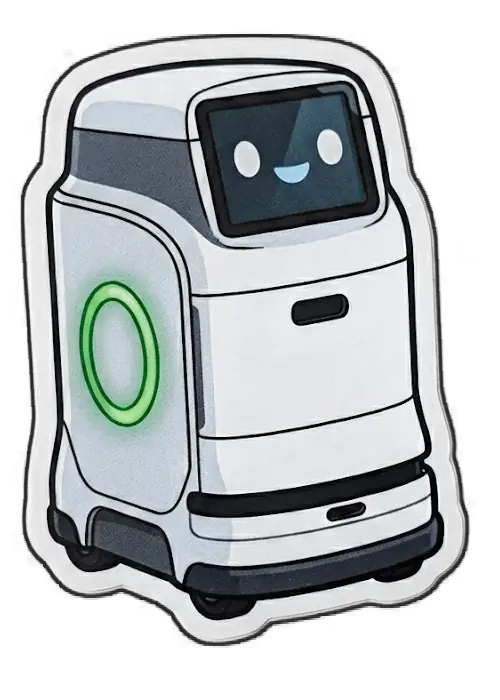
YouTubeチャンネルの顔を作る ― チャンネル名・アイコン・バナーをハコブくんにそろえるまで
Pixels to Motors の YouTube チャンネルで解説動画を出す準備として、チャンネルの見た目と運用の仕組みを Claude と対話しながら整えました。解説動画のナレーションは、病院で薬を運ぶロボットのキャラクター「ハコブくん」が担当すると決めています(LOG331)。そこで、チャンネルを開いた人が最初に目にするアイコンとバナーも、ハコブくんにそろえることにしました。
やったことは大きく4つです。YouTube を運用するための Google アカウントを新しく作り、既存のチャンネルを引き継ぐ。チャンネルの説明文を書き直す。バナーを作る。アイコンをハコブくんにする。バナーは文字入りの3案から始めて、5回作り直し、計18案を見たうえで決めました。
本記事は、その手順と、途中で方針が変わった場面の記録です。アカウントの引き継ぎで Claude が誤った案内をした場面も残しています。バナーとアイコンを作った Python スクリプトは、記事の後半に全文を載せています。メールアドレスと Google Workspace の料金の具体的な金額は伏せました。
YouTube用のアカウントは、Google Workspaceのエイリアスではなく新しいユーザーにした
Pixels to Motors のメールは、ADAPT DESIGN の独自ドメインで Google Workspace(Google のメールやドライブを会社のドメインで使うサービス)を契約して運用しています。ここに Pixels to Motors 用のアドレスを足す方法は2つありました。
方法 | できること | できないこと | 費用 |
|---|---|---|---|
エイリアス(既存のユーザーに別名のアドレスを付ける) | メールの受信。設定すれば、そのアドレス名義での送信 | そのアドレスで Google にログインすること | かからない |
新しいユーザー | 専用のログイン、ドライブ、YouTube チャンネル、外部サービスのアカウントを完全に分けること | ― | 1ユーザー分の月額が増える |
YouTube チャンネルを、普段使いのアカウントから切り離して運用したかったので、新しいユーザーにしました。契約が年間プランのため、途中で足したユーザーは更新時期まで減らせない前提で決めています。
管理コンソールには、普段使いのアカウントでは入れなかった
ユーザーを足す画面は、Google Workspace の管理コンソール(admin.google.com)にあります。最初に普段使いのアカウントでログインしたところ、「管理者アカウントでログインしてください」と表示されて入れませんでした。
ドメインには、普段使いのアカウントともう1つ、合わせて2つのユーザーがありました。管理者の権限を持っていたのは、もう1つのほうでした。そちらで入り直すと、Chrome が「このプロフィールで作業を続けるか、仕事用のプロフィールを新しく作成するか」を聞いてきます。以前、Chrome のプロフィールが10個以上重複して増えたことがあったため、どちらを選ぶかは「そのプロフィールを何に使っているか」で決めました。仕事用のプロフィールに切り替わったあとは、管理コンソールが自動では開き直らなかったため、アドレスを入れて開き直しています。
「このユーザーは既に存在しています」の原因は、3月に付けたエイリアスだった
「新しいユーザーの追加」で、作りたいアドレスを入れると、次の赤字が出て作成できませんでした。
すでにユーザーの予備のメールアドレス(メール エイリアス)として使用されています
2026年3月、同じアドレスをエイリアスとして管理者アカウントに付けていました(当時はユーザーを増やさず、無料のエイリアスで済ませる判断をしていた)。エイリアスとして使っているアドレスと同じ名前のユーザーは作れません。
管理者アカウントの詳細画面から「メールエイリアス」を開き、そのエイリアスを削除して保存しました。そのあと「新しいユーザーの追加」をやり直すと、ユーザーが作成されました。名前は姓「Pixels to」、名「Motors」で入れています。この入れ方だと、YouTube の画面によっては「Motors Pixels to」と、姓と名が逆の順に表示されることが後で分かりました。
作ろうとしたチャンネルのハンドルは、自分の既存チャンネルが使っていた
新しいアカウントで YouTube を開き、チャンネルを作ろうとすると、ハンドル(チャンネルの @ から始まる固有の名前)の欄に次のように出ました。
このハンドルは使用できません。 こちらは使用可能です: @PixelstoMotors-r2y
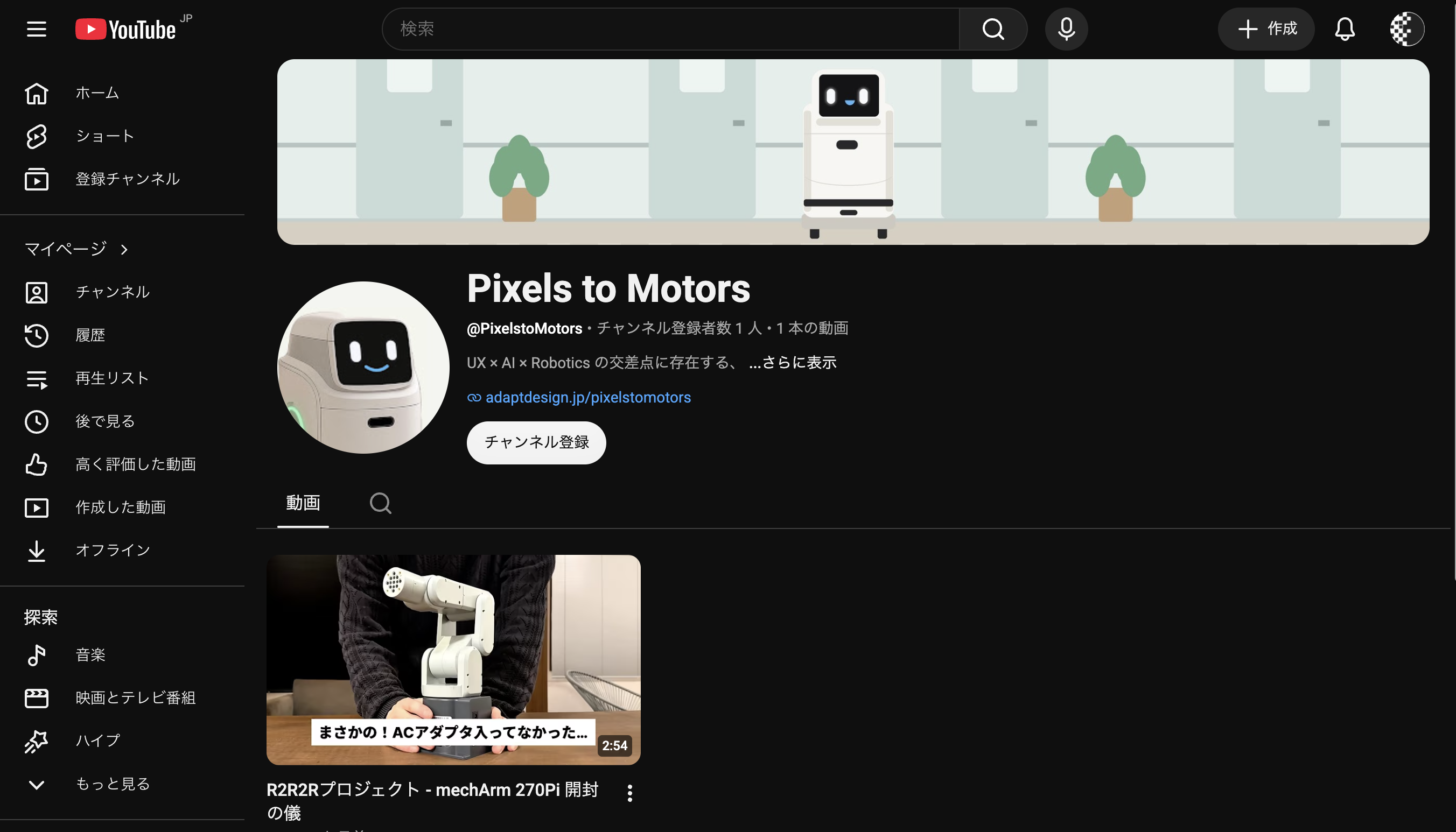
@PixelstoMotors を使っていたのは、2026年3月21日に管理者アカウントで作った、自分の既存チャンネルでした。登録者1人、動画1本(mechArm 270-Pi の開封動画)がすでにあります。
新しいチャンネルを別に作ると、動画と登録者が既存チャンネルに残ったまま、ハンドルも別のものになります。そこで新しいチャンネルは作らず、既存チャンネルを新しいアカウントから操作できるようにする方針に切り替えました。
既存チャンネルは、新しいアカウントを「管理者」として招待して引き継いだ
YouTube Studio の「設定」→「権限」で、新しいアカウントのアドレスを招待しました。選べる役割は次のとおりで、「オーナー」は一覧にありませんでした。YouTube のヘルプにも、オーナーの役割は他のユーザーに移せないと書かれています。
役割 | できること | できないこと |
|---|---|---|
オーナー | すべての操作。チャンネルの削除、権限の管理 | オーナーの役割を他のユーザーに移すこと |
管理者 | 全データの閲覧、権限の管理、チャンネル情報の編集、動画の作成・アップロード・公開・削除 | チャンネルの削除 |
編集者 | 全データの閲覧、編集、アップロード・公開 | 公開済みの動画の削除、権限の管理 |
字幕編集者 | 字幕の追加・編集・削除 | 字幕以外の編集 |
閲覧者 | 全データの閲覧 | 編集 |
新しいアカウントには「管理者」を付けました。動画の投稿から分析、説明文やバナーの変更まで、運用に必要なことはすべてできます。
招待の承諾には、受け取る側にもチャンネルが必要だった
招待メールを新しいアカウントで開いて進むと、「チャンネルのプロフィール」という、新しいチャンネルを作る画面が出ました。Claude はこれを「余計な空のチャンネルができてしまう画面」と判断し、キャンセルするよう案内しました。
キャンセルしたあと Studio の権限の画面を見ると、新しいアカウントは「承認保留中」のままでした。招待メールを開き直すと、手順は次の2段になっていました。
ステップ 1. Pixels to Motors にアクセスするには YouTube チャンネルが必要です。 ステップ 2. チャンネルの作成後、この招待を承諾すると Pixels to Motors にアクセスできるようになります。
キャンセルを勧めた画面は、承諾の途中の「ステップ1」でした。招待を受ける側のアカウントにも自分のチャンネルが必要、という YouTube の仕様を Claude が知らずに案内した誤りです。新しいアカウント側に空のチャンネルを作ってから「招待を承諾」を押すと、承諾済みになりました。空のチャンネルは使わずに置いておきます。
承諾したあとは、Studio の右上で「チャンネルを切り替え」から Pixels to Motors を選ぶと、「あなたは管理者です」と表示された状態で管理画面に入れました。
管理者で入っていても、YouTube本体での名義は空のチャンネルになる
管理者の権限で使えるのは、Studio の中の操作です。YouTube 本体の画面(動画の視聴ページなど)に移ると、操作の名義は新しいアカウント自身の空のチャンネルになります。他の人の動画に Pixels to Motors の名前でコメントしたり、チャンネル登録したりはできません。
これも必要になったら、チャンネルの所有の形そのものを変える必要があります。どう変えるのが正しいかは、今回は確かめていません。
チャンネルの説明文は、フィジカルAIを先頭に置いて書き直した
書き直す前の説明文は、次のとおりでした。
UX × AI × Robotics の交差点に存在する、
まだ誰も名前をつけていない領域「Motion UX」を探求しています。

iPhoneの3Dスキャン → Unityシミュレーション → 実機ロボットアーム
という低コストなパイプラインを一人で構築中。

すべてのプロセスをオープンに記録しています。

// ADAPT DESIGN — Pixels to Motors
// adaptdesign.jp/pixelstomotors
iPhone → Unity → 実機というパイプラインは、いまの開発の中心ではなくなっています。冒頭の2〜3行は、検索結果やチャンネルページで最初に見える部分です。そこで、機材の名前ではなく、何のチャンネルかが伝わる文にしました。方向の違う3案(フィジカルAI・実装寄り/UX・体験寄り/個人・低コスト寄り)から、フィジカルAI寄りの案を選び、機材名の行は削りました。英語の段落は、日本語と同じ内容にそろえています。
フィジカルAIを、現場で使える形にするまでを記録するチャンネルです。
AIが考え、ロボットが動く。その間にある設計・調整・失敗を、
小さなロボットアームで一つずつ確かめています。

精度より、まず体験が成立すること。
精度はあとからお金で解決できる。

Documenting the journey of making Physical AI work in real-world settings.
Between AI thinking and robots moving lies design, tuning, and failure.
I test each step with a small robot arm.

Experience first. Precision can be bought later.

// ADAPT DESIGN — Pixels to Motors
// adaptdesign.jp/pixelstomotors
Studio の「カスタマイズ」→「プロフィール」→「説明」に貼り付けて公開しました。公開ボタンが押せない状態(灰色)になっていれば保存済みです。ただ、チャンネルページの表示は、記事を書いている時点でもまだ古い説明文のままでした。
バナーは、どの端末でも切れない中央の範囲を基準に作った
YouTube のヘルプでは、バナー画像は次のように決まっています。
項目 | 値 |
|---|---|
最小サイズ | 2048×1152px(16:9) |
テキストやロゴが切れずに表示される範囲 | 中央の 1235×338px |
推奨サイズ(テレビでも見やすい) | 2560×1440px |
ファイルサイズ | 6MB 以下 |
同じ 16:9 の画像が、テレビでは全体、パソコンでは横長の帯、スマホではさらに左右を切った中央だけで表示されます。そのため、主役になる絵は中央の 1235×338px(2560×1440px の画像なら、同じ比率で 1546×423px)に収めました。作った案は、パソコンでの見え方(横長の帯)と、全体図に安全範囲の枠を重ねた図の2つで確認しています。
バナーの1回目は、実機の写真に文字を入れた3案だった
最初は、手元にある素材から作りました。サイトの画像はこちらの作業環境から取得できなかったため、Mac の r2r2r-content フォルダにあった画像認識シリーズの写真を使っています。
A:mechArm 270-Pi のグリッパーと赤・青のキューブを真上から撮った写真に、「フィジカルAIを、現場で使える形に。」の文字
B:アームの根元側をドット状にぼかし、先端に向かってくっきりさせた「Pixels to Motors」の絵
C:明るい背景に、キューブの写真・色で切り出したマスク・グリッパーの3コマを並べた「見る → 判断する → 動かす」
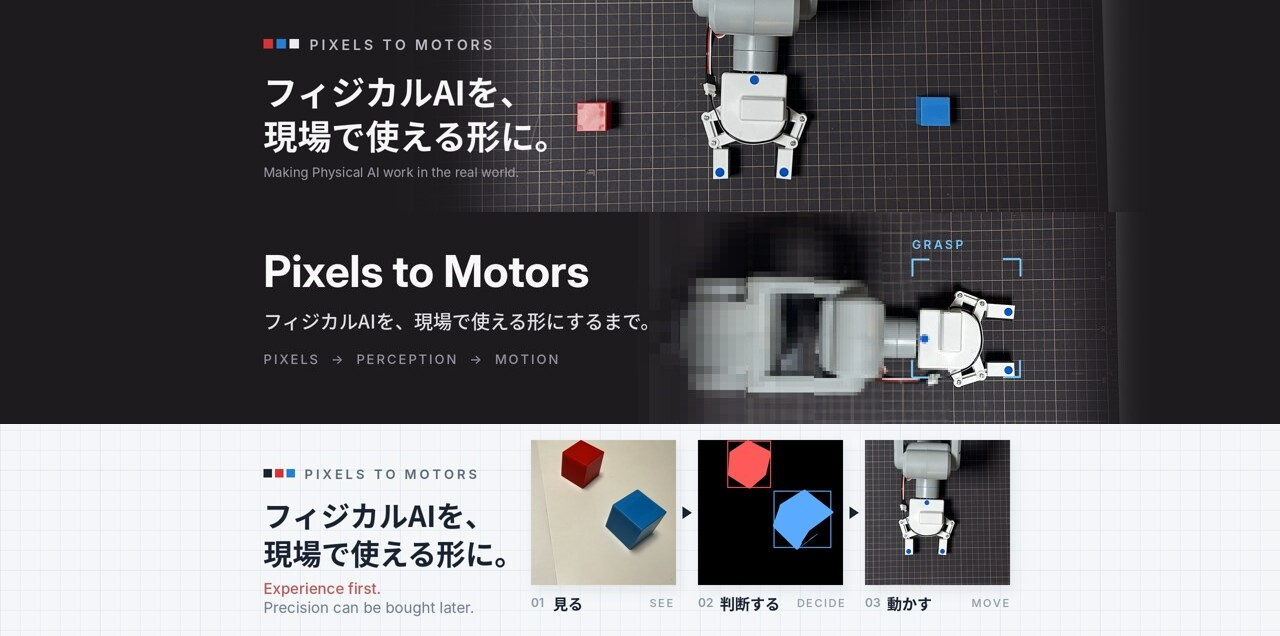
これに対しての返事は次のとおりでした。
テキスト情報は必要なくイメージだけでいいですよ。同じアームだけを使ったバナーではなく、もっといろんなパターンが考えられるはずです。最初はもっと違うパターンを見せて欲しい(今回のは1種類カウントです)
3案とも同じアームの写真が主役で、見せ方の幅が狭かったということです。
2回目は、サイトの画像から6つの方向を出した
サイトのトップページを画面ごとPDFに保存したものを受け取り、そこから記事のサムネイル、4コマ漫画、シリーズの扉絵などを切り出しました。文字は入れず、方向がはっきり違う6案にしています。
案 | 中身 |
|---|---|
アーカイブの壁 | 記事のサムネイルと4コマを3段に並べる |
白黒スプリット | 左が黒、右がクリーム。境目でピクセルが崩れ、斜線の円と点線のグラフを重ねる |
シミュレーション | Unity で並べたたくさんのアームを網点にする |
ハコブくん 4コマ | 4コマ漫画を横一列に並べ、両側に集中線 |
ドットマトリクス | 「フィジカルAIが社会実装される前に解くべき課題」の丸を全面に広げる |
ハコブくん 写真 | 病院の廊下にいるハコブくんの写真 |
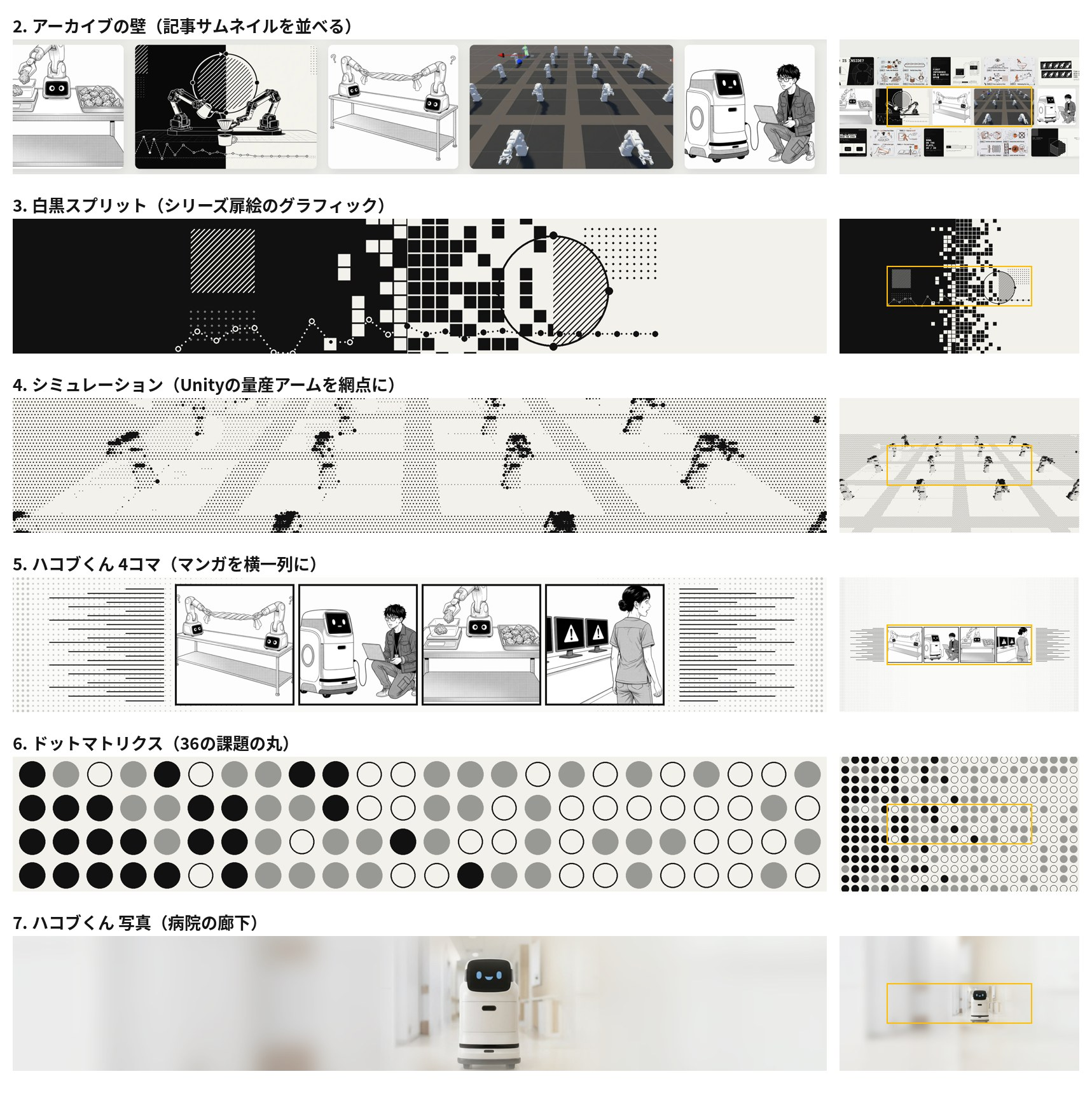
このあと、YouTube に合わせて全案を 2048×1152px でも書き出しました。
アイコンは、動画で話しているハコブくんの1コマから作った
チャンネル名とアイコンを、YouTube で覚えてもらいやすいものに変えることになりました。アイコンはハコブくんにする前提です。
最初に Claude が出したのは、ハコブくんの顔(黒いディスプレイ、白いカプセル形の目、水色の口)をコードで描き起こした3案でした。顔のアップ、オレンジの背景に頭と胴、いまのアイコンの市松模様を引き継いだもの、の3つです。
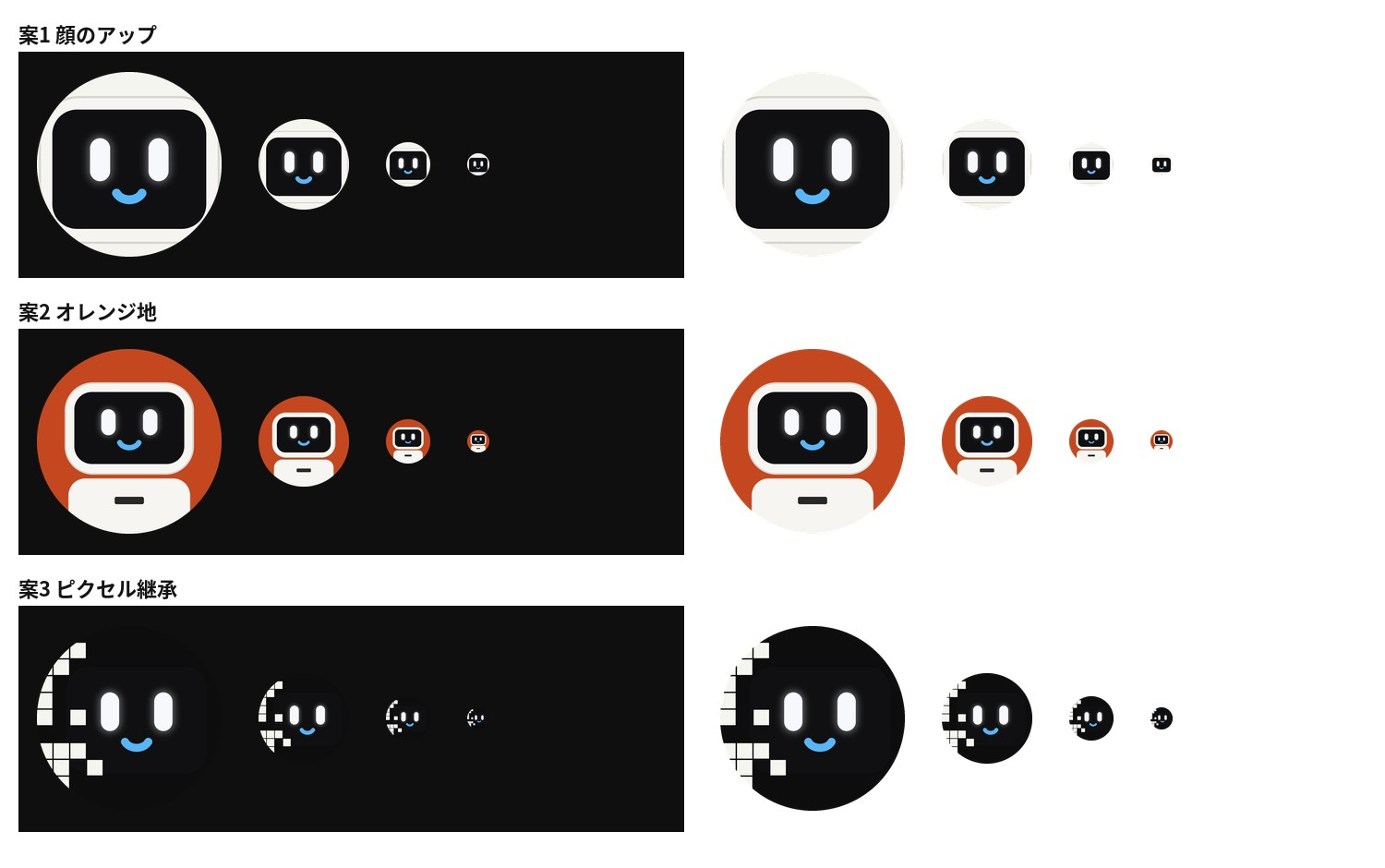
これには、試作動画の画面を書き出した MP4 が返ってきました。
アイコンはこのハコブくん使えばいいんじゃないの?
動画で話しているハコブくんと、アイコンのハコブくんが同じ見た目なら、アイコンから動画を開いた人に同じキャラクターだと伝わります。コードで描いた顔は、仕様には合っていても、動画のハコブくんとは別物でした。
動画(1920×1080px)を1秒に3コマずつ書き出して、表情を見比べ、口を閉じて笑っているコマを選びました。ハコブくんは画面の左下にいて、大きさは横幅が約320pxです。画面の右側にある出典の文字などが入らないよう、ハコブくんの範囲の外は背景色で塗りつぶしてから切り抜いています。案は3つです。
A:動画のまま。上半身をクリーム地に置く
B:A にオレンジの輪を付ける。ダークモードでもライトモードでも輪郭が見える
C:顔に寄せる
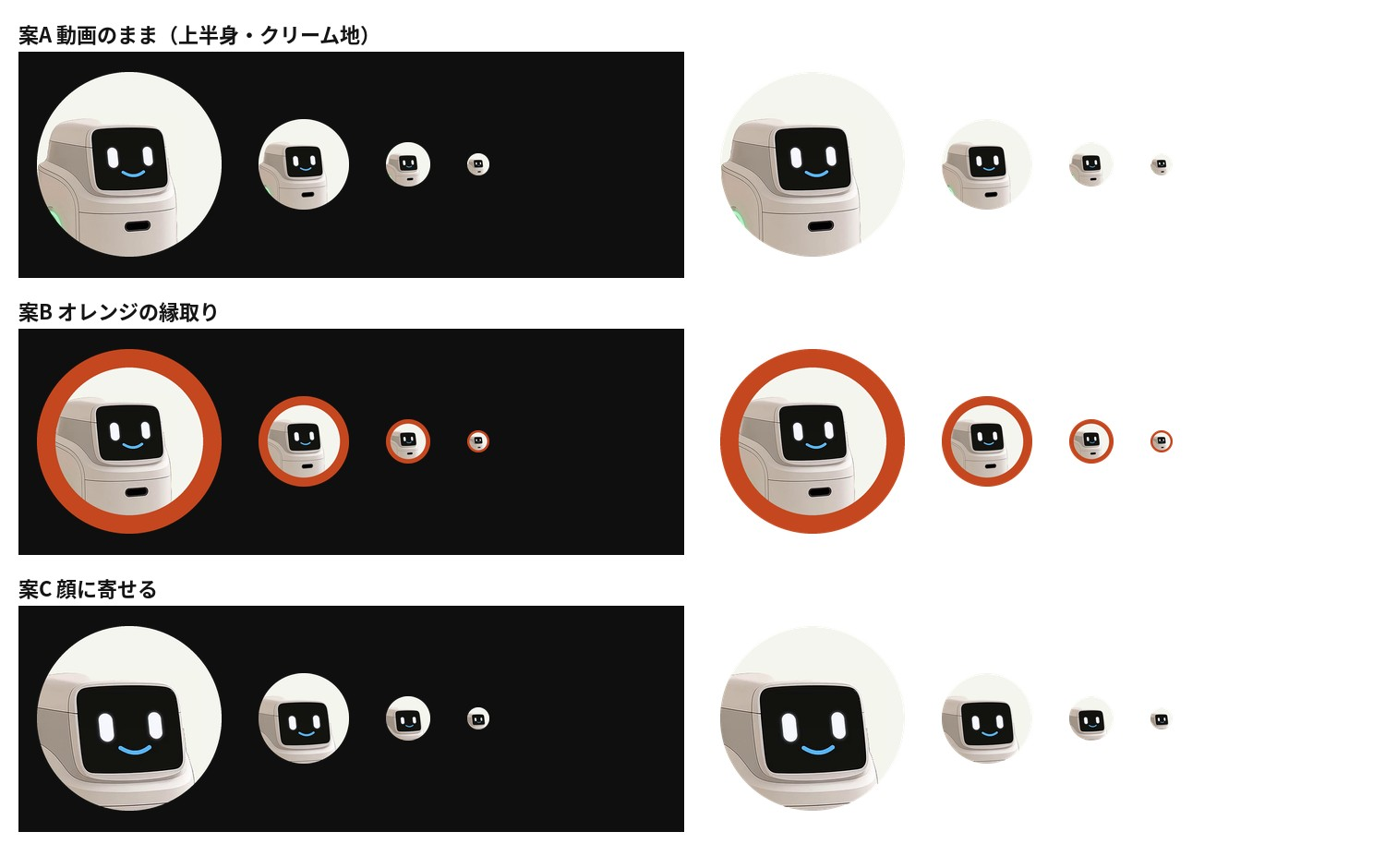
各案は、YouTube の表示サイズ(200px・98px・48px・24px)で、ダークモードとライトモードの背景に並べて確認しました。チャンネルには A を設定しています。元が動画の1コマなので、800×800px にするために約2倍に拡大しています。
バナーの3回目は、ハコブくんだけで5つのタッチを作った
次の依頼は、ハコブくんだけを使って、タッチの違う5種類を作ることでした。
イラスト系、4コマまんが風、写実的、写真系、グラフィックデザインの5種類
タッチ | 作り方 |
|---|---|
イラスト系 | 病院の廊下とハコブくんを、線のないフラットな絵としてコードで描く |
4コマまんが風 | 動画のハコブくんを白黒のトーン調に変え、表情の違う4コマを文字なしで並べる |
写実的 | 動画の3Dのハコブくんを、表情を変えて5体並べる |
写真系 | 病院の廊下にいるハコブくんの写真 |
グラフィックデザイン | ハコブくんの顔のディスプレイを大きく置き、ピクセルの崩れ・寸法線・緑のリングを添える |
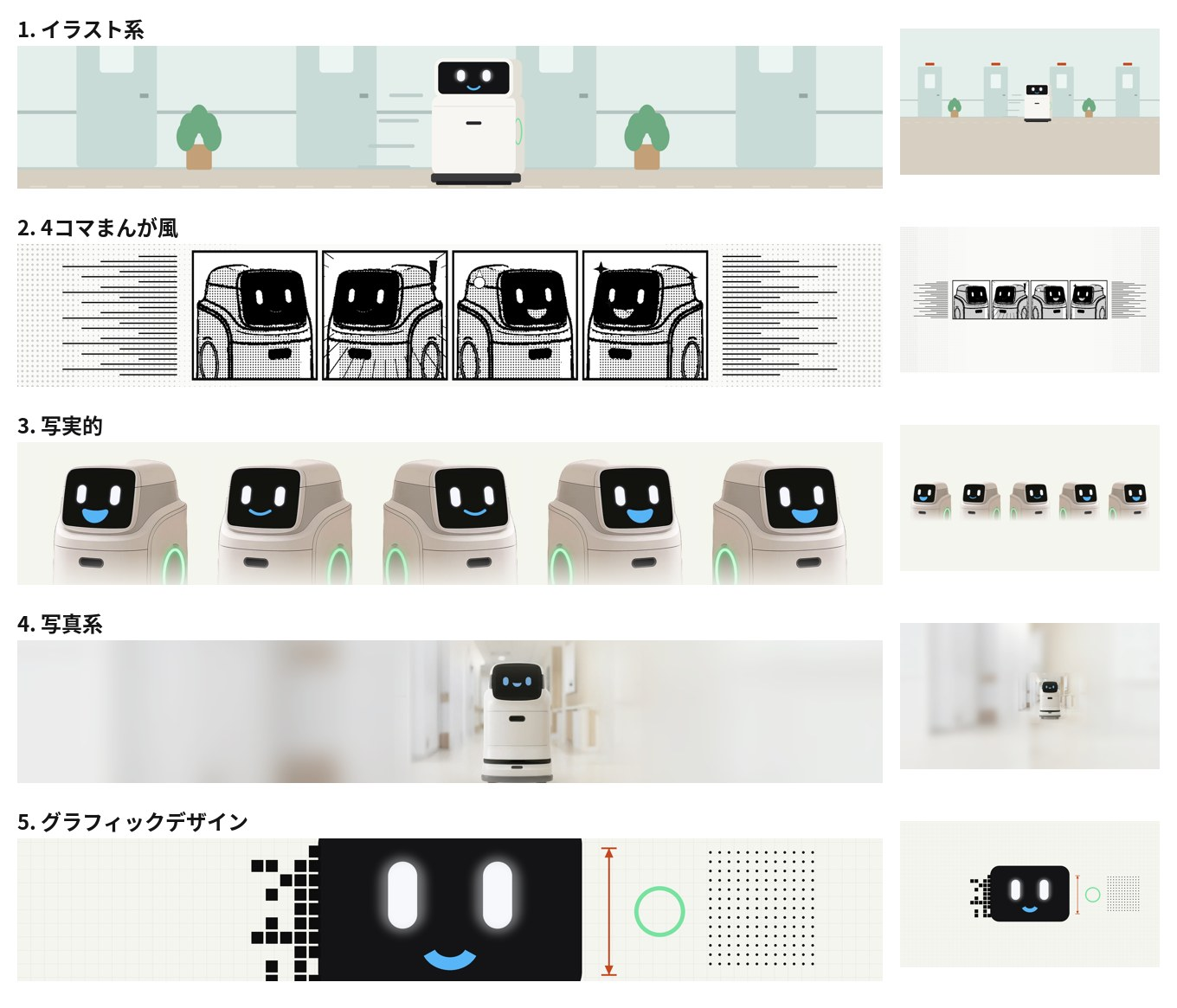
4コマまんが風は、動画のコマを次の手順で白黒にしています。輪郭を検出して黒い線にする。暗い部分(明るさ70未満)は黒で塗る。中間の明るさ(215未満)は、7px 間隔の網点にする。それ以外は白にする。
返事は次のとおりでした。
イラスト系か4コママンガ風がいいけど、イラストはハコブくんじゃないし、4コママンガ風はハコブくんだけしか描かれてない。
イラスト系のハコブくんは、Claude が写真を見ながら比率を推測して描いたもので、実物と形が違いました。4コマまんが風は、4コマとも同じハコブくんで、漫画に出てくる他の登場人物がいませんでした。
ハコブくんの三面図を受け取り、寸法を読み取った
ここで、ハコブくんの三面図(正面・側面・背面を漫画のタッチで描いたもの)を受け取りました。
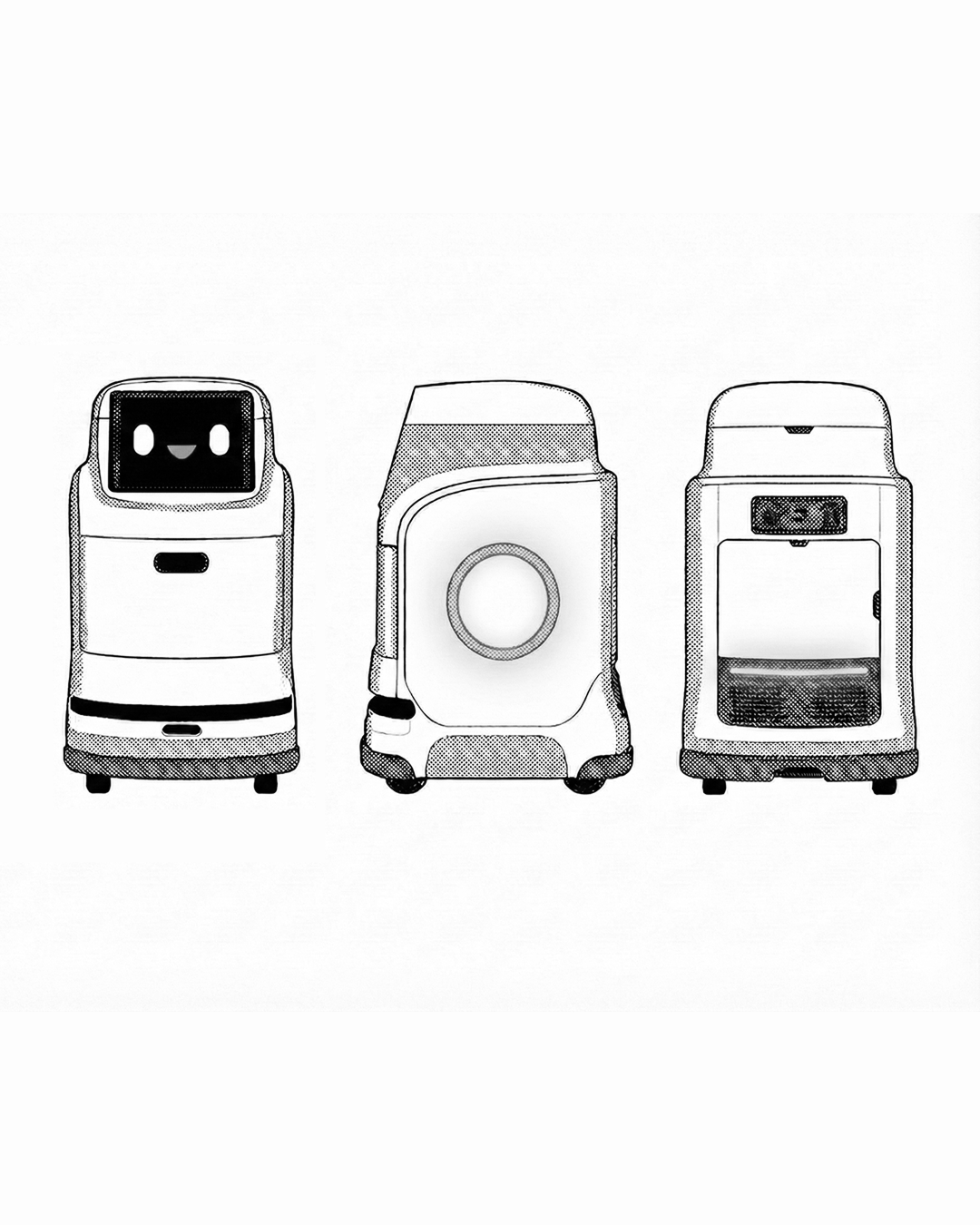
画像に座標の目盛りを重ねて、正面図の各部の位置を読み取りました(単位は三面図の画像上の px)。
部分 | 位置 |
|---|---|
全体 | 横 70〜331、縦 415〜874(高さ約460) |
頭の外装 | 横 100〜300、上端 413 |
ディスプレイ | 横 120〜283、縦 427〜541 |
目 | 中心が横 152 と 241、縦 486。幅 22、高さ 40 |
口 | 横 184〜215、縦 490〜505 |
胴 | 横 76〜324、縦 505〜816 |
引き出しのスリット | 横 167〜225、縦 606〜630 |
黒い帯 | 横 78〜322、縦 767〜786 |
台座 | 横 72〜328、縦 806〜848 |
車輪 | 横 95〜120 と 280〜305、縦 836〜874 |
側面図のリングは、中心が(554, 663)、内側の線が半径約51、外側の線が半径約62でした。リングの位置は、中心の候補を動かしながら半径ごとの平均の明るさを測り、暗い線が2本くっきり出る点を探して決めています。
4回目は、三面図そのものと、他の登場人物を使った
三面図のハコブくんを使って、イラスト系と4コマまんが風を2案ずつ作りました。
イラスト系 A:方眼の上に正面・背面・側面を並べ、寸法線と、顔とリングの拡大図を添える
イラスト系 B:線画に淡い色を付けた廊下を、三面図の側面のハコブくんが走る
4コマまんが風 A:斜めのコマ割りで、中央にハコブくん、左右にツカムくん(顔の付いたアーム)、エンジニア、看護師
4コマまんが風 B:ハコブくんを中央の爆発形の枠に置き、他の登場人物を丸い枠で並べる
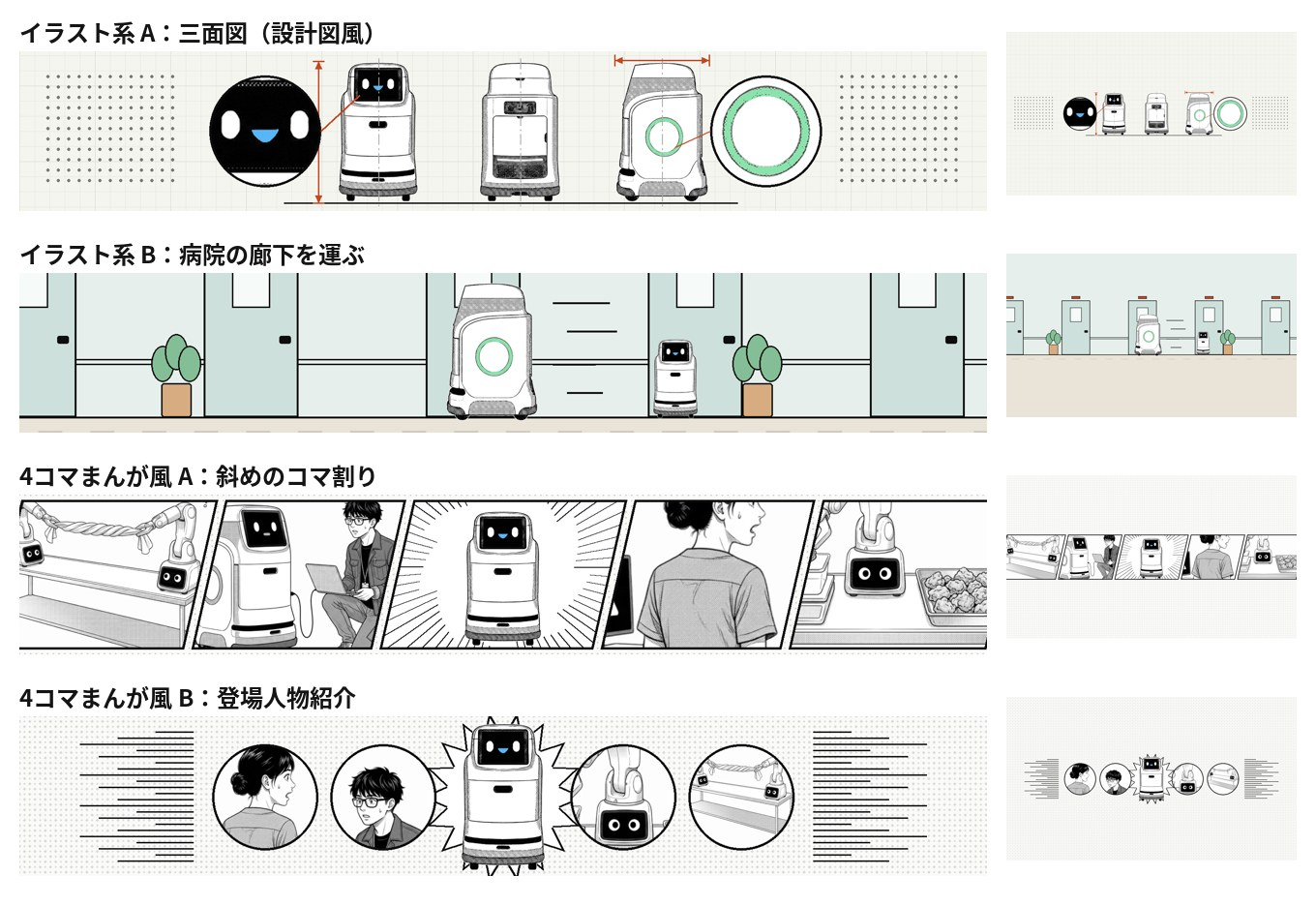
返事は次のとおりでした。
イラストは背景のイラストタッチにハコブくんを修正しないとダメだよ(イラストと漫画風を一緒にしたらNG)
4コマまんがの処理は前の方が良かった。このタッチのまま、登場するキャラを入れ替えればいいだけです。
イラスト系 B は、背景は線画に色を付けたイラストなのに、ハコブくんだけ漫画のトーンのままでした。1枚の絵の中で、タッチが2種類混ざっていたことになります。4コマまんが風は、コマ割りを変えたことで、3回目で良かった処理(輪郭線と網点)が失われていました。
5回目で、ハコブくんを背景と同じタッチで描き直した
イラスト系は、三面図から読み取った寸法を使い、ハコブくんを背景と同じタッチで描き直しました。三面図の座標をそのまま渡すと、バナーの上の位置と大きさに変換して描く仕組みです(スクリプトの Pen クラス)。線のない背景には線のないハコブくん、黒い輪郭線の背景には同じ太さの輪郭線のハコブくん、と2つのタッチで作りました。
4コマまんが風は、3回目の処理と並び(4コマを横一列・両側に集中線)に戻し、コマごとの登場人物を入れ替えました。左からハコブくん、看護師(「!」)、エンジニア(汗)、ツカムくん(キラキラ)です。看護師たちは元が線画なので、3回目の処理(輪郭検出)をそのままかけると全体が黒くつぶれました。線画には輪郭検出をかけず、明るさだけで黒・網点・白に分ける処理にしています。網点の間隔は、ハコブくんのコマと同じ 7px にそろえました。
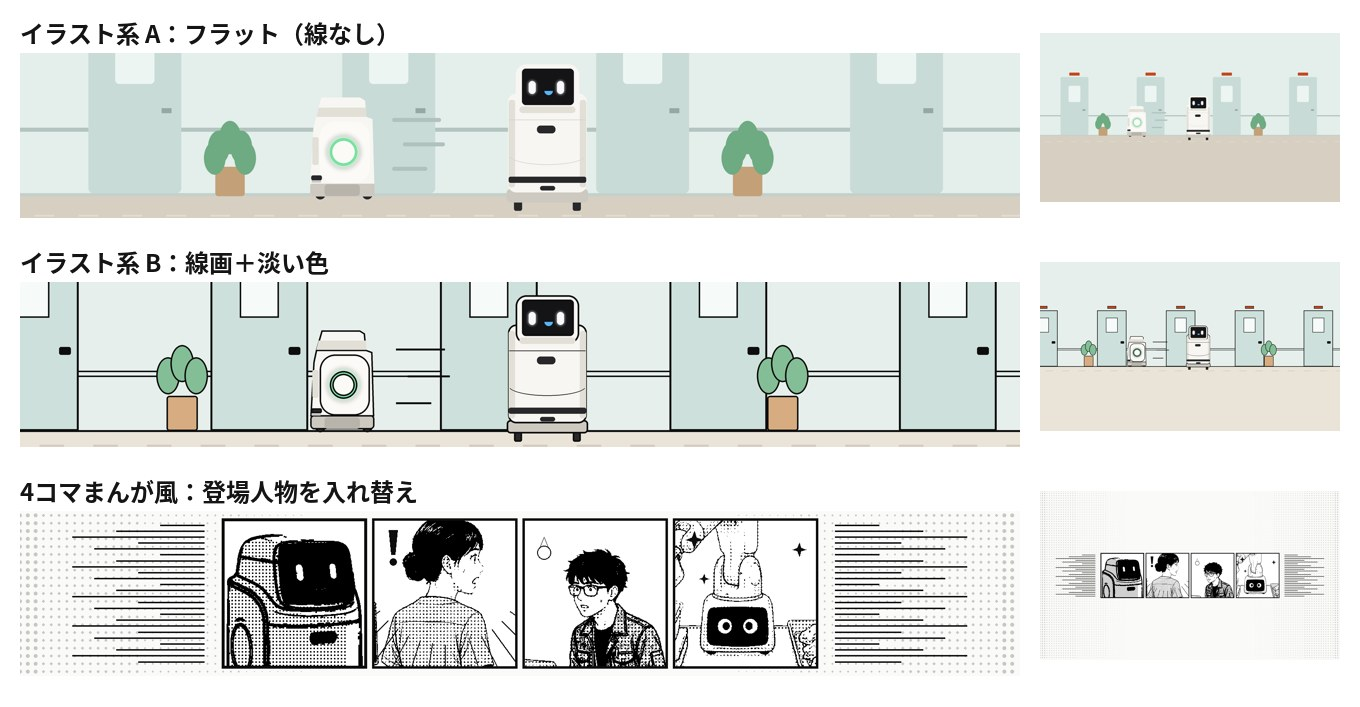
決まったのは、線のないフラットなイラストでした。
イラスト系、ハコブくんは1体だけでいいよ。タッチはこれがいいかな。
横向きのハコブくんと動きの線を消し、正面のハコブくんだけをドアとドアの間に立たせて完成にしました。ハコブくんは、顔から足元まで、どの端末でも切れない範囲に収まっています。
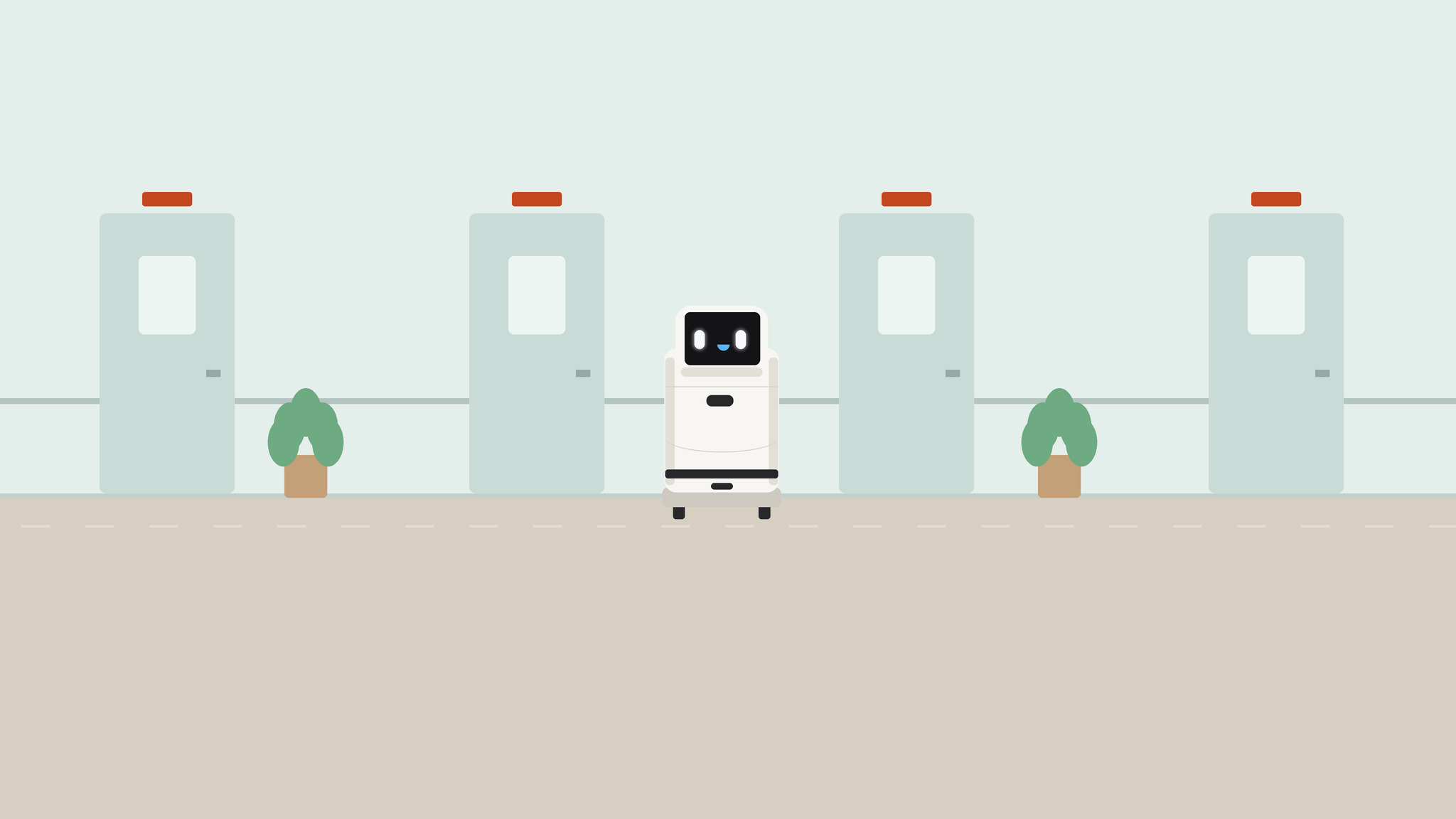
1回目から5回目までに出したバナーは次のとおりです。
回 | 案の数 | 主な中身 | 返ってきた判断 |
|---|---|---|---|
1 | 3 | 実機の写真+文字 | 文字は要らない。同じアームだけで幅が狭い |
2 | 7 | サイトの画像から6方向+1回目の写真(文字なし) | 方向の幅を確認 |
3 | 5 | ハコブくんだけで5つのタッチ | イラストと4コマが良い。ただし形が違う/他の人物がいない |
4 | 4 | 三面図と他の登場人物 | タッチを混ぜない。4コマは3回目の処理に戻す |
5 | 3+1 | タッチをそろえて描き直し | フラットのイラスト、ハコブくん1体で決定 |
チャンネル名は「フィジカルAI解説|Pixels to Motors」を候補にした
チャンネル名は、ブランド名の Pixels to Motors を残したまま、何のチャンネルかが分かる言葉を足す案にしました。Pixels to Motors のルールで、外に出すブランド名は Pixels to Motors だけと決めているためです。
案 | 名前 | 良い点 | 気になる点 |
|---|---|---|---|
1 | Pixels to Motors|フィジカルAI解説 | ブランド名が先に来る | 少し長い |
2 | フィジカルAI解説|Pixels to Motors | 日本語が先に来て、内容が一番早く伝わる | 幅が狭い画面ではブランド名が切れやすい |
3 | ハコブくんのフィジカルAI解説 | 覚えやすく、アイコンと一体になる | ブランド名と、動画を作っている本人が見えなくなる |
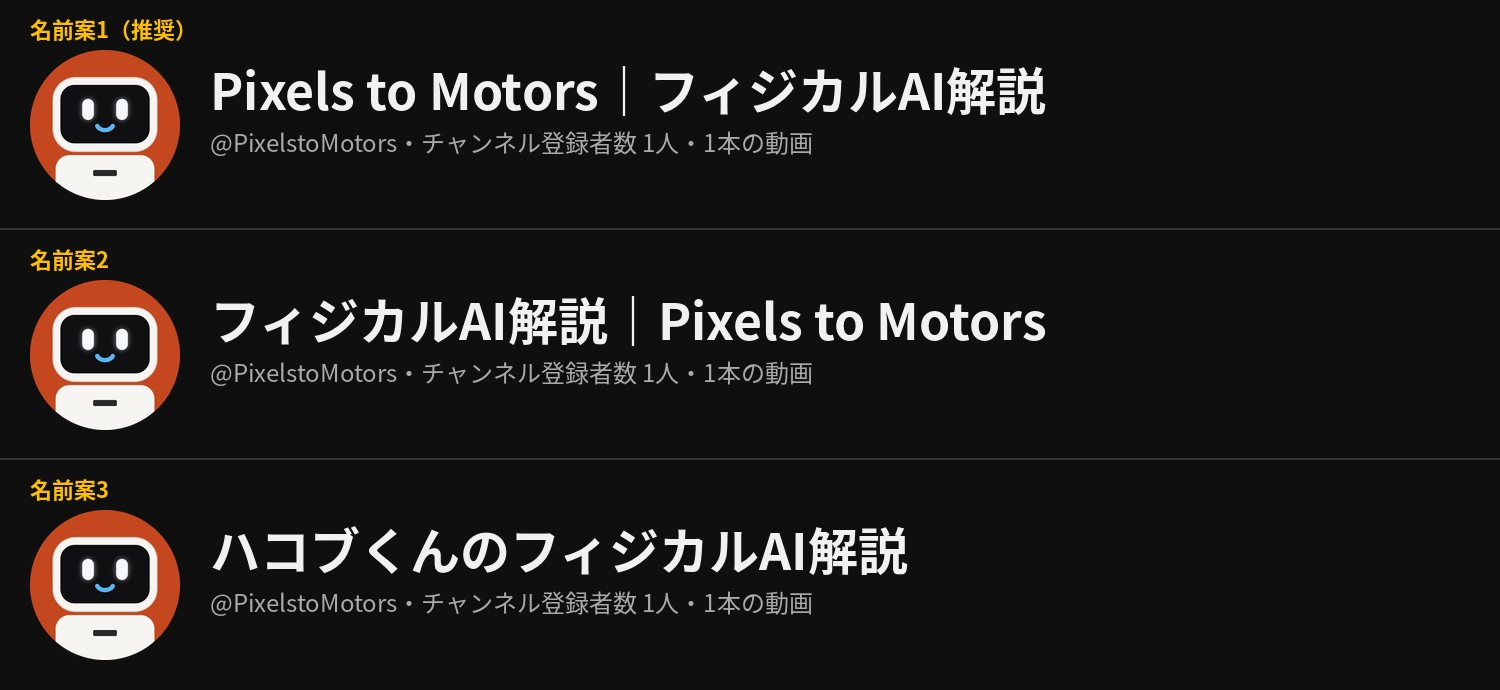
選ばれたのは2の並びでした。そのうえで、次の質問がありました。
ロボティクスとフィジカルAIでどちらがタイトルの言葉として使うのがいい?
Claude の答えは「フィジカルAI」です。理由は3つです。動画を届けたい相手(ロボットに関心のある経営者・PM・マネージャー)が、ニュースや業界の発表で目にしている言葉であること。動画の中身が「AIがロボットを動かす」話で、ロボティクス全般より範囲がはっきりすること。サイトの課題地図や研究室のシリーズ名でも「フィジカルAI」を使っていること。流行りの言葉なので数年後に古く聞こえるおそれはありますが、チャンネル名は後から変えられ、ハンドル(@PixelstoMotors)は変わりません。
チャンネル名の変更は、記事を書いている時点ではまだ行っていません。
チャンネル名の変更と、アイコン・4コマの作り直しが残っている
チャンネル名を「フィジカルAI解説|Pixels to Motors」に変える
新しい説明文がチャンネルページに反映されたかを確かめる
新しいアカウントに2段階認証を設定する
アイコンは動画の1コマを約2倍に拡大している。元の切り抜き画像(動画の制作ベースのフォルダにある)から作り直すと、もっと鮮明になる
4コマまんが風の看護師たちは、サイトの画面を保存した PDF から切り出した。採用するなら元の漫画画像で作り直す
細かい修正は、動画をアップしながら進める予定です。
制作スクリプトの全文
バナーとアイコンは、すべて Python(Pillow と NumPy)で作りました。作業フォルダは /home/claude/banner/ です。スクリプトは作った順に載せています。採用したバナーは make5_single.py、採用したアイコンは hakobu_icon.py の出力です。
ファイル | 作ったもの |
|---|---|
make.py | 1回目:実機の写真に文字を入れた3案 |
make2.py | 2回目:サイトの画像から作った6案 |
icons.py | アイコン:ハコブくんの顔をコードで描いた3案 |
hakobu_icon.py | アイコン:動画の1コマから作った3案(採用) |
make3.py | 3回目:ハコブくんだけで5つのタッチ |
make4.py | 4回目:三面図と他の登場人物を使った4案 |
make5.py | 5回目:タッチをそろえた3案 |
make5_single.py | 決定版:フラットのイラスト、ハコブくん1体(採用) |
make.py(1回目の3案)
import numpy as np
from PIL import Image, ImageDraw, ImageFont, ImageFilter, ImageOps, ImageEnhance

SRC = '/mnt/user-data/uploads/r2r2r-content/articles/'
OUT = '/home/claude/banner/out/'
W, H = 2560, 1440
SAFE = (507, 508, 2053, 932)   # x0,y0,x1,y1  (1546 x 423 visible on every device)

CJK_B = '/usr/share/fonts/opentype/noto/NotoSansCJK-Bold.ttc'
CJK_M = '/usr/share/fonts/opentype/noto/NotoSansCJK-Medium.ttc'
INTER = '/usr/share/fonts/opentype/inter/'

def f_cjk(size, bold=True):
    return ImageFont.truetype(CJK_B if bold else CJK_M, size, index=0)

def f_inter(size, w='SemiBold'):
    return ImageFont.truetype(INTER + f'Inter-{w}.otf', size)

def tracked(draw, xy, text, font, fill, track=0):
    x, y = xy
    for ch in text:
        draw.text((x, y), ch, font=font, fill=fill)
        x += draw.textlength(ch, font=font) + track
    return x

def load(name):
    return ImageOps.exif_transpose(Image.open(SRC + name)).convert('RGB')

def place(canvas, img, scale, src_pt, dst_pt):
    """paste img scaled so that src_pt (in img coords) lands on dst_pt"""
    im = img.resize((round(img.width * scale), round(img.height * scale)), Image.LANCZOS)
    ox = round(dst_pt[0] - src_pt[0] * scale)
    oy = round(dst_pt[1] - src_pt[1] * scale)
    layer = Image.new('RGB', (W, H))
    layer.paste(im, (ox, oy))
    return layer, (ox, oy, im.width, im.height)

def rect_mask(box, feather):
    m = Image.new('L', (W, H), 0)
    ImageDraw.Draw(m).rectangle(box, fill=255)
    return m.filter(ImageFilter.GaussianBlur(feather))

def hgrad(x0, x1, a0, a1):
    """horizontal alpha ramp, a0 at x<=x0 to a1 at x>=x1"""
    xs = np.clip((np.arange(W) - x0) / max(1, x1 - x0), 0, 1)
    row = (a0 + (a1 - a0) * xs).astype(np.uint8)
    return Image.fromarray(np.tile(row, (H, 1)))

def pixel_squares(draw, x, y, s, gap, cols):
    for i, c in enumerate(cols):
        draw.rectangle((x + i * (s + gap), y, x + i * (s + gap) + s, y + s), fill=c)

RED, BLUE = (214, 52, 52), (36, 128, 214)
MAT = (30, 27, 31)

photo = load('IMG_7933.jpg')          # top-down: mechArm on cutting mat, red & blue cubes
MAT_BOX = (697, 639, 3211, 2471)       # cutting-mat area in full-res coords

# ---------------------------------------------------------------- A: GRASP
def banner_a():
    bg = Image.new('RGB', (W, H), MAT)
    subj = ((1282 + 2650) / 2, 1790)    # midpoint between the two cubes, gripper level
    layer, _ = place(bg, photo, 0.55, subj, (1530, 728))
    # keep only the mat, fade its edges into the background
    s = 0.55
    ox = 1530 - subj[0] * s; oy = 728 - subj[1] * s
    mb = (ox + MAT_BOX[0] * s + 70, oy + MAT_BOX[1] * s + 70,
          ox + MAT_BOX[2] * s - 70, oy + MAT_BOX[3] * s - 70)
    m = rect_mask(mb, 60)
    layer = ImageEnhance.Brightness(layer).enhance(0.92)
    bg.paste(layer, (0, 0), m)
    # darken left for the type
    shade = Image.new('RGB', (W, H), MAT)
    bg.paste(shade, (0, 0), hgrad(900, 1080, 235, 0))
    d = ImageDraw.Draw(bg)
    x = SAFE[0] + 20
    pixel_squares(d, x, 586, 18, 8, [RED, BLUE, (235, 235, 235)])
    tracked(d, (x + 92, 580), 'PIXELS TO MOTORS', f_inter(28, 'SemiBold'), (190, 186, 194), track=6)
    d.text((x, 640), 'フィジカルAIを、', font=f_cjk(68), fill=(245, 245, 245))
    d.text((x, 728), '現場で使える形に。', font=f_cjk(68), fill=(245, 245, 245))
    d.text((x, 836), 'Making Physical AI work in the real world.', font=f_inter(26, 'Regular'), fill=(160, 156, 166))
    return bg

# ---------------------------------------------------------------- B: PIXELS → MOTORS (dissolve)
def banner_b():
    rot = photo.rotate(90, expand=True)     # CCW: robot base on the left, gripper reaching right
    # mapping for CCW 90 with expand: (x, y) -> (y, W0 - x)
    W0 = photo.width
    def r(pt): return (pt[1], W0 - pt[0])
    base = r((2010, 700)); tips = r((2010, 2045))
    # arm axis: y = W0 - 2010 ; x from 700 to 2045
    s = 0.50
    layer, (ox, oy, iw, ih) = place(None, rot, s, (tips[0], tips[1]), (2030, 720))
    # mat region after rotation
    mb0 = (MAT_BOX[1], W0 - MAT_BOX[2], MAT_BOX[3], W0 - MAT_BOX[0])
    mb = (ox + mb0[0] * s + 70, oy + mb0[1] * s + 70, ox + mb0[2] * s - 70, oy + mb0[3] * s - 70)
    bg = Image.new('RGB', (W, H), MAT)
    bg.paste(layer, (0, 0), rect_mask(mb, 50))
    # progressive pixelation, left -> right, in vertical strips
    arr = np.array(bg)
    out = arr.copy()
    sizes = [96, 84, 72, 64, 56, 48, 40, 34, 28, 22, 16, 11, 7, 4]
    x_start, x_end = 0, 1900
    sw = (x_end - x_start) / len(sizes)
    for i, b in enumerate(sizes):
        xa, xb = int(x_start + i * sw), int(x_start + (i + 1) * sw)
        small = bg.resize((max(1, W // b), max(1, H // b)), Image.BOX).resize(
            (W // b * b, H // b * b), Image.NEAREST)
        sm = np.zeros_like(arr); sa = np.array(small)
        sm[:sa.shape[0], :sa.shape[1]] = sa
        out[:, xa:xb] = sm[:, xa:xb]
    bg = Image.fromarray(out)
    shade = Image.new('RGB', (W, H), MAT)
    bg.paste(shade, (0, 0), hgrad(760, 1060, 205, 0))
    d = ImageDraw.Draw(bg)
    # detection-style bracket around the gripper (perception -> action)
    gx, gy, hw, hh = 1932, 720, 108, 118
    c = (120, 200, 255); L = 34; t = 4
    for sx in (-1, 1):
        for sy in (-1, 1):
            px, py = gx + sx * hw, gy + sy * hh
            d.line((px, py, px - sx * L, py), fill=c, width=t)
            d.line((px, py, px, py - sy * L), fill=c, width=t)
    tracked(d, (gx - hw, gy - hh - 44), 'GRASP', f_inter(24, 'SemiBold'), c, track=5)
    x = SAFE[0] + 20
    d.text((x, 572), 'Pixels to Motors', font=ImageFont.truetype(INTER + 'InterDisplay-Bold.otf', 88), fill=(248, 248, 248))
    d.text((x, 696), 'フィジカルAIを、現場で使える形にするまで。', font=f_cjk(38, bold=False), fill=(225, 222, 228))
    tracked(d, (x, 786), 'PIXELS  →  PERCEPTION  →  MOTION', f_inter(26, 'Medium'), (150, 146, 156), track=4)
    return bg

# ---------------------------------------------------------------- C: SEE / DECIDE / MOVE (light)
def banner_c():
    NAVY = (26, 35, 50); BG = (244, 246, 248); GRID = (226, 231, 236)
    bg = Image.new('RGB', (W, H), BG)
    d = ImageDraw.Draw(bg)
    for gx in range(0, W, 40):
        d.line((gx, 0, gx, H), fill=GRID if gx % 200 else (214, 221, 228), width=1)
    for gy in range(0, H, 40):
        d.line((0, gy, W, gy), fill=GRID if gy % 200 else (214, 221, 228), width=1)
    # panel sources
    cubes = load('IMG_7912.JPG')                         # red & blue cubes, white paper
    crop = (1500, 700, 3500, 2700)
    p1 = cubes.crop(crop)
    hsv = np.array(p1.convert('HSV')).astype(int)
    rgb = np.array(p1).astype(int)
    sat = hsv[..., 1] > 110
    red = sat & ((hsv[..., 0] < 12) | (hsv[..., 0] > 235)) & (rgb[..., 0] > rgb[..., 2])
    blue = sat & (hsv[..., 0] > 120) & (hsv[..., 0] < 170)
    mask = np.zeros(rgb.shape, np.uint8)
    mask[red] = (255, 90, 90); mask[blue] = (90, 170, 255)
    p2 = Image.fromarray(mask).filter(ImageFilter.MedianFilter(7))
    # bounding boxes on mask
    d2 = ImageDraw.Draw(p2)
    for m, col in ((red, (255, 90, 90)), (blue, (90, 170, 255))):
        ys, xs = np.where(m)
        if len(xs):
            x0, x1 = np.percentile(xs, [1, 99]); y0, y1 = np.percentile(ys, [1, 99])
            d2.rectangle((x0 - 30, y0 - 30, x1 + 30, y1 + 30), outline=col, width=14)
    p3 = photo.crop((1100, 1250, 2900, 2250))           # gripper between the cubes
    P = 290; gap = 44
    x0 = 1062; y0 = 540
    panels = [(p1, '01', '見る', 'SEE'), (p2, '02', '判断する', 'DECIDE'), (p3, '03', '動かす', 'MOVE')]
    for i, (im, n, jp, en) in enumerate(panels):
        px = x0 + i * (P + gap)
        tile = ImageOps.fit(im, (P, P), Image.LANCZOS)
        shadow = Image.new('L', (W, H), 0)
        ImageDraw.Draw(shadow).rectangle((px + 6, y0 + 10, px + P + 6, y0 + P + 10), fill=70)
        bg.paste((180, 190, 200), (0, 0), shadow.filter(ImageFilter.GaussianBlur(12)))
        bg.paste(tile, (px, y0))
        d = ImageDraw.Draw(bg)
        d.text((px, y0 + P + 20), n, font=f_inter(24, 'SemiBold'), fill=(138, 155, 168))
        d.text((px + 44, y0 + P + 14), jp, font=f_cjk(30), fill=NAVY)
        tw = d.textlength(en, font=f_inter(22, 'Medium'))
        tracked(d, (px + P - tw - 12, y0 + P + 22), en, f_inter(22, 'Medium'), (138, 155, 168), track=3)
        if i < 2:
            ax = px + P + gap // 2; ay = y0 + P // 2
            d.polygon([(ax - 9, ay - 12), (ax + 9, ay), (ax - 9, ay + 12)], fill=NAVY)
    d = ImageDraw.Draw(bg)
    x = SAFE[0] + 20
    pixel_squares(d, x, 598, 16, 7, [NAVY, RED, BLUE])
    tracked(d, (x + 82, 592), 'PIXELS TO MOTORS', f_inter(26, 'SemiBold'), (90, 105, 120), track=6)
    d.text((x, 646), 'フィジカルAIを、', font=f_cjk(58), fill=NAVY)
    d.text((x, 722), '現場で使える形に。', font=f_cjk(58), fill=NAVY)
    d.text((x, 818), 'Experience first.', font=f_inter(30, 'Medium'), fill=(184, 90, 90))
    d.text((x, 856), 'Precision can be bought later.', font=f_inter(30, 'Regular'), fill=(110, 125, 140))
    return bg

def preview(img, name):
    """safe-area overlay + desktop/mobile crops for checking"""
    ov = img.copy(); d = ImageDraw.Draw(ov, 'RGBA')
    d.rectangle((0, 0, W, SAFE[1]), fill=(0, 0, 0, 110)); d.rectangle((0, SAFE[3], W, H), fill=(0, 0, 0, 110))
    d.rectangle((0, SAFE[1], SAFE[0], SAFE[3]), fill=(0, 0, 0, 60)); d.rectangle((SAFE[2], SAFE[1], W, SAFE[3]), fill=(0, 0, 0, 60))
    d.rectangle(SAFE, outline=(255, 220, 0, 255), width=4)
    ov.resize((1280, 720)).save(OUT + f'check_{name}_overlay.jpg', quality=88)
    img.crop((0, SAFE[1], W, SAFE[3])).resize((1280, 212)).save(OUT + f'check_{name}_desktop.jpg', quality=88)
    img.crop(SAFE).save(OUT + f'check_{name}_mobile.jpg', quality=90)

import os
os.makedirs(OUT, exist_ok=True)
for name, fn in (('A_grasp', banner_a), ('B_pixels_to_motors', banner_b), ('C_see_decide_move', banner_c)):
    im = fn()
    im.save(OUT + f'pixelstomotors_banner_{name}.jpg', quality=92, subsampling=0)
    preview(im, name)
    print(name, os.path.getsize(OUT + f'pixelstomotors_banner_{name}.jpg') // 1024, 'KB')
make2.py(2回目の6案)
import os, math, random
import numpy as np
from PIL import Image, ImageDraw, ImageFilter, ImageOps

S = '/home/claude/banner/site/'
OUT = '/home/claude/banner/out2/'
os.makedirs(OUT, exist_ok=True)
W, H = 2560, 1440
SAFE = (507, 508, 2053, 932)
CY = 720
INK = (17, 17, 17); CREAM = (242, 241, 236); GRAY = (152, 152, 148)

def L(name): return Image.open(S + f'c_{name}.png').convert('RGB')

def rounded(im, r):
    m = Image.new('L', im.size, 0)
    ImageDraw.Draw(m).rounded_rectangle((0, 0, im.width - 1, im.height - 1), r, fill=255)
    return m

def card(canvas, im, box, r=14, shadow=True):
    x0, y0, x1, y1 = box
    tile = ImageOps.fit(im, (x1 - x0, y1 - y0), Image.LANCZOS)
    if shadow:
        sh = Image.new('L', (W, H), 0)
        ImageDraw.Draw(sh).rounded_rectangle((x0 + 4, y0 + 12, x1 + 4, y1 + 12), r, fill=60)
        canvas.paste((150, 150, 150), (0, 0), sh.filter(ImageFilter.GaussianBlur(16)))
    canvas.paste(tile, (x0, y0), rounded(tile, r))

# ------------------------------------------------ 1. Archive wall
def archive():
    c = Image.new('RGB', (W, H), (236, 236, 233))
    rows = [
        ['inside', 'panels320', 'gpu', 'panels324', 'film', 'rec_say'],
        ['manga2', 'lab', 'manga3', 'sim', 'manga0', 'drug', 'manga1'],
        ['who03', 'panels319', 'bowl', 'panels323', 'imgrec_top', 'rec_micro'],
    ]
    hs = [300, 390, 300]
    ys = [CY - 195 - 36 - 300, CY - 195, CY + 195 + 36]
    offs = [-170, -60, -250]
    for row, h, y, off in zip(rows, hs, ys, offs):
        x = off
        while x < W:
            for n in row:
                im = L(n)
                w = int(h * im.width / im.height)
                if n.startswith('manga'): w = int(h * 1.05)
                card(c, im, (x, y, x + w, y + h))
                x += w + 36
                if x >= W: break
    return c

# ------------------------------------------------ 2. Mono split (vector)
def split():
    c = Image.new('RGB', (W, H), CREAM)
    d = ImageDraw.Draw(c)
    mid = 1240
    d.rectangle((0, 0, mid, H), fill=INK)
    # pixel dissolve across the seam: black squares scattered into cream, cream squares into black
    random.seed(7); cell = 44
    for gx in range(mid - cell * 10, mid + cell * 14, cell):
        for gy in range(0, H, cell):
            t = (gx - mid) / (cell * 12)
            if gx >= mid and random.random() < max(0, 0.9 - t):
                d.rectangle((gx + 3, gy + 3, gx + cell - 3, gy + cell - 3), fill=INK)
            if gx < mid and random.random() < max(0, 0.75 + t * 1.4):
                d.rectangle((gx + 3, gy + 3, gx + cell - 3, gy + cell - 3), fill=CREAM)
    # hatched block (top-left of band) and dot grids
    hx0, hy0, hx1, hy1 = 560, 540, 760, 740
    hl = Image.new('RGB', (W, H), INK); hd = ImageDraw.Draw(hl)
    for k in range(-220, 240, 16):
        hd.line((hx0 + k, hy1, hx0 + k + 200, hy0), fill=CREAM, width=4)
    hm = Image.new('L', (W, H), 0); ImageDraw.Draw(hm).rectangle((hx0, hy0, hx1, hy1), fill=255)
    c.paste(hl, (0, 0), hm)
    for gx in range(1800, 2040, 22):
        for gy in range(540, 700, 22):
            d.ellipse((gx - 3, gy - 3, gx + 3, gy + 3), fill=INK)
    for gx in range(560, 760, 22):
        for gy in range(800, 900, 22):
            d.ellipse((gx - 3, gy - 3, gx + 3, gy + 3), fill=(120, 120, 120))
    # half-hatched circle (right)
    cx, cy, r = 1700, 735, 175
    circ = Image.new('L', (W, H), 0); ImageDraw.Draw(circ).ellipse((cx - r, cy - r, cx + r, cy + r), fill=255)
    hatch = Image.new('RGB', (W, H), CREAM); hd = ImageDraw.Draw(hatch)
    for k in range(-400, 400, 18):
        hd.line((cx + k - 200, cy + 200, cx + k + 200, cy - 200), fill=INK, width=5)
    half = Image.new('L', (W, H), 0); ImageDraw.Draw(half).rectangle((cx, 0, W, H), fill=255)
    m = Image.fromarray((np.array(circ) & np.array(half)).astype(np.uint8))
    c.paste(hatch, (0, 0), m)
    d.ellipse((cx - r, cy - r, cx + r, cy + r), outline=INK, width=6)
    for a in (0, 90, 180, 270):
        px = cx + r * math.cos(math.radians(a)); py = cy + r * math.sin(math.radians(a))
        d.ellipse((px - 12, py - 12, px + 12, py + 12), fill=INK)
    # dotted signal line running from black side into cream (noisy -> settled)
    random.seed(3)
    pts = []
    for i, x in enumerate(range(520, 2060, 60)):
        amp = 90 * max(0, 1 - (x - 520) / 1200)
        pts.append((x, 870 - random.uniform(-1, 1) * amp))
    for (x0, y0), (x1, y1) in zip(pts, pts[1:]):
        steps = int(math.hypot(x1 - x0, y1 - y0) // 14)
        for s in range(steps):
            t = s / steps; px = x0 + (x1 - x0) * t; py = y0 + (y1 - y0) * t
            col = CREAM if px < mid else INK
            d.ellipse((px - 2.5, py - 2.5, px + 2.5, py + 2.5), fill=col)
    for x, y in pts:
        col = CREAM if x < mid else INK
        d.ellipse((x - 9, y - 9, x + 9, y + 9), fill=INK if x >= mid else INK, outline=col, width=4)
    return c

# ------------------------------------------------ 3. Simulation halftone
def halftone():
    src = ImageOps.autocontrast(L('sim').convert('L'), cutoff=1)
    sc = W / src.width; bh = int(src.height * sc)
    big = src.resize((W, bh), Image.BICUBIC)
    top = int(0.30 * bh) - SAFE[1] - 340
    full = Image.new('L', (W, H), 0)
    full.paste(big, (0, -top))
    a = np.array(full).astype(float) / 255
    c = Image.new('RGB', (W, H), CREAM); d = ImageDraw.Draw(c)
    step = 10
    for y in range(0, H, step):
        for x in range((y // step % 2) * step // 2, W, step):
            v = a[y, min(W - 1, x)]
            r = v ** 1.6 * step * 0.66
            if r > 0.6:
                d.ellipse((x - r, y - r, x + r, y + r), fill=INK)
    return c

# ------------------------------------------------ 4. Manga strip
def manga():
    c = Image.new('RGB', (W, H), (250, 250, 248)); d = ImageDraw.Draw(c)
    # screentone background (fading dots towards the centre)
    for y in range(0, H, 16):
        for x in range(0, W, 16):
            dist = abs(x - W / 2) / (W / 2)
            r = 3.2 * max(0, dist - 0.35) / 0.65
            if r > 0.4:
                d.ellipse((x - r, y - r, x + r, y + r), fill=(200, 200, 198))
    order = ['manga3', 'manga0', 'manga2', 'manga1']
    ph = 372; pw = 366; gap = 22
    total = 4 * pw + 3 * gap
    x = (W - total) // 2; y = CY - ph // 2
    for n in order:
        im = L(n)
        tile = ImageOps.fit(im, (pw, ph), Image.LANCZOS, centering=(0.5, 0.6))
        c.paste(tile, (x, y))
        d.rectangle((x - 5, y - 5, x + pw + 4, y + ph + 4), outline=INK, width=6)
        x += pw + gap
    # speed lines on both sides
    for k in range(26):
        yy = y + 10 + k * (ph - 20) / 25
        ln = 120 + (k * 37 % 5) * 60
        d.line((x + 30, yy, x + 30 + ln, yy), fill=INK, width=3)
        x0 = (W - total) // 2 - 40
        d.line((x0 - ln, yy, x0, yy), fill=INK, width=3)
    return c

# ------------------------------------------------ 5. Dot matrix
def dots():
    c = Image.new('RGB', (W, H), CREAM); d = ImageDraw.Draw(c)
    D = 82; G = 24; P = D + G
    random.seed(36)
    cols = W // P + 2; rows = H // P + 4
    ox = (W - cols * P) // 2 + G // 2; oy = SAFE[1] + G // 2 + 2 - P * 6
    for j in range(rows):
        for i in range(cols):
            x = ox + i * P; y = oy + j * P
            t = i / cols
            r = random.random()
            # left: mostly solved (black), middle: in progress (gray), right: open (outline)
            pb = max(0, 0.75 - t * 1.3); pg = 0.55 - abs(t - 0.5) * 0.6
            if r < pb: d.ellipse((x, y, x + D, y + D), fill=INK)
            elif r < pb + pg: d.ellipse((x, y, x + D, y + D), fill=GRAY)
            else: d.ellipse((x + 2, y + 2, x + D - 2, y + D - 2), outline=INK, width=4)
    return c

# ------------------------------------------------ 6. Hakobu photo
def hakobu():
    src = L('drug')
    sw = int(src.width * 0.30)
    left = src.crop((0, 0, sw, src.height)); right = src.crop((src.width - sw, 0, src.width, src.height))
    pano = Image.new('RGB', (sw * 2, src.height)); pano.paste(left, (0, 0)); pano.paste(right, (sw, 0))
    bgim = pano.resize((W, H), Image.BICUBIC).filter(ImageFilter.GaussianBlur(30))
    bgim = Image.blend(bgim, Image.new('RGB', (W, H), (238, 236, 232)), 0.25)
    # sharp copy: robot fits inside the band
    h = 470; s = h / src.height; w = int(src.width * s)
    sm = src.resize((w, h), Image.LANCZOS)
    x = 1500 - w // 2; y = CY - h // 2 + 12
    m = Image.new('L', (w, h), 0)
    ImageDraw.Draw(m).rectangle((60, 45, w - 60, h - 45), fill=255)
    m = m.filter(ImageFilter.GaussianBlur(45))
    bgim.paste(sm, (x, y), m)
    return bgim

def preview(img, name):
    img.crop((0, SAFE[1], W, SAFE[3])).save(OUT + f'_band_{name}.png')

items = [('B_archive_wall', archive), ('C_mono_split', split), ('D_sim_halftone', halftone),
         ('E_hakobu_manga', manga), ('F_dot_matrix', dots), ('G_hakobu_photo', hakobu)]
for name, fn in items:
    im = fn()
    im.save(OUT + f'pixelstomotors_banner_{name}.jpg', quality=92, subsampling=0)
    preview(im, name)
    print(name, os.path.getsize(OUT + f'pixelstomotors_banner_{name}.jpg') // 1024, 'KB')
icons.py(コードで描いたアイコン3案)
import os, random
from PIL import Image, ImageDraw, ImageFilter

OUT = '/home/claude/banner/icons/'
os.makedirs(OUT, exist_ok=True)
SS = 4; N = 800 * SS
SHELL = (246, 245, 241); SHELL_EDGE = (214, 214, 208)
DISP = (16, 16, 18); EYE = (246, 248, 252); MOUTH = (87, 181, 248)
CREAM = (245, 245, 240); ORANGE = (196, 71, 31); INK = (13, 13, 13)

def face(img, box):
    """draw display + eyes + smile inside box (x0,y0,x1,y1)"""
    x0, y0, x1, y1 = box; w = x1 - x0; h = y1 - y0
    d = ImageDraw.Draw(img)
    d.rounded_rectangle(box, radius=int(w * 0.16), fill=DISP)
    ew, eh = w * 0.13, h * 0.36
    cy = y0 + h * 0.42
    # glow
    glow = Image.new('RGBA', img.size, (0, 0, 0, 0)); gd = ImageDraw.Draw(glow)
    for cx in (x0 + w * 0.31, x0 + w * 0.69):
        gd.rounded_rectangle((cx - ew * 0.75, cy - eh * 0.62, cx + ew * 0.75, cy + eh * 0.62), radius=int(ew * 0.75), fill=(246, 248, 252, 90))
    glow = glow.filter(ImageFilter.GaussianBlur(w * 0.03))
    img.alpha_composite(glow) if img.mode == 'RGBA' else img.paste(glow, (0, 0), glow)
    d = ImageDraw.Draw(img)
    for cx in (x0 + w * 0.31, x0 + w * 0.69):
        d.rounded_rectangle((cx - ew / 2, cy - eh / 2, cx + ew / 2, cy + eh / 2), radius=int(ew / 2), fill=EYE)
    # smile: thick arc with round caps
    mw = w * 0.24; my = y0 + h * 0.70; t = int(h * 0.075)
    d.arc((x0 + w / 2 - mw / 2, my - mw * 0.55, x0 + w / 2 + mw / 2, my + mw * 0.30), 25, 155, fill=MOUTH, width=t)
    import math
    for a in (25, 155):
        rx = mw / 2 - t / 2; ry = (mw * 0.85) / 2 - t / 2
        cx = x0 + w / 2 + rx * math.cos(math.radians(a)); cyy = (my - mw * 0.55 + my + mw * 0.30) / 2 + ry * math.sin(math.radians(a))
        d.ellipse((cx - t / 2, cyy - t / 2, cx + t / 2, cyy + t / 2), fill=MOUTH)

def head(img, cx, cy, w, h):
    d = ImageDraw.Draw(img)
    d.rounded_rectangle((cx - w / 2, cy - h / 2, cx + w / 2, cy + h / 2), radius=int(w * 0.22), fill=SHELL, outline=SHELL_EDGE, width=int(w * 0.012))
    m = w * 0.075
    face(img, (cx - w / 2 + m, cy - h / 2 + m, cx + w / 2 - m, cy + h / 2 - m * 1.1))

def circle_out(img, name):
    im = img.convert('RGB').resize((800, 800), Image.LANCZOS)
    im.save(OUT + f'{name}.png')
    m = Image.new('L', (800, 800), 0); ImageDraw.Draw(m).ellipse((0, 0, 799, 799), fill=255)
    c = Image.new('RGBA', (800, 800), (0, 0, 0, 0)); c.paste(im, (0, 0), m)
    c.save(OUT + f'{name}_circle.png')
    return c

# 1. close-up face (shell fills the circle)
def i1():
    img = Image.new('RGBA', (N, N), CREAM + (255,))
    head(img, N / 2, N * 0.53, N * 0.98, N * 0.80)
    return circle_out(img, 'icon1_face')

# 2. orange ground, head + top of body
def i2():
    img = Image.new('RGBA', (N, N), ORANGE + (255,))
    d = ImageDraw.Draw(img)
    bw = N * 0.66
    d.rounded_rectangle((N / 2 - bw / 2, N * 0.70, N / 2 + bw / 2, N * 1.2), radius=int(bw * 0.14), fill=SHELL, outline=SHELL_EDGE, width=SS * 3)
    d.rounded_rectangle((N / 2 - bw * 0.12, N * 0.80, N / 2 + bw * 0.12, N * 0.84), radius=SS * 8, fill=(40, 40, 40))
    head(img, N / 2, N * 0.43, N * 0.70, N * 0.50)
    return circle_out(img, 'icon2_orange')

# 3. pixel dissolve (continuity with the current checker logo)
def i3():
    img = Image.new('RGBA', (N, N), INK + (255,))
    face(img, (N * 0.16, N * 0.22, N * 0.92, N * 0.80))
    d = ImageDraw.Draw(img)
    random.seed(4); cell = N // 11
    for gx in range(0, N // 2, cell):
        for gy in range(0, N, cell):
            p = 0.85 - gx / (N * 0.42)
            if random.random() < p:
                d.rectangle((gx, gy, gx + cell - SS * 6, gy + cell - SS * 6), fill=(245, 245, 240))
    return circle_out(img, 'icon3_pixel')

icons = [i1(), i2(), i3()]

# size check sheet on YouTube dark + light backgrounds
from PIL import ImageFont
fnt = ImageFont.truetype('/usr/share/fonts/opentype/noto/NotoSansCJK-Bold.ttc', 22, index=0)
sheet = Image.new('RGB', (1500, 3 * 300 + 40), (255, 255, 255)); sd = ImageDraw.Draw(sheet)
labels = ['案1 顔のアップ', '案2 オレンジ地', '案3 ピクセル継承']
for r, (ic, lab) in enumerate(zip(icons, labels)):
    y = 20 + r * 300
    sd.text((20, y), lab, font=fnt, fill=(20, 20, 20))
    for bgc, x0 in (((15, 15, 15), 20), ((255, 255, 255), 760)):
        sd.rectangle((x0, y + 36, x0 + 720, y + 280), fill=bgc)
        x = x0 + 20
        for s in (200, 98, 48, 24):
            sheet.paste(ic.resize((s, s), Image.LANCZOS), (x, y + 58 + (200 - s) // 2), ic.resize((s, s), Image.LANCZOS))
            x += s + 40
sheet.save('/home/claude/banner/icons_sizes.jpg', quality=90)
hakobu_icon.py(動画の1コマから作ったアイコン3案)
from PIL import Image, ImageDraw, ImageFilter, ImageFont
fr=Image.open('fr_0.png').convert('RGB'); W0,H0=fr.size
BG=(245,245,240); OR=(196,71,31)
clean=Image.new('RGB',(W0,H0),BG); clean.paste(fr.crop((0,758,360,H0)),(0,758))
def grab(box):
    x0,y0,x1,y1=box; c=Image.new('RGB',(x1-x0,y1-y0),BG)
    c.paste(clean.crop((max(0,x0),max(0,y0),min(W0,x1),min(H0,y1))),(max(0,-x0),max(0,-y0))); return c
def up(c,s=800): return c.resize((s,s),Image.LANCZOS).filter(ImageFilter.UnsharpMask(2,60,2))
def circ(im):
    m=Image.new('L',im.size,0);ImageDraw.Draw(m).ellipse((0,0,im.width-1,im.height-1),fill=255)
    o=Image.new('RGBA',im.size,(0,0,0,0));o.paste(im,(0,0),m);return o
A=up(grab((30,660,450,1080)))
C=up(grab((90,690,390,990)))
# B: orange ring around the cream picture (no cut-out edges)
inner=up(grab((50,690,430,1070)),640)
B=Image.new('RGB',(800,800),OR); m=Image.new('L',(640,640),0); ImageDraw.Draw(m).ellipse((0,0,639,639),fill=255)
B.paste(inner,(80,80),m)
out={'A_upper':A,'B_orange_ring':B,'C_face':C}
import glob,os
for p in glob.glob('../icons/hakobu_icon_*'): os.remove(p)
for p in glob.glob('../icons/zoomB.png'): os.remove(p)
for k,v in out.items():
    v.save(f'../icons/hakobu_icon_{k}.png'); circ(v).save(f'../icons/hakobu_icon_{k}_circle.png')
f=ImageFont.truetype('/usr/share/fonts/opentype/noto/NotoSansCJK-Bold.ttc',22,index=0)
labels={'A_upper':'案A 動画のまま(上半身・クリーム地)','B_orange_ring':'案B オレンジの縁取り','C_face':'案C 顔に寄せる'}
sh=Image.new('RGB',(1500,3*300+40),(255,255,255));d=ImageDraw.Draw(sh)
for r,k in enumerate(out):
    y=20+r*300; d.text((20,y),labels[k],font=f,fill=(20,20,20)); ic=circ(out[k])
    for bgc,x0 in (((15,15,15),20),((255,255,255),760)):
        d.rectangle((x0,y+36,x0+720,y+280),fill=bgc);x=x0+20
        for s in (200,98,48,24):
            t=ic.resize((s,s),Image.LANCZOS); sh.paste(t,(x,y+58+(200-s)//2),t); x+=s+40
sh.save('../hakobu_icons_sizes.jpg',quality=90)
make3.py(3回目の5つのタッチ)
import os, math, random
import numpy as np
from PIL import Image, ImageDraw, ImageFilter, ImageOps, ImageChops

OUT = '/home/claude/banner/hakobu/'
os.makedirs(OUT, exist_ok=True)
W, H = 2048, 1152
BAND = (0, 407, 2048, 745)          # visible on desktop
SAFE = (406, 407, 1642, 745)        # visible everywhere
CREAM = (245, 245, 240); INK = (13, 13, 13); ORANGE = (196, 71, 31); BLUE = (26, 108, 152)
SHELL = (247, 246, 242); SHELL2 = (226, 223, 215); DISP = (20, 20, 22)
EYE = (246, 248, 252); MOUTH = (87, 181, 248); RING = (120, 226, 160)
FR = '/home/claude/banner/vid/fx/'
SS = 3  # supersampling for vector work

def frame(i):
    """video frame with everything except Hakobu painted over with the background"""
    f = Image.open(FR + f'e_{i}.png').convert('RGB')
    c = Image.new('RGB', f.size, CREAM)
    c.paste(f.crop((0, 758, 362, 1080)), (0, 758))
    return c

# ---------------------------------------------------------------- vector Hakobu
def face(d, box, expr='smile', glow_layer=None):
    x0, y0, x1, y1 = box; w = x1 - x0; h = y1 - y0
    d.rounded_rectangle(box, radius=int(min(w, h) * 0.16), fill=DISP)
    ew, eh = w * 0.11, h * 0.36; cy = y0 + h * 0.43
    for cx in (x0 + w * 0.32, x0 + w * 0.68):
        if expr == 'blink':
            d.rounded_rectangle((cx - ew * 0.8, cy - ew * 0.18, cx + ew * 0.8, cy + ew * 0.18), radius=int(ew * 0.18), fill=EYE)
        elif expr == 'happy':
            d.arc((cx - ew * 0.9, cy - ew * 0.3, cx + ew * 0.9, cy + ew * 1.5), 200, 340, fill=EYE, width=int(ew * 0.35))
        else:
            if glow_layer is not None:
                ImageDraw.Draw(glow_layer).rounded_rectangle((cx - ew * 0.9, cy - eh * 0.62, cx + ew * 0.9, cy + eh * 0.62), radius=int(ew * 0.9), fill=(246, 248, 252, 110))
            d.rounded_rectangle((cx - ew / 2, cy - eh / 2, cx + ew / 2, cy + eh / 2), radius=int(ew / 2), fill=EYE)
    mw = w * 0.22; my = y0 + h * 0.74; t = max(2, int(h * 0.07))
    if expr in ('open', 'happy'):
        d.chord((x0 + w / 2 - mw / 2, my - mw * 0.45, x0 + w / 2 + mw / 2, my + mw * 0.45), 0, 180, fill=MOUTH)
    elif expr == 'o':
        r = mw * 0.18; d.ellipse((x0 + w / 2 - r, my - r * 0.6, x0 + w / 2 + r, my + r * 1.2), fill=MOUTH)
    else:
        d.arc((x0 + w / 2 - mw / 2, my - mw * 0.55, x0 + w / 2 + mw / 2, my + mw * 0.30), 25, 155, fill=MOUTH, width=t)

def hakobu(img, cx, base, h, expr='smile', side=True):
    """flat front-ish Hakobu, bottom of wheels at `base`, total height h"""
    d = ImageDraw.Draw(img)
    hw = h * 0.31; bw = h * 0.33; sd = h * 0.07 if side else 0
    # body
    by0 = base - h * 0.70; by1 = base - h * 0.08
    if side:
        d.rounded_rectangle((cx + bw - sd * 2, by0, cx + bw + sd, by1), radius=int(h * 0.05), fill=SHELL2)
        d.ellipse((cx + bw - sd * 0.2, by0 + (by1 - by0) * 0.28, cx + bw + sd * 0.75, by0 + (by1 - by0) * 0.62), outline=RING, width=max(2, int(h * 0.012)))
    d.rounded_rectangle((cx - bw, by0, cx + bw, by1), radius=int(h * 0.06), fill=SHELL)
    d.line((cx - bw + h * 0.01, by0 + h * 0.08, cx + bw - h * 0.01, by0 + h * 0.08), fill=SHELL2, width=max(1, int(h * 0.006)))
    d.rounded_rectangle((cx - h * 0.06, by0 + h * 0.20, cx + h * 0.06, by0 + h * 0.225), radius=int(h * 0.012), fill=(40, 40, 42))
    # base
    d.rounded_rectangle((cx - bw * 1.02, by1 - h * 0.01, cx + bw * 1.02 + sd * 0.5, base - h * 0.02), radius=int(h * 0.02), fill=(58, 58, 60))
    d.rounded_rectangle((cx - bw * 0.9, base - h * 0.03, cx + bw * 0.9, base), radius=int(h * 0.012), fill=(30, 30, 32))
    # head
    hy0 = base - h; hy1 = base - h * 0.70 + h * 0.015
    if side:
        d.rounded_rectangle((cx + hw - sd * 2, hy0 + h * 0.01, cx + hw + sd, hy1), radius=int(h * 0.05), fill=SHELL2)
    d.rounded_rectangle((cx - hw, hy0, cx + hw, hy1), radius=int(h * 0.07), fill=SHELL)
    m = h * 0.03
    glow = Image.new('RGBA', img.size, (0, 0, 0, 0))
    face(d, (cx - hw + m, hy0 + m, cx + hw - m, hy1 - m * 1.1), expr, glow)
    img.alpha_composite(glow.filter(ImageFilter.GaussianBlur(h * 0.012)))

def ss_canvas(color):
    return Image.new('RGBA', (W * SS, H * SS), color + (255,))

def finish(img):
    return img.convert('RGB').resize((W, H), Image.LANCZOS)

# ---------------------------------------------------------------- 1. illustration
def illustration():
    S = SS; img = ss_canvas((228, 238, 235)); d = ImageDraw.Draw(img)
    floor_y = 700 * S
    d.rectangle((0, floor_y, W * S, H * S), fill=(214, 207, 194))
    d.rectangle((0, floor_y - 6 * S, W * S, floor_y), fill=(196, 208, 204))   # skirting
    d.rectangle((0, 560 * S, W * S, 568 * S), fill=(180, 196, 192))           # handrail
    for x in range(0, W, 520):                                                 # doors
        dx = (x + 140) * S
        d.rounded_rectangle((dx, 300 * S, dx + 190 * S, floor_y - 6 * S), radius=10 * S, fill=(201, 219, 214))
        d.rounded_rectangle((dx + 55 * S, 360 * S, dx + 135 * S, 470 * S), radius=8 * S, fill=(237, 245, 243))
        d.rectangle((dx + 150 * S, 520 * S, dx + 170 * S, 530 * S), fill=(150, 168, 164))
        # room number plate (blank)
        d.rounded_rectangle((dx + 60 * S, 270 * S, dx + 130 * S, 290 * S), radius=4 * S, fill=(196, 71, 31))
    for x in (400, 1460):                                                      # plants
        px = x * S
        d.rounded_rectangle((px, 640 * S, px + 60 * S, floor_y), radius=6 * S, fill=(196, 160, 120))
        for a, r in ((-30, 46), (0, 60), (30, 46), (-60, 36), (60, 36)):
            ex = px + 30 * S + math.sin(math.radians(a)) * r * S; ey = 640 * S - math.cos(math.radians(a)) * r * S
            d.ellipse((ex - 22 * S, ey - 34 * S, ex + 22 * S, ey + 34 * S), fill=(110, 170, 130))
    # floor reflection lines
    for x in range(0, W, 90):
        d.line(((x + 30) * S, (floor_y + 40 * S), (x + 70) * S, (floor_y + 40 * S)), fill=(226, 220, 208), width=4 * S)
    # Hakobu, carrying a medicine tray on its head
    cx, base, h = 1080 * S, 736 * S, 300 * S
    hakobu(img, cx, base, h, 'smile')
    d = ImageDraw.Draw(img)
    # motion lines behind
    for k, yy in enumerate((520, 580, 640, 690)):
        d.rounded_rectangle(((880 - k * 25) * S, yy * S, (960 - k * 10) * S, (yy + 8) * S), radius=4 * S, fill=(190, 206, 202))
    return finish(img)

# ---------------------------------------------------------------- 2. 4-koma manga style (wordless)
def to_manga(im):
    g = ImageOps.grayscale(im)
    g = ImageOps.autocontrast(g, cutoff=1)
    e = g.filter(ImageFilter.FIND_EDGES).point(lambda v: 255 if v > 28 else 0).filter(ImageFilter.MaxFilter(3))
    a = np.array(g).astype(int)
    out = np.full(a.shape, 255, np.uint8)
    yy, xx = np.mgrid[0:a.shape[0], 0:a.shape[1]]
    dots = ((xx % 7 - 3) ** 2 + (yy % 7 - 3) ** 2) <= 3
    out[(a < 215) & dots] = 0
    out[a < 70] = 0
    out[np.array(e) > 0] = 0
    return Image.fromarray(out).convert('RGB')

def manga():
    c = Image.new('RGB', (W, H), (250, 250, 248)); d = ImageDraw.Draw(c)
    for y in range(0, H, 12):
        for x in range(0, W, 12):
            dist = abs(x - W / 2) / (W / 2); r = 2.6 * max(0, dist - 0.4) / 0.6
            if r > 0.4: d.ellipse((x - r, y - r, x + r, y + r), fill=(205, 205, 203))
    seq = [(1, 'smile'), (8, 'surprise'), (15, 'blink'), (9, 'joy')]
    pw, ph, gap = 290, 300, 18
    x = (W - (4 * pw + 3 * gap)) // 2; y = (BAND[1] + BAND[3]) // 2 - ph // 2
    for i, (fi, fx) in enumerate(seq):
        crop = frame(fi).crop((0, 730, 380, 1080))
        if i % 2 == 1: crop = ImageOps.mirror(crop)
        panel = ImageOps.fit(to_manga(crop), (pw, ph), Image.LANCZOS, centering=(0.5, 0.15))
        pd = ImageDraw.Draw(panel)
        if fx == 'surprise':   # focus lines + exclamation mark
            for a in range(0, 360, 9):
                r0, r1 = 150, 260; ca, sa = math.cos(math.radians(a)), math.sin(math.radians(a))
                pd.line((pw / 2 + ca * r0, ph * 0.35 + sa * r0, pw / 2 + ca * r1, ph * 0.35 + sa * r1), fill=INK, width=2)
            pd.polygon([(250, 20), (268, 20), (263, 70), (255, 70)], fill=INK); pd.ellipse((252, 78, 266, 92), fill=INK)
        if fx == 'blink':      # sweat drop
            pd.polygon([(60, 40), (48, 70), (72, 70)], fill=(255, 255, 255), outline=INK)
            pd.ellipse((46, 58, 74, 86), fill=(255, 255, 255), outline=INK, width=2)
        if fx == 'joy':        # sparkles
            for sx, sy, s in ((40, 40, 18), (255, 60, 14), (60, 120, 10)):
                pd.polygon([(sx, sy - s), (sx + s * 0.25, sy - s * 0.25), (sx + s, sy), (sx + s * 0.25, sy + s * 0.25),
                            (sx, sy + s), (sx - s * 0.25, sy + s * 0.25), (sx - s, sy), (sx - s * 0.25, sy - s * 0.25)], fill=INK)
        c.paste(panel, (x, y))
        d.rectangle((x - 4, y - 4, x + pw + 3, y + ph + 3), outline=INK, width=5)
        x += pw + gap
    x0 = (W - (4 * pw + 3 * gap)) // 2
    for k in range(24):
        yy = y + 10 + k * (ph - 20) / 23; ln = 90 + (k * 37 % 5) * 45
        d.line((x + 20, yy, x + 20 + ln, yy), fill=INK, width=3)
        d.line((x0 - 40 - ln, yy, x0 - 40, yy), fill=INK, width=3)
    return c

# ---------------------------------------------------------------- 3. realistic (3D render line-up)
def realistic():
    c = Image.new('RGB', (W, H), CREAM)
    order = [15, 8, 1, 9, 4]
    step = 390; x = W // 2 - 2 * step - 190
    fade = Image.new('L', (380, 350), 255); fd = ImageDraw.Draw(fade)
    for k in range(90):
        fd.line((0, 349 - k, 380, 349 - k), fill=int(255 * k / 90))
    for i, fi in enumerate(order):
        crop = frame(fi).crop((0, 730, 380, 1080))
        if i < 2: crop = ImageOps.mirror(crop)     # left side looks toward the centre
        c.paste(crop, (x, 412), fade)
        x += step
    # soft floor line
    d = ImageDraw.Draw(c, 'RGBA')
    return c

# ---------------------------------------------------------------- 4. photo (hospital corridor)
def photo():
    src = Image.open('/home/claude/banner/site/c_drug.png').convert('RGB')
    sw = int(src.width * 0.30)
    pano = Image.new('RGB', (sw * 2, src.height))
    pano.paste(src.crop((0, 0, sw, src.height)), (0, 0)); pano.paste(src.crop((src.width - sw, 0, src.width, src.height)), (sw, 0))
    bg = pano.resize((W, H), Image.BICUBIC).filter(ImageFilter.GaussianBlur(24))
    bg = Image.blend(bg, Image.new('RGB', (W, H), (238, 236, 232)), 0.2)
    h = 400; s = h / src.height; w = int(src.width * s)
    sm = src.resize((w, h), Image.LANCZOS)
    m = Image.new('L', (w, h), 0); ImageDraw.Draw(m).rectangle((50, 35, w - 50, h - 35), fill=255)
    bg.paste(sm, (W // 2 - w // 2 + 160, 390), m.filter(ImageFilter.GaussianBlur(38)))
    return bg

# ---------------------------------------------------------------- 5. graphic design (face as geometry)
def graphic():
    S = SS; img = ss_canvas(CREAM); d = ImageDraw.Draw(img)
    for gx in range(0, W, 32):
        d.line((gx * S, 0, gx * S, H * S), fill=(232, 232, 226), width=S)
    for gy in range(0, H, 32):
        d.line((0, gy * S, W * S, gy * S), fill=(232, 232, 226), width=S)
    # huge display, face fills the band
    box = (712 * S, 352 * S, 1336 * S, 792 * S)
    glow = Image.new('RGBA', img.size, (0, 0, 0, 0))
    face(d, box, 'smile', glow)
    img.alpha_composite(glow.filter(ImageFilter.GaussianBlur(14 * S)))
    d = ImageDraw.Draw(img)
    # pixel squares leaving the display (left) – echo of the brand mark
    random.seed(5); cell = 34
    for gx in range(520, 712, cell):
        for gy in range(424, 740, cell):
            if random.random() < (gx - 520) / 200:
                d.rectangle((gx * S, gy * S, (gx + cell - 6) * S, (gy + cell - 6) * S), fill=INK)
    # orange dimension lines (right) and blue dot (ring) accent
    ox = 1400
    d.line((ox * S, 430 * S, ox * S, 730 * S), fill=ORANGE, width=4 * S)
    for yy in (430, 730):
        d.line(((ox - 18) * S, yy * S, (ox + 18) * S, yy * S), fill=ORANGE, width=4 * S)
    d.polygon([(ox * S, 430 * S), ((ox - 10) * S, 452 * S), ((ox + 10) * S, 452 * S)], fill=ORANGE)
    d.polygon([(ox * S, 730 * S), ((ox - 10) * S, 708 * S), ((ox + 10) * S, 708 * S)], fill=ORANGE)
    d.ellipse((1460 * S, 520 * S, 1580 * S, 640 * S), outline=RING, width=10 * S)
    for gx in range(1640, 1900, 22):
        for gy in range(440, 720, 22):
            d.ellipse(((gx - 3) * S, (gy - 3) * S, (gx + 3) * S, (gy + 3) * S), fill=INK)
    return finish(img)

items = [('1_illustration', illustration), ('2_manga', manga), ('3_realistic', realistic),
         ('4_photo', photo), ('5_graphic', graphic)]
for name, fn in items:
    im = fn()
    im.save(OUT + f'hakobu_banner_{name}_2048x1152.jpg', quality=92, subsampling=0)
    im.crop(BAND).save(OUT + f'_band_{name}.png')
    print(name)
make4.py(4回目の4案)
import os, math, random
import numpy as np
from PIL import Image, ImageDraw, ImageFilter, ImageOps

OUT = '/home/claude/banner/hakobu2/'
os.makedirs(OUT, exist_ok=True)
W, H = 2048, 1152
BAND = (0, 407, 2048, 745)
CREAM = (245, 245, 240); INK = (13, 13, 13); ORANGE = (196, 71, 31)
MOUTH = (87, 181, 248); RING = (140, 226, 172)
SITE = '/home/claude/banner/site/'

# ------------------------------------------------------------ three-view sheet
src = Image.open('/home/claude/banner/sheet/src.png').convert('RGB')
g = np.array(src.convert('L')).astype(int)
clean = np.array(src).astype(int)
clean[g > 212] = 255                                   # remove faint paper pattern
# colour accents: mouth blue, side ring green
yy, xx = np.mgrid[0:g.shape[0], 0:g.shape[1]]
mouth = (xx >= 184) & (xx <= 215) & (yy >= 490) & (yy <= 505) & (g > 70) & (g < 200)
clean[mouth] = MOUTH
r = np.hypot(xx - 554, yy - 663)
ring = (r >= 50.5) & (r <= 62.5) & (g > 95)
clean[ring] = RING
sheet = Image.fromarray(clean.astype(np.uint8))
VIEWS = {'front': (64, 409, 338, 881), 'side': (390, 413, 705, 881), 'back': (743, 414, 1019, 882)}

def view(name):
    """RGBA cut-out of one view (white outside the outline becomes transparent)"""
    box = VIEWS[name]
    im = sheet.crop(box)
    gg = np.array(im.convert('L'))
    barrier = Image.fromarray(np.where(gg < 200, 0, 255).astype(np.uint8)).filter(ImageFilter.MinFilter(5))
    ff = barrier.copy()
    for p in ((0, 0), (ff.width - 1, 0), (0, ff.height - 1), (ff.width - 1, ff.height - 1)):
        if ff.getpixel(p) == 255:
            ImageDraw.floodfill(ff, p, 128)
    m = np.where(np.array(ff) == 128, 0, 255).astype(np.uint8)
    mask = Image.fromarray(m).filter(ImageFilter.MinFilter(3)).filter(ImageFilter.GaussianBlur(0.7))
    out = im.convert('RGBA'); out.putalpha(mask)
    return out

def scaled(im, h):
    return im.resize((int(im.width * h / im.height), h), Image.LANCZOS)

def manga_crop(n, box):
    return Image.open(SITE + f'c_manga{n}.png').convert('RGB').crop(box)

def grid(c, step=32, major=160):
    d = ImageDraw.Draw(c)
    for x in range(0, W, step):
        d.line((x, 0, x, H), fill=(214, 214, 208) if x % major == 0 else (230, 230, 224), width=1)
    for y in range(0, H, step):
        d.line((0, y, W, y), fill=(214, 214, 208) if y % major == 0 else (230, 230, 224), width=1)

def arrow_dim(d, x, y0, y1, col=ORANGE, w=3):
    d.line((x, y0, x, y1), fill=col, width=w)
    for yy_, s in ((y0, 1), (y1, -1)):
        d.line((x - 12, yy_, x + 12, yy_), fill=col, width=w)
        d.polygon([(x, yy_), (x - 7, yy_ + 16 * s), (x + 7, yy_ + 16 * s)], fill=col)

def hdim(d, x0, x1, y, col=ORANGE, w=3):
    d.line((x0, y, x1, y), fill=col, width=w)
    for xx_, s in ((x0, 1), (x1, -1)):
        d.line((xx_, y - 12, xx_, y + 12), fill=col, width=w)
        d.polygon([(xx_, y), (xx_ + 16 * s, y - 7), (xx_ + 16 * s, y + 7)], fill=col)

def dashdot(d, x, y0, y1, col=(170, 170, 165)):
    y = y0
    while y < y1:
        d.line((x, y, x, min(y1, y + 22)), fill=col, width=2); y += 30
        d.line((x, y, x, min(y1, y + 3)), fill=col, width=2); y += 10

def circle_img(c, im, cx, cy, r, border=5):
    tile = ImageOps.fit(im, (2 * r, 2 * r), Image.LANCZOS)
    m = Image.new('L', tile.size, 0); ImageDraw.Draw(m).ellipse((0, 0, 2 * r - 1, 2 * r - 1), fill=255)
    c.paste(tile, (cx - r, cy - r), m)
    ImageDraw.Draw(c).ellipse((cx - r, cy - r, cx + r, cy + r), outline=INK, width=border)

# ============================================================ I-a  three-view design sheet
def illust_threeview():
    c = Image.new('RGB', (W, H), CREAM); grid(c); d = ImageDraw.Draw(c)
    h = 300; ground = 728
    xs = {'front': 760, 'back': 1060, 'side': 1360}
    for n, cx in xs.items():
        v = scaled(view(n), h)
        c.paste(v, (cx - v.width // 2, ground - h), v)
        dashdot(d, cx, ground - h - 6, ground + 6)
    d.line((560, ground, 1520, ground), fill=INK, width=3)
    fv = scaled(view('front'), h)
    arrow_dim(d, xs['front'] - fv.width // 2 - 40, ground - h, ground)
    sv = scaled(view('side'), h)
    hdim(d, xs['side'] - sv.width // 2, xs['side'] + sv.width // 2, ground - h - 2 + 0, ORANGE)
    # detail circles: face (left) and side ring (right)
    face = sheet.crop((100, 425, 300, 560))
    circle_img(c, face, 520, 576, 118)
    d.line((520 + 118, 576, xs['front'] - 40, 500), fill=ORANGE, width=3)
    ringc = sheet.crop((474, 583, 634, 743))
    circle_img(c, ringc, 1580, 576, 118)
    d.line((1580 - 118, 576, 1388, 610), fill=ORANGE, width=3)
    # dots at the far edges
    for gx in range(60, 330, 22):
        for gy in range(460, 700, 22):
            d.ellipse((gx - 3, gy - 3, gx + 3, gy + 3), fill=(120, 120, 116))
    for gx in range(1740, 2000, 22):
        for gy in range(460, 700, 22):
            d.ellipse((gx - 3, gy - 3, gx + 3, gy + 3), fill=(120, 120, 116))
    return c

# ============================================================ I-b  corridor illustration (line + flat colour)
def illust_corridor():
    c = Image.new('RGB', (W, H), (230, 239, 236)); d = ImageDraw.Draw(c)
    floor = 712
    d.rectangle((0, floor, W, H), fill=(234, 228, 216)); d.line((0, floor, W, floor), fill=INK, width=4)
    d.line((0, 590, W, 590), fill=INK, width=3); d.line((0, 600, W, 600), fill=INK, width=3)
    for i, x in enumerate(range(-80, W, 470)):
        d.rectangle((x, 330, x + 200, floor), fill=(206, 224, 219), outline=INK, width=4)
        d.rectangle((x + 60, 380, x + 140, 480), fill=(246, 250, 249), outline=INK, width=3)
        d.rounded_rectangle((x + 160, 540, x + 184, 556), radius=4, fill=INK)
        d.rectangle((x + 70, 300, x + 130, 318), fill=ORANGE, outline=INK, width=3)
    for x in (300, 1530):
        d.rounded_rectangle((x, 640, x + 64, floor), radius=6, fill=(214, 172, 128), outline=INK, width=3)
        for a, rr in ((-35, 50), (0, 66), (35, 50)):
            ex = x + 32 + math.sin(math.radians(a)) * rr; ey = 640 - math.cos(math.radians(a)) * rr
            d.ellipse((ex - 24, ey - 38, ex + 24, ey + 38), fill=(132, 190, 150), outline=INK, width=3)
    for x in range(40, W, 110):
        d.line((x, floor + 30, x + 50, floor + 30), fill=(210, 202, 188), width=4)
    # Hakobu (side view, moving left) + motion lines behind
    v = scaled(view('side'), 296)
    hx = 1000; c.paste(v, (hx - v.width // 2, floor + 10 - v.height), v)
    d = ImageDraw.Draw(c)
    for k, yy_ in enumerate((470, 530, 600, 660)):
        x0 = hx + v.width // 2 + 30 + (k % 2) * 30
        d.line((x0, yy_, x0 + 120 - k * 15, yy_), fill=INK, width=4)
    # a second Hakobu waiting at the far door (front view, small)
    f = scaled(view('front'), 170)
    c.paste(f, (1340, floor + 4 - f.height), f)
    return c

# ============================================================ M-a  manga page, slanted panels
def manga_page():
    c = Image.new('RGB', (W, H), (250, 250, 248)); d = ImageDraw.Draw(c)
    for y in range(0, H, 12):
        for x in range(0, W, 12):
            d.ellipse((x - 1.6, y - 1.6, x + 1.6, y + 1.6), fill=(212, 212, 210))
    top, bot, sl = 418, 734, 36
    cuts = [-40, 392, 790, 1258, 1656, 2090]
    imgs = [manga_crop(3, (0, 40, 561, 470)), manga_crop(0, (0, 60, 561, 536)), None,
            manga_crop(1, (250, 0, 561, 400)), manga_crop(2, (100, 0, 561, 400))]
    for i in range(5):
        xl, xr = cuts[i] + 8, cuts[i + 1] - 8
        poly = [(xl + sl, top), (xr + sl, top), (xr - sl, bot), (xl - sl, bot)]
        bw, bh = xr - xl + 2 * sl, bot - top
        if imgs[i] is None:    # centre: Hakobu front with focus lines
            tile = Image.new('RGB', (bw, bh), (255, 255, 255)); td = ImageDraw.Draw(tile)
            cx0, cy0 = bw / 2, bh * 0.45
            for a in range(0, 360, 5):
                ca, sa = math.cos(math.radians(a)), math.sin(math.radians(a))
                r0 = 150 + (a * 7 % 40)
                td.line((cx0 + ca * r0, cy0 + sa * r0, cx0 + ca * 600, cy0 + sa * 600), fill=INK, width=2)
            v = scaled(view('front'), bh - 26)
            tile.paste(v, (int(cx0 - v.width / 2), bh - v.height - 4), v)
        else:
            tile = ImageOps.fit(imgs[i], (bw, bh), Image.LANCZOS, centering=(0.5, 0.4))
        m = Image.new('L', (W, H), 0); ImageDraw.Draw(m).polygon(poly, fill=255)
        layer = Image.new('RGB', (W, H)); layer.paste(tile, (xl - sl, top))
        c.paste(layer, (0, 0), m)
        ImageDraw.Draw(c).polygon(poly, outline=INK, width=5)
    return c

# ============================================================ M-b  cast introduction
def manga_cast():
    c = Image.new('RGB', (W, H), (250, 250, 248)); d = ImageDraw.Draw(c)
    for y in range(0, H, 11):
        for x in range(0, W, 11):
            rr = 2.2 if (x // 11 + y // 11) % 2 == 0 else 1.2
            d.ellipse((x - rr, y - rr, x + rr, y + rr), fill=(218, 218, 216))
    cy = 578
    # starburst behind Hakobu
    pts = []
    for k in range(36):
        a = math.radians(k * 10); rr = 180 if k % 2 == 0 else 128
        pts.append((1024 + math.cos(a) * rr * 0.95, cy + math.sin(a) * rr))
    d.polygon(pts, fill=(255, 255, 255), outline=INK, width=4)
    v = scaled(view('front'), 316)
    c.paste(v, (1024 - v.width // 2, 736 - v.height), v)
    # cast circles
    cast = [(520, manga_crop(1, (300, 0, 540, 240))),       # nurse
            (770, manga_crop(0, (360, 40, 561, 241))),        # engineer
            (1278, manga_crop(2, (160, 20, 380, 240))),       # arm robot with a face
            (1528, manga_crop(3, (40, 20, 561, 541)))]        # the twin arms
    for x, im in cast:
        circle_img(c, im, x, cy, 112, 5)
    d = ImageDraw.Draw(c)
    # speed lines at both ends
    for k in range(22):
        yy_ = 440 + k * 13; ln = 80 + (k * 37 % 5) * 40
        d.line((1680, yy_, 1680 + ln, yy_), fill=INK, width=3)
        d.line((368 - ln, yy_, 368, yy_), fill=INK, width=3)
    return c

items = [('I1_threeview', illust_threeview), ('I2_corridor', illust_corridor),
         ('M1_manga_page', manga_page), ('M2_cast', manga_cast)]
for name, fn in items:
    im = fn()
    im.save(OUT + f'hakobu_banner_{name}_2048x1152.jpg', quality=92, subsampling=0)
    im.crop(BAND).save(OUT + f'_band_{name}.png')
    print(name)
make5.py(5回目の3案)
import os, math, random
import numpy as np
from PIL import Image, ImageDraw, ImageFilter, ImageOps

_src = open('/home/claude/banner/make3.py').read()
exec(_src[:_src.index("items = [")])          # reuse frame(), to_manga(), constants

OUT = '/home/claude/banner/hakobu3/'
os.makedirs(OUT, exist_ok=True)
SITE = '/home/claude/banner/site/'
DARK = (40, 40, 42); BASE = (205, 201, 192); BASE2 = (184, 180, 171)
SHELL = (247, 246, 242); SHELL2 = (226, 223, 215); SHELL_L = (251, 250, 247); SEAM = (214, 211, 203)

# ------------------------------------------------------------ Hakobu redrawn from the three-view sheet
class Pen:
    """maps three-view sheet coordinates to the canvas"""
    def __init__(self, img, x0, y0, ox, oy, s, line=None, lw=0):
        self.d = ImageDraw.Draw(img); self.x0, self.y0, self.ox, self.oy, self.s = x0, y0, ox, oy, s
        self.line, self.lw = line, lw
    def p(self, x, y): return (self.ox + (x - self.x0) * self.s, self.oy + (y - self.y0) * self.s)
    def box(self, b): a = self.p(b[0], b[1]); c = self.p(b[2], b[3]); return (a[0], a[1], c[0], c[1])
    def rr(self, b, r, fill, outline=True):
        self.d.rounded_rectangle(self.box(b), radius=r * self.s, fill=fill,
                                 outline=self.line if (outline and self.line) else None, width=int(self.lw))
    def poly(self, pts, fill, outline=True):
        self.d.polygon([self.p(*q) for q in pts], fill=fill, outline=self.line if (outline and self.line) else None,
                       width=int(self.lw) if self.line else 1)
    def ell(self, b, fill, outline=True):
        self.d.ellipse(self.box(b), fill=fill, outline=self.line if (outline and self.line) else None, width=int(self.lw))
    def ln(self, a, b, fill, w):
        self.d.line((self.p(*a), self.p(*b)), fill=fill, width=max(1, int(w * self.s)))

def hakobu_front(img, cx, ground, h, line=None, lw=0, expr='smile'):
    s = h / 461.0
    pen = Pen(img, 200, 874, cx, ground, s, line, lw)
    seam = line or SEAM
    pen.rr((95, 836, 120, 874), 6, DARK); pen.rr((280, 836, 305, 874), 6, DARK)          # wheels
    pen.rr((72, 806, 328, 848), 12, BASE)                                                # base
    pen.rr((76, 505, 324, 816), 26, SHELL)                                               # body
    pen.rr((78, 525, 98, 800), 8, SHELL2, False); pen.rr((302, 525, 322, 800), 8, SHELL2, False)
    pen.rr((100, 413, 300, 566), 34, SHELL)                                              # head
    pen.rr((112, 546, 288, 566), 10, SHELL2, False)
    pen.rr((120, 427, 283, 541), 12, DISP)                                               # display
    glow = Image.new('RGBA', img.size, (0, 0, 0, 0)); gp = Pen(glow, 200, 874, cx, ground, s)
    for ex in (152, 241):
        gp.rr((ex - 17, 460, ex + 17, 512), 17, (246, 248, 252, 110), False)
    img.alpha_composite(glow.filter(ImageFilter.GaussianBlur(4 * s)))
    pen.d = ImageDraw.Draw(img)
    for ex in (152, 241):
        if expr == 'blink':
            pen.rr((ex - 13, 484, ex + 13, 490), 3, EYE, False)
        else:
            pen.rr((ex - 11, 466, ex + 11, 506), 11, EYE, False)
    pen.d.chord(pen.box((191, 484, 217, 510)), 0, 180, fill=MOUTH)                      # mouth
    pen.ln((80, 588), (320, 588), seam, 2.2)
    pen.rr((167, 606, 225, 630), 11, DARK, False)                                        # drawer slot
    pen.d.arc(pen.box((78, 668, 322, 730)), 15, 165, fill=seam, width=max(1, int(2.2 * s)))
    pen.rr((78, 767, 322, 786), 6, DARK, False)                                          # black stripe
    pen.rr((177, 796, 224, 810), 7, DARK, False)

def hakobu_side(img, cx, ground, h, line=None, lw=0):
    """side view, front of the robot on the left"""
    s = h / 461.0
    pen = Pen(img, 548, 874, cx, ground, s, line, lw)
    pen.ell((426, 830, 472, 876), DARK); pen.ell((638, 830, 684, 876), DARK)            # wheels
    pen.rr((404, 798, 692, 862), 18, BASE)
    pen.rr((468, 808, 626, 860), 14, BASE2, False)
    pen.poly([(430, 505), (418, 560), (410, 700), (404, 805), (692, 805), (684, 515), (656, 505)], SHELL)
    pen.poly([(455, 418), (628, 418), (650, 432), (657, 505), (430, 505)], SHELL)        # head
    pen.poly([(442, 464), (654, 464), (657, 505), (431, 505)], SHELL2, False)
    pen.rr((413, 596, 441, 720), 8, SHELL2, False)                                       # front strip
    pen.rr((446, 526, 672, 800), 70, SHELL_L)                                            # side panel
    glow = Image.new('RGBA', img.size, (0, 0, 0, 0)); gp = Pen(glow, 548, 874, cx, ground, s)
    gp.ell((554 - 74, 663 - 74, 554 + 74, 663 + 74), RING + (90,), False)
    img.alpha_composite(glow.filter(ImageFilter.GaussianBlur(10 * s)))
    pen.d = ImageDraw.Draw(img)
    pen.ell((554 - 62, 663 - 62, 554 + 62, 663 + 62), RING)                              # ring
    pen.ell((554 - 50, 663 - 50, 554 + 50, 663 + 50), SHELL_L)
    pen.rr((408, 768, 456, 790), 8, DARK)                                                # bumper
    pen.rr((410, 790, 452, 800), 4, (200, 200, 198), False)

# ------------------------------------------------------------ I-flat: flat corridor (no outlines)
def corridor_flat():
    S = SS; img = ss_canvas((228, 238, 235)); d = ImageDraw.Draw(img)
    floor = 700 * S
    d.rectangle((0, floor, W * S, H * S), fill=(214, 207, 194))
    d.rectangle((0, floor - 6 * S, W * S, floor), fill=(196, 208, 204))
    d.rectangle((0, 560 * S, W * S, 568 * S), fill=(180, 196, 192))
    for x in range(0, W, 520):
        dx = (x + 140) * S
        d.rounded_rectangle((dx, 300 * S, dx + 190 * S, floor - 6 * S), radius=10 * S, fill=(201, 219, 214))
        d.rounded_rectangle((dx + 55 * S, 360 * S, dx + 135 * S, 470 * S), radius=8 * S, fill=(237, 245, 243))
        d.rectangle((dx + 150 * S, 520 * S, dx + 170 * S, 530 * S), fill=(150, 168, 164))
        d.rounded_rectangle((dx + 60 * S, 270 * S, dx + 130 * S, 290 * S), radius=4 * S, fill=ORANGE)
    for x in (400, 1460):
        px = x * S
        d.rounded_rectangle((px, 640 * S, px + 60 * S, floor), radius=6 * S, fill=(196, 160, 120))
        for a, rr_ in ((-30, 46), (0, 60), (30, 46), (-60, 36), (60, 36)):
            ex = px + 30 * S + math.sin(math.radians(a)) * rr_ * S; ey = 640 * S - math.cos(math.radians(a)) * rr_ * S
            d.ellipse((ex - 22 * S, ey - 34 * S, ex + 22 * S, ey + 34 * S), fill=(110, 170, 130))
    for x in range(0, W, 90):
        d.line(((x + 30) * S, floor + 40 * S, (x + 70) * S, floor + 40 * S), fill=(226, 220, 208), width=4 * S)
    # moving Hakobu (side) + motion lines, and one waiting at a door (front)
    hakobu_side(img, 660 * S, 706 * S, 210 * S)
    d = ImageDraw.Draw(img)
    for k, yy_ in enumerate((540, 590, 640)):
        x0 = (762 + (k % 2) * 22) * S
        d.rounded_rectangle((x0, yy_ * S, x0 + (100 - k * 14) * S, (yy_ + 8) * S), radius=4 * S, fill=(176, 194, 190))
    hakobu_front(img, 1080 * S, 730 * S, 300 * S)
    return finish(img)

# ------------------------------------------------------------ I-line: line + flat colour corridor
def corridor_line():
    S = SS; img = ss_canvas((230, 239, 236)); d = ImageDraw.Draw(img); L = 4 * S
    floor = 712 * S
    d.rectangle((0, floor, W * S, H * S), fill=(234, 228, 216)); d.line((0, floor, W * S, floor), fill=INK, width=L)
    d.line((0, 590 * S, W * S, 590 * S), fill=INK, width=3 * S); d.line((0, 600 * S, W * S, 600 * S), fill=INK, width=3 * S)
    for x in range(-80, W, 470):
        d.rectangle((x * S, 330 * S, (x + 200) * S, floor), fill=(206, 224, 219), outline=INK, width=L)
        d.rectangle(((x + 60) * S, 380 * S, (x + 140) * S, 480 * S), fill=(246, 250, 249), outline=INK, width=3 * S)
        d.rounded_rectangle(((x + 160) * S, 540 * S, (x + 184) * S, 556 * S), radius=4 * S, fill=INK)
        d.rectangle(((x + 70) * S, 300 * S, (x + 130) * S, 318 * S), fill=ORANGE, outline=INK, width=3 * S)
    for x in (300, 1530):
        d.rounded_rectangle((x * S, 640 * S, (x + 64) * S, floor), radius=6 * S, fill=(214, 172, 128), outline=INK, width=3 * S)
        for a, rr_ in ((-35, 50), (0, 66), (35, 50)):
            ex = (x + 32 + math.sin(math.radians(a)) * rr_) * S; ey = (640 - math.cos(math.radians(a)) * rr_) * S
            d.ellipse((ex - 24 * S, ey - 38 * S, ex + 24 * S, ey + 38 * S), fill=(132, 190, 150), outline=INK, width=3 * S)
    for x in range(40, W, 110):
        d.line(((x) * S, (floor + 30 * S), (x + 50) * S, (floor + 30 * S)), fill=(210, 202, 188), width=4 * S)
    hakobu_side(img, 660 * S, 714 * S, 210 * S, line=INK, lw=3 * S)
    d = ImageDraw.Draw(img)
    for k, yy_ in enumerate((545, 600, 655)):
        x0 = (770 + (k % 2) * 24) * S
        d.line((x0, yy_ * S, x0 + (100 - k * 14) * S, yy_ * S), fill=INK, width=L)
    hakobu_front(img, 1080 * S, 734 * S, 300 * S, line=INK, lw=3.5 * S)
    return finish(img)

def ink_manga(im):
    g = ImageOps.autocontrast(ImageOps.grayscale(im), cutoff=2)
    a = np.array(g).astype(int)
    yy_, xx_ = np.mgrid[0:a.shape[0], 0:a.shape[1]]
    dots = ((xx_ % 7 - 3) ** 2 + (yy_ % 7 - 3) ** 2) <= 3
    out = np.full(a.shape, 255, np.uint8)
    out[(a < 205) & dots] = 0
    out[a < 120] = 0
    return Image.fromarray(out).convert('RGB')

# ------------------------------------------------------------ manga: v1 touch, different characters per panel
def manga_cast_strip():
    c = Image.new('RGB', (W, H), (250, 250, 248)); d = ImageDraw.Draw(c)
    for y in range(0, H, 16):
        for x in range(0, W, 16):
            dist = abs(x - W / 2) / (W / 2); r = 3.2 * max(0, dist - 0.35) / 0.65
            if r > 0.4: d.ellipse((x - r, y - r, x + r, y + r), fill=(200, 200, 198))
    mg = lambda n, b: Image.open(SITE + f'c_manga{n}.png').convert('RGB').crop(b)
    panels = [
        (frame(1).crop((0, 730, 380, 1080)), 'none', (0.5, 0.15)),          # Hakobu
        (mg(1, (290, 0, 545, 330)), 'surprise', (0.5, 0.1)),                  # nurse
        (mg(0, (330, 30, 561, 330)), 'sweat', (0.5, 0.1)),                    # engineer
        (mg(2, (170, 0, 400, 270)), 'joy', (0.5, 0.5)),                       # arm robot with a face
    ]
    pw, ph, gap = 290, 300, 18
    x = (W - (4 * pw + 3 * gap)) // 2; y = (BAND[1] + BAND[3]) // 2 - ph // 2
    for i, (im, fx, cen) in enumerate(panels):
        big = ImageOps.fit(im, (pw, ph), Image.LANCZOS, centering=cen)
        panel = to_manga(big) if i == 0 else ink_manga(big)
        pd = ImageDraw.Draw(panel)
        if fx == 'surprise':
            for a in range(0, 360, 9):
                ca, sa = math.cos(math.radians(a)), math.sin(math.radians(a))
                pd.line((pw / 2 + ca * 165, ph * 0.3 + sa * 165, pw / 2 + ca * 260, ph * 0.3 + sa * 260), fill=INK, width=2)
            pd.polygon([(30, 20), (48, 20), (43, 70), (35, 70)], fill=INK); pd.ellipse((32, 78, 46, 92), fill=INK)
        if fx == 'sweat':
            pd.polygon([(40, 34), (28, 64), (52, 64)], fill=(255, 255, 255), outline=INK)
            pd.ellipse((26, 52, 54, 80), fill=(255, 255, 255), outline=INK, width=2)
        if fx == 'joy':
            for sx, sy, s in ((40, 40, 18), (255, 60, 14), (60, 120, 10)):
                pd.polygon([(sx, sy - s), (sx + s * 0.25, sy - s * 0.25), (sx + s, sy), (sx + s * 0.25, sy + s * 0.25),
                            (sx, sy + s), (sx - s * 0.25, sy + s * 0.25), (sx - s, sy), (sx - s * 0.25, sy - s * 0.25)], fill=INK)
        c.paste(panel, (x, y))
        d.rectangle((x - 4, y - 4, x + pw + 3, y + ph + 3), outline=INK, width=5)
        x += pw + gap
    x0 = (W - (4 * pw + 3 * gap)) // 2
    for k in range(24):
        yy_ = y + 10 + k * (ph - 20) / 23; ln = 90 + (k * 37 % 5) * 45
        d.line((x + 20, yy_, x + 20 + ln, yy_), fill=INK, width=3)
        d.line((x0 - 40 - ln, yy_, x0 - 40, yy_), fill=INK, width=3)
    return c

items = [('illust_flat', corridor_flat), ('illust_line', corridor_line), ('manga_cast', manga_cast_strip)]
for name, fn in items:
    im = fn()
    im.save(OUT + f'hakobu_banner_{name}_2048x1152.jpg', quality=92, subsampling=0)
    im.crop(BAND).save(OUT + f'_band_{name}.png')
    print(name)
make5_single.py(決定版のバナー)
import os, math, random
import numpy as np
from PIL import Image, ImageDraw, ImageFilter, ImageOps

_src = open('/home/claude/banner/make3.py').read()
exec(_src[:_src.index("items = [")])          # reuse frame(), to_manga(), constants

OUT = '/home/claude/banner/hakobu3/'
os.makedirs(OUT, exist_ok=True)
SITE = '/home/claude/banner/site/'
DARK = (40, 40, 42); BASE = (205, 201, 192); BASE2 = (184, 180, 171)
SHELL = (247, 246, 242); SHELL2 = (226, 223, 215); SHELL_L = (251, 250, 247); SEAM = (214, 211, 203)

# ------------------------------------------------------------ Hakobu redrawn from the three-view sheet
class Pen:
    """maps three-view sheet coordinates to the canvas"""
    def __init__(self, img, x0, y0, ox, oy, s, line=None, lw=0):
        self.d = ImageDraw.Draw(img); self.x0, self.y0, self.ox, self.oy, self.s = x0, y0, ox, oy, s
        self.line, self.lw = line, lw
    def p(self, x, y): return (self.ox + (x - self.x0) * self.s, self.oy + (y - self.y0) * self.s)
    def box(self, b): a = self.p(b[0], b[1]); c = self.p(b[2], b[3]); return (a[0], a[1], c[0], c[1])
    def rr(self, b, r, fill, outline=True):
        self.d.rounded_rectangle(self.box(b), radius=r * self.s, fill=fill,
                                 outline=self.line if (outline and self.line) else None, width=int(self.lw))
    def poly(self, pts, fill, outline=True):
        self.d.polygon([self.p(*q) for q in pts], fill=fill, outline=self.line if (outline and self.line) else None,
                       width=int(self.lw) if self.line else 1)
    def ell(self, b, fill, outline=True):
        self.d.ellipse(self.box(b), fill=fill, outline=self.line if (outline and self.line) else None, width=int(self.lw))
    def ln(self, a, b, fill, w):
        self.d.line((self.p(*a), self.p(*b)), fill=fill, width=max(1, int(w * self.s)))

def hakobu_front(img, cx, ground, h, line=None, lw=0, expr='smile'):
    s = h / 461.0
    pen = Pen(img, 200, 874, cx, ground, s, line, lw)
    seam = line or SEAM
    pen.rr((95, 836, 120, 874), 6, DARK); pen.rr((280, 836, 305, 874), 6, DARK)          # wheels
    pen.rr((72, 806, 328, 848), 12, BASE)                                                # base
    pen.rr((76, 505, 324, 816), 26, SHELL)                                               # body
    pen.rr((78, 525, 98, 800), 8, SHELL2, False); pen.rr((302, 525, 322, 800), 8, SHELL2, False)
    pen.rr((100, 413, 300, 566), 34, SHELL)                                              # head
    pen.rr((112, 546, 288, 566), 10, SHELL2, False)
    pen.rr((120, 427, 283, 541), 12, DISP)                                               # display
    glow = Image.new('RGBA', img.size, (0, 0, 0, 0)); gp = Pen(glow, 200, 874, cx, ground, s)
    for ex in (152, 241):
        gp.rr((ex - 17, 460, ex + 17, 512), 17, (246, 248, 252, 110), False)
    img.alpha_composite(glow.filter(ImageFilter.GaussianBlur(4 * s)))
    pen.d = ImageDraw.Draw(img)
    for ex in (152, 241):
        if expr == 'blink':
            pen.rr((ex - 13, 484, ex + 13, 490), 3, EYE, False)
        else:
            pen.rr((ex - 11, 466, ex + 11, 506), 11, EYE, False)
    pen.d.chord(pen.box((191, 484, 217, 510)), 0, 180, fill=MOUTH)                      # mouth
    pen.ln((80, 588), (320, 588), seam, 2.2)
    pen.rr((167, 606, 225, 630), 11, DARK, False)                                        # drawer slot
    pen.d.arc(pen.box((78, 668, 322, 730)), 15, 165, fill=seam, width=max(1, int(2.2 * s)))
    pen.rr((78, 767, 322, 786), 6, DARK, False)                                          # black stripe
    pen.rr((177, 796, 224, 810), 7, DARK, False)

def hakobu_side(img, cx, ground, h, line=None, lw=0):
    """side view, front of the robot on the left"""
    s = h / 461.0
    pen = Pen(img, 548, 874, cx, ground, s, line, lw)
    pen.ell((426, 830, 472, 876), DARK); pen.ell((638, 830, 684, 876), DARK)            # wheels
    pen.rr((404, 798, 692, 862), 18, BASE)
    pen.rr((468, 808, 626, 860), 14, BASE2, False)
    pen.poly([(430, 505), (418, 560), (410, 700), (404, 805), (692, 805), (684, 515), (656, 505)], SHELL)
    pen.poly([(455, 418), (628, 418), (650, 432), (657, 505), (430, 505)], SHELL)        # head
    pen.poly([(442, 464), (654, 464), (657, 505), (431, 505)], SHELL2, False)
    pen.rr((413, 596, 441, 720), 8, SHELL2, False)                                       # front strip
    pen.rr((446, 526, 672, 800), 70, SHELL_L)                                            # side panel
    glow = Image.new('RGBA', img.size, (0, 0, 0, 0)); gp = Pen(glow, 548, 874, cx, ground, s)
    gp.ell((554 - 74, 663 - 74, 554 + 74, 663 + 74), RING + (90,), False)
    img.alpha_composite(glow.filter(ImageFilter.GaussianBlur(10 * s)))
    pen.d = ImageDraw.Draw(img)
    pen.ell((554 - 62, 663 - 62, 554 + 62, 663 + 62), RING)                              # ring
    pen.ell((554 - 50, 663 - 50, 554 + 50, 663 + 50), SHELL_L)
    pen.rr((408, 768, 456, 790), 8, DARK)                                                # bumper
    pen.rr((410, 790, 452, 800), 4, (200, 200, 198), False)

# ------------------------------------------------------------ I-flat: flat corridor (no outlines)
def corridor_flat():
    S = SS; img = ss_canvas((228, 238, 235)); d = ImageDraw.Draw(img)
    floor = 700 * S
    d.rectangle((0, floor, W * S, H * S), fill=(214, 207, 194))
    d.rectangle((0, floor - 6 * S, W * S, floor), fill=(196, 208, 204))
    d.rectangle((0, 560 * S, W * S, 568 * S), fill=(180, 196, 192))
    for x in range(0, W, 520):
        dx = (x + 140) * S
        d.rounded_rectangle((dx, 300 * S, dx + 190 * S, floor - 6 * S), radius=10 * S, fill=(201, 219, 214))
        d.rounded_rectangle((dx + 55 * S, 360 * S, dx + 135 * S, 470 * S), radius=8 * S, fill=(237, 245, 243))
        d.rectangle((dx + 150 * S, 520 * S, dx + 170 * S, 530 * S), fill=(150, 168, 164))
        d.rounded_rectangle((dx + 60 * S, 270 * S, dx + 130 * S, 290 * S), radius=4 * S, fill=ORANGE)
    for x in (400, 1460):
        px = x * S
        d.rounded_rectangle((px, 640 * S, px + 60 * S, floor), radius=6 * S, fill=(196, 160, 120))
        for a, rr_ in ((-30, 46), (0, 60), (30, 46), (-60, 36), (60, 36)):
            ex = px + 30 * S + math.sin(math.radians(a)) * rr_ * S; ey = 640 * S - math.cos(math.radians(a)) * rr_ * S
            d.ellipse((ex - 22 * S, ey - 34 * S, ex + 22 * S, ey + 34 * S), fill=(110, 170, 130))
    for x in range(0, W, 90):
        d.line(((x + 30) * S, floor + 40 * S, (x + 70) * S, floor + 40 * S), fill=(226, 220, 208), width=4 * S)
    # moving Hakobu (side) + motion lines, and one waiting at a door (front)
    hakobu_front(img, 1015 * S, 730 * S, 300 * S)
    return finish(img)

# ------------------------------------------------------------ I-line: line + flat colour corridor
def corridor_line():
    S = SS; img = ss_canvas((230, 239, 236)); d = ImageDraw.Draw(img); L = 4 * S
    floor = 712 * S
    d.rectangle((0, floor, W * S, H * S), fill=(234, 228, 216)); d.line((0, floor, W * S, floor), fill=INK, width=L)
    d.line((0, 590 * S, W * S, 590 * S), fill=INK, width=3 * S); d.line((0, 600 * S, W * S, 600 * S), fill=INK, width=3 * S)
    for x in range(-80, W, 470):
        d.rectangle((x * S, 330 * S, (x + 200) * S, floor), fill=(206, 224, 219), outline=INK, width=L)
        d.rectangle(((x + 60) * S, 380 * S, (x + 140) * S, 480 * S), fill=(246, 250, 249), outline=INK, width=3 * S)
        d.rounded_rectangle(((x + 160) * S, 540 * S, (x + 184) * S, 556 * S), radius=4 * S, fill=INK)
        d.rectangle(((x + 70) * S, 300 * S, (x + 130) * S, 318 * S), fill=ORANGE, outline=INK, width=3 * S)
    for x in (300, 1530):
        d.rounded_rectangle((x * S, 640 * S, (x + 64) * S, floor), radius=6 * S, fill=(214, 172, 128), outline=INK, width=3 * S)
        for a, rr_ in ((-35, 50), (0, 66), (35, 50)):
            ex = (x + 32 + math.sin(math.radians(a)) * rr_) * S; ey = (640 - math.cos(math.radians(a)) * rr_) * S
            d.ellipse((ex - 24 * S, ey - 38 * S, ex + 24 * S, ey + 38 * S), fill=(132, 190, 150), outline=INK, width=3 * S)
    for x in range(40, W, 110):
        d.line(((x) * S, (floor + 30 * S), (x + 50) * S, (floor + 30 * S)), fill=(210, 202, 188), width=4 * S)
    hakobu_side(img, 660 * S, 714 * S, 210 * S, line=INK, lw=3 * S)
    d = ImageDraw.Draw(img)
    for k, yy_ in enumerate((545, 600, 655)):
        x0 = (770 + (k % 2) * 24) * S
        d.line((x0, yy_ * S, x0 + (100 - k * 14) * S, yy_ * S), fill=INK, width=L)
    hakobu_front(img, 1080 * S, 734 * S, 300 * S, line=INK, lw=3.5 * S)
    return finish(img)

def ink_manga(im):
    g = ImageOps.autocontrast(ImageOps.grayscale(im), cutoff=2)
    a = np.array(g).astype(int)
    yy_, xx_ = np.mgrid[0:a.shape[0], 0:a.shape[1]]
    dots = ((xx_ % 7 - 3) ** 2 + (yy_ % 7 - 3) ** 2) <= 3
    out = np.full(a.shape, 255, np.uint8)
    out[(a < 205) & dots] = 0
    out[a < 120] = 0
    return Image.fromarray(out).convert('RGB')

# ------------------------------------------------------------ manga: v1 touch, different characters per panel
def manga_cast_strip():
    c = Image.new('RGB', (W, H), (250, 250, 248)); d = ImageDraw.Draw(c)
    for y in range(0, H, 16):
        for x in range(0, W, 16):
            dist = abs(x - W / 2) / (W / 2); r = 3.2 * max(0, dist - 0.35) / 0.65
            if r > 0.4: d.ellipse((x - r, y - r, x + r, y + r), fill=(200, 200, 198))
    mg = lambda n, b: Image.open(SITE + f'c_manga{n}.png').convert('RGB').crop(b)
    panels = [
        (frame(1).crop((0, 730, 380, 1080)), 'none', (0.5, 0.15)),          # Hakobu
        (mg(1, (290, 0, 545, 330)), 'surprise', (0.5, 0.1)),                  # nurse
        (mg(0, (330, 30, 561, 330)), 'sweat', (0.5, 0.1)),                    # engineer
        (mg(2, (170, 0, 400, 270)), 'joy', (0.5, 0.5)),                       # arm robot with a face
    ]
    pw, ph, gap = 290, 300, 18
    x = (W - (4 * pw + 3 * gap)) // 2; y = (BAND[1] + BAND[3]) // 2 - ph // 2
    for i, (im, fx, cen) in enumerate(panels):
        big = ImageOps.fit(im, (pw, ph), Image.LANCZOS, centering=cen)
        panel = to_manga(big) if i == 0 else ink_manga(big)
        pd = ImageDraw.Draw(panel)
        if fx == 'surprise':
            for a in range(0, 360, 9):
                ca, sa = math.cos(math.radians(a)), math.sin(math.radians(a))
                pd.line((pw / 2 + ca * 165, ph * 0.3 + sa * 165, pw / 2 + ca * 260, ph * 0.3 + sa * 260), fill=INK, width=2)
            pd.polygon([(30, 20), (48, 20), (43, 70), (35, 70)], fill=INK); pd.ellipse((32, 78, 46, 92), fill=INK)
        if fx == 'sweat':
            pd.polygon([(40, 34), (28, 64), (52, 64)], fill=(255, 255, 255), outline=INK)
            pd.ellipse((26, 52, 54, 80), fill=(255, 255, 255), outline=INK, width=2)
        if fx == 'joy':
            for sx, sy, s in ((40, 40, 18), (255, 60, 14), (60, 120, 10)):
                pd.polygon([(sx, sy - s), (sx + s * 0.25, sy - s * 0.25), (sx + s, sy), (sx + s * 0.25, sy + s * 0.25),
                            (sx, sy + s), (sx - s * 0.25, sy + s * 0.25), (sx - s, sy), (sx - s * 0.25, sy - s * 0.25)], fill=INK)
        c.paste(panel, (x, y))
        d.rectangle((x - 4, y - 4, x + pw + 3, y + ph + 3), outline=INK, width=5)
        x += pw + gap
    x0 = (W - (4 * pw + 3 * gap)) // 2
    for k in range(24):
        yy_ = y + 10 + k * (ph - 20) / 23; ln = 90 + (k * 37 % 5) * 45
        d.line((x + 20, yy_, x + 20 + ln, yy_), fill=INK, width=3)
        d.line((x0 - 40 - ln, yy_, x0 - 40, yy_), fill=INK, width=3)
    return c

items = [('illust_flat_single', corridor_flat)]
for name, fn in items:
    im = fn()
    im.save(OUT + f'hakobu_banner_{name}_2048x1152.jpg', quality=92, subsampling=0)
    im.crop(BAND).save(OUT + f'_band_{name}.png')
    print(name)
スクリプト以外に実行したコマンド
サイトの画面を保存したPDFから画像を取り出し、ページを縦につないだ
cd /home/claude/banner/site && pdfimages -j "/root/.claude/uploads/6f54b9ec-7b51-53dd-a180-2e8bdb7969c6/f328e762-screencapture-adaptdesign-jp-pixelstomotors-2026-10-12-07_46_26.pdf" pg && convert pg-000.jpg pg-001.jpg pg-002.jpg -append full.jpg && identify full.jpg && for i in 0 1 2 3 4; do convert full.jpg -crop 2728x2100+0+$((i*2100)) -resize 1100x prev$i.jpg; done; lsつないだ画像から、サムネイルや4コマを切り出した
from PIL import Image
im=Image.open('full.jpg')
k=1/0.4032
def c(name, x0,y0,x1,y1,page):
    box=(int(x0*k),int(page*2100+y0*k),int(x1*k),int(page*2100+y1*k))
    im.crop(box).save(f'c_{name}.png'); print(name, box, (box[2]-box[0],box[3]-box[1]))
c('hero',670,86,936,283,0)
for i,(a,b) in enumerate([(62,288),(312,538),(562,788),(812,1038)]):
    c(f'manga{i}',a,512,b,728,0)
c('drug',62,158,535,481,1)
c('lab',565,158,1038,481,1)
c('imgrec_top',62,598,535,846,1)
c('deep_top',565,598,1038,846,1)
c('sim',62,245,535,533,2)
c('flow',565,210,1038,533,2)
c('rec_study',62,0,368,116,3); c('rec_micro',397,0,703,116,3); c('rec_say',731,0,1038,116,3)
c('bowl',62,254,368,425,3); c('gpu',397,254,703,425,3); c('film',731,254,1038,425,3)
c('panels324',62,605,368,775,3); c('panels323',397,605,703,775,3); c('who03',731,605,1038,775,3)
c('inside',62,65,368,236,4); c('panels320',397,65,703,236,4); c('panels319',731,65,1038,236,4)
c('issues',620,488,900,612,4)
試作動画から、ハコブくんの表情のコマを書き出した
cd /home/claude/banner/vid && V="/root/.claude/uploads/6f54b9ec-7b51-53dd-a180-2e8bdb7969c6/d2aa7563-hakobu_demo_upper.mp4"; ffmpeg -v error -y -i "$V" -vf "fps=3,crop=400:340:0:740" h_%03d.png; ls h_*.png | wc -l; montage h_*.png -tile 10x -geometry 200x170+2+2 -label '%t' -pointsize 10 hsheet.jpgcd /home/claude/banner/vid && V="/root/.claude/uploads/6f54b9ec-7b51-53dd-a180-2e8bdb7969c6/d2aa7563-hakobu_demo_upper.mp4"; for t in 0 3.0; do ffmpeg -v error -y -ss $t -i "$V" -frames:v 1 fr_$t.png; donecd /home/claude/banner/vid && V="/root/.claude/uploads/6f54b9ec-7b51-53dd-a180-2e8bdb7969c6/d2aa7563-hakobu_demo_upper.mp4"; mkdir -p fx && for i in 1 4 8 9 15 24; do t=$(python3 -c "print(($i-1)/3)"); ffmpeg -v error -y -ss $t -i "$V" -frames:v 1 fx/e_$i.png; done; ls fx動画のコマで、ハコブくんの範囲とディスプレイの位置を測った
from PIL import Image
import numpy as np
im=Image.open('fr_0.png').convert('RGB')
a=np.array(im).astype(int)
bg=np.array([245,245,240])
reg=a[700:1080,0:420]
dist=np.abs(reg-bg).sum(-1)
ys,xs=np.where(dist>18)
print('bbox',xs.min(),xs.max(),ys.min()+700,ys.max()+700)
print('corner color',a[720,5],a[1075,410])
from PIL import Image; import numpy as np
a=np.array(Image.open('fr_0.png').convert('RGB')).astype(int)[700:1080,0:420]
ys,xs=np.where(a.sum(-1)<90); print(xs.min(),xs.max(),ys.min()+700,ys.max()+700)三面図の3つの図の範囲、リングの中心と半径、口の位置を測った
from PIL import Image
import numpy as np
a=np.array(Image.open('src.png').convert('L')).astype(int)
# column/row darkness profile to find view bboxes
dark=a<120
cols=dark[380:900].sum(0); rows=dark[:, :].sum(1)
runs=[];inrun=False
for x,v in enumerate(cols):
    if v>3 and not inrun: s=x;inrun=True
    if v<=3 and inrun: runs.append((s,x));inrun=False
print([r for r in runs if r[1]-r[0]>20])
for (x0,x1) in [r for r in runs if r[1]-r[0]>20]:
    ys=np.where(dark[:,x0:x1].sum(1)>2)[0]; ys=ys[(ys>300)&(ys<1000)]; print(x0,x1,ys.min(),ys.max())
# ring: find dark circle near side center
from PIL import Image
import numpy as np
a=np.array(Image.open('src.png').convert('L')).astype(float)
best=None
for cx in range(540,568,2):
for cy in range(655,690,2):
yy,xx=np.mgrid[cy-80:cy+80,cx-80:cx+80]; r=np.hypot(xx-cx,yy-cy); sub=a[cy-80:cy+80,cx-80:cx+80]
prof=[sub[(r>=k)&(r<k+1)].mean() for k in range(30,75)]
score=np.std(prof)
sharp=sorted(prof)[:2]
s=sum(sharp)
if best is None or s<best[0]: best=(s,cx,cy,prof)
s,cx,cy,prof=best; print(cx,cy); print([int(p) for p in prof])
# mouth gray pixels
sub=a[480:515,175:230]; ys,xs=np.where((sub>70)&(sub<200)); print('mouth', xs.min()+175,xs.max()+175,ys.min()+480,ys.max()+480)2回目の全案を 2048×1152px で書き出した(1回目の写真は文字を外して作り直した)
cd /home/claude/banner && python3 - <<'EOF'
src=open('make.py').read()
src=src[:src.index("import os\nos.makedirs")]
exec(src)
def arm_clean():
    bg = Image.new('RGB', (W, H), MAT)
    s=0.74; subj=((1282+2650)/2, 1790)
    layer,_=place(bg, photo, s, subj, (1280, 730))
    ox=1280-subj[0]*s; oy=730-subj[1]*s
    mb=(ox+MAT_BOX[0]*s+70, oy+MAT_BOX[1]*s+70, ox+MAT_BOX[2]*s-70, oy+MAT_BOX[3]*s-70)
    bg.paste(ImageEnhance.Brightness(layer).enhance(0.95),(0,0),rect_mask(mb,60))
    return bg
im=arm_clean(); im.save('/home/claude/banner/deliver/pixelstomotors_banner_A_arm_photo.jpg',quality=92,subsampling=0)
EOF
mkdir -p final_2048 && cd deliver && for f in pixelstomotors_banner_*.jpg; do n=${f%.jpg}; convert "$f" -resize 2048x1152! -quality 92 -sampling-factor 4:4:4 ../final_2048/${n}_2048x1152.jpg; done; cd ../final_2048 && identify -format "%f %wx%h %b\n" *.jpg
実行ログ
1回目の書き出し(make.py)
A_grasp 464 KB
B_pixels_to_motors 341 KB
C_see_decide_move 461 KB
2回目の書き出し(make2.py)
B_archive_wall 769 KB
C_mono_split 315 KB
D_sim_halftone 1300 KB
E_hakobu_manga 908 KB
F_dot_matrix 669 KB
G_hakobu_photo 170 KB
サイトの画面から切り出した範囲
hero (1661, 213, 2321, 701) (660, 488)
manga0 (153, 1269, 714, 1805) (561, 536)
manga1 (773, 1269, 1334, 1805) (561, 536)
manga2 (1393, 1269, 1954, 1805) (561, 536)
manga3 (2013, 1269, 2574, 1805) (561, 536)
drug (153, 2491, 1326, 3292) (1173, 801)
lab (1401, 2491, 2574, 3292) (1173, 801)
imgrec_top (153, 3583, 1326, 4198) (1173, 615)
deep_top (1401, 3583, 2574, 4198) (1173, 615)
sim (153, 4807, 1326, 5521) (1173, 714)
flow (1401, 4720, 2574, 5521) (1173, 801)
rec_study (153, 6300, 912, 6587) (759, 287)
rec_micro (984, 6300, 1743, 6587) (759, 287)
rec_say (1812, 6300, 2574, 6587) (762, 287)
bowl (153, 6929, 912, 7354) (759, 425)
gpu (984, 6929, 1743, 7354) (759, 425)
film (1812, 6929, 2574, 7354) (762, 425)
panels324 (153, 7800, 912, 8222) (759, 422)
panels323 (984, 7800, 1743, 8222) (759, 422)
who03 (1812, 7800, 2574, 8222) (762, 422)
inside (153, 8561, 912, 8985) (759, 424)
panels320 (984, 8561, 1743, 8985) (759, 424)
panels319 (1812, 8561, 2574, 8985) (762, 424)
issues (1537, 9610, 2232, 9917) (695, 307)
試作動画の情報と、ハコブくんの範囲
1920,1080,30/1,13.266667
0/0,13.266000
bbox 29 351 766 1079
corner color [244 245 237] [244 245 237]155 326 787 1022三面図の測定
[(70, 331), (396, 698), (749, 1012)]
70 331 415 874
396 698 419 874
749 1012 420 875
554 663
[250, 250, 249, 248, 247, 246, 245, 244, 242, 241, 240, 239, 238, 237, 235, 235, 234, 232, 225, 188, 140, 122, 140, 173, 179, 182, 188, 189, 177, 181, 174, 131, 114, 155, 194, 219, 227, 228, 229, 230, 230, 231, 232, 232, 233]
mouth 184 215 490 5052048×1152px への書き出し
pixelstomotors_banner_A_arm_photo_2048x1152.jpg 2048x1152 478891B
pixelstomotors_banner_B_archive_wall_2048x1152.jpg 2048x1152 522786B
pixelstomotors_banner_C_mono_split_2048x1152.jpg 2048x1152 182721B
pixelstomotors_banner_D_sim_halftone_2048x1152.jpg 2048x1152 506840B
pixelstomotors_banner_E_hakobu_manga_2048x1152.jpg 2048x1152 506732B
pixelstomotors_banner_F_dot_matrix_2048x1152.jpg 2048x1152 481321B
pixelstomotors_banner_G_hakobu_photo_2048x1152.jpg 2048x1152 96050B
3回目〜決定版の書き出し
1_illustration
2_manga
3_realistic
4_photo
5_graphic
I1_threeview
I2_corridor
M1_manga_page
M2_castillust_flat
illust_line
manga_castillust_flat_single