

フィジカルAI研究室を作る Log#3 | Physical Intelligenceπ0.5をシミュレータで評価し、本当に必要なGPUメモリを測る
Log#2 では、Physical Intelligence 社が公開しているロボット用の AI モデル π0.5 を、クラウドで借りた GPU(Runpod の NVIDIA A40)の上で動かし、Mac から画像と指示を送って、π0.5 が返す動きの数値を受け取るところまでを通しました。ただ、そのとき送った画像はランダムな色の点の集まりで、返ってきた数値でロボットが何かをしたわけではありませんでした。
この回では、同じ A40 を借りて、LIBERO というロボット作業のシミュレータの中で π0.5 にアームを動かしてもらいました。シミュレータの中の机の上に黒いボウルが置かれていて、「黒いボウルを拾って、皿の上に置いて」という指示文と、カメラの画像を π0.5 に送ります。π0.5 が返した動きでアームが動き、ボウルが皿に載ったかどうかをシミュレータが自動で判定します。
結果は、ボウルの置き場所が違う10種類の作業を2回ずつ試して、20回すべて成功しました。続けて GPU のメモリの使い方を変えてもう1周(10回)試し、こちらも10回すべて成功しています。
もう1つ、Log#2 で「まだ測っていない」と書いた数字を取りました。π0.5 が GPU のメモリをどれだけ使うかです。初期設定のまま動かすと、π0.5 を動かすプログラムは A40 のメモリ(46,068MiB)の75%にあたる 34,399MiB を起動した瞬間に確保します。これは「先に確保した量」で、実際に使っている量ではありません。先に確保しない設定に切り替えて測り直すと、π0.5 を動かすプログラムが使っていたのは 8,486MiB(約8.3GiB)でした。シミュレータの画面描画の分を合わせても、GPU 全体の使用量は最大 9,735MiB です。
借りていた時間は約52分で、費用は0.51ドルでした。途中で、手順の書き漏れから Pod(Runpod で借りる GPU マシンの単位)用のコマンドを Mac で実行してしまったこと、ターミナルが固まって再起動したことなど、つまずいた箇所もあります。この記事では、それも含めて実行ログをすべて残します。
LIBERO は、シミュレータの中のアームに言葉で作業をさせ、成否を自動で判定する試験問題集
LIBERO は、2023年にテキサス大学オースティン校などの研究者が公開した、ロボットの作業を評価するための問題集です。物理シミュレータ(MuJoCo)の中に台所やリビングの机があり、Franka Panda(7軸のロボットアーム)が、言葉で指示された作業をこなせるかを試します。作業が終わったかどうかは、シミュレータが物の位置から自動で判定します。人が動画を見て成否を決める必要はありません。
作業は全部で130あり、問題集ごとに分かれています。この回で使ったのは libero_spatial という問題集で、10種類の作業が入っています。10種類とも「黒いボウルを拾って、皿の上に置く」という同じ作業で、違うのはボウルが最初にどこに置かれているかだけです(皿とラムカン(小さな器)の間、引き出しの中、コンロの上、など)。同じ形のボウルが机の上に2つあるので、指示文に書かれた場所の言葉を読み取らないと、どちらを運べばいいのか決められません。
openpi(Physical Intelligence が π0.5 のコードと重みを公開している GitHub のリポジトリ)には、LIBERO 向けに追加学習した π0.5(pi05_libero)と、LIBERO で π0.5 を試すためのプログラム(examples/libero/main.py)が入っています。openpi の README には、この pi05_libero を各作業50回ずつ試した成功率が載っていて、libero_spatial は98.8%です。
問題集 | README に載っている成功率 |
|---|---|
Libero Spatial | 98.8% |
Libero Object | 98.2% |
Libero Goal | 98.0% |
Libero 10 | 92.4% |
平均 | 96.85% |
main.py は、1回の試行(エピソード)を次の流れで進めます。
シミュレータを作業の初期状態にする。机の上の物が落ち着くまで、最初の10ステップは何もしない
机全体を見下ろすカメラと、アームの手首のカメラの画像(それぞれ 224×224 ピクセルに縮めたもの)、アームの手先の位置・向き・グリッパーの開き具合(合わせて8つの数値)、指示文を π0.5 に送る
π0.5 は、この先の数ステップ分の動きをまとめて返す。シミュレータは、そのうち最初の5ステップ分だけアームを動かす
動いた後の画像を撮り直して、2に戻る
ボウルが皿に載ったとシミュレータが判定したら成功。
libero_spatialでは220ステップ以内に載らなければ失敗
各試行は、机全体のカメラの画像をつないだ動画ファイルとして保存されます。
π0.5 のサーバーとシミュレータを、同じ Runpod の Pod の中で動かした
Log#2 では、π0.5 を Pod の上で「サーバー」(ポート8000番で指示を待ち受けるプログラム)として起動し、Mac から SSH トンネル(SSH の接続の中に別の通信を通す機能)を通して画像と指示を送りました。
この回は、シミュレータも Pod の中で動かしました。LIBERO の画面描画には Linux と GPU が必要で、Mac では動かせないためです。Mac は SSH で Pod に入って、コマンドを打つためだけに使います。
[Runpod の Pod(A40・Ubuntu 24.04)]
  ├ π0.5-LIBERO のサーバー(ポート8000)
  │     ↑↓ localhost:8000(同じマシンの中の通信)
  ├ LIBERO のシミュレータ(examples/libero/main.py)
  └ GPU の記録(nvidia-smi を5秒ごと)
        ↑
      SSH(コマンドを打つだけ)
        ↑
[Mac]
サーバーとシミュレータが同じマシンの中にあるので、Log#2 で測ったような通信の往復の時間は、この回の結果にはほぼ入っていません。
π0.5 のサーバーと、シミュレータ側のプログラムは、別々の Python の環境で動かします。サーバーは openpi 本体の環境(Python 3.11)、シミュレータは LIBERO が求める古いライブラリ(PyTorch 1.11 など)をまとめた別の環境(Python 3.8)です。2つは WebSocket(一度つないだら何度でもやり取りできる通信方式)でつながっていて、シミュレータ側は openpi-client という小さなパッケージだけを使います。
openpi の README は Docker(アプリを動かす環境を丸ごと箱に入れて配る仕組み)での実行を推奨していますが、Runpod の Pod はそれ自体が Docker の箱の中で動いているので、その中でさらに Docker を使うのは難しいことが多いです。この回は README の「Docker なし」の手順で進めました。
手順の書き漏れで、Pod 用のコマンドを Mac で実行した
作業を始める前に、Claude(この記事の手順を一緒に組み立てた AI)が手順書を書きました。その手順書は「Pod の中で打つコマンド」から始まっていて、Runpod で Pod を作り、SSH で Pod に入るという最初の段階が抜けていました。そのため、最初のコマンドのまとまりは Mac のターミナルでそのまま実行されました。
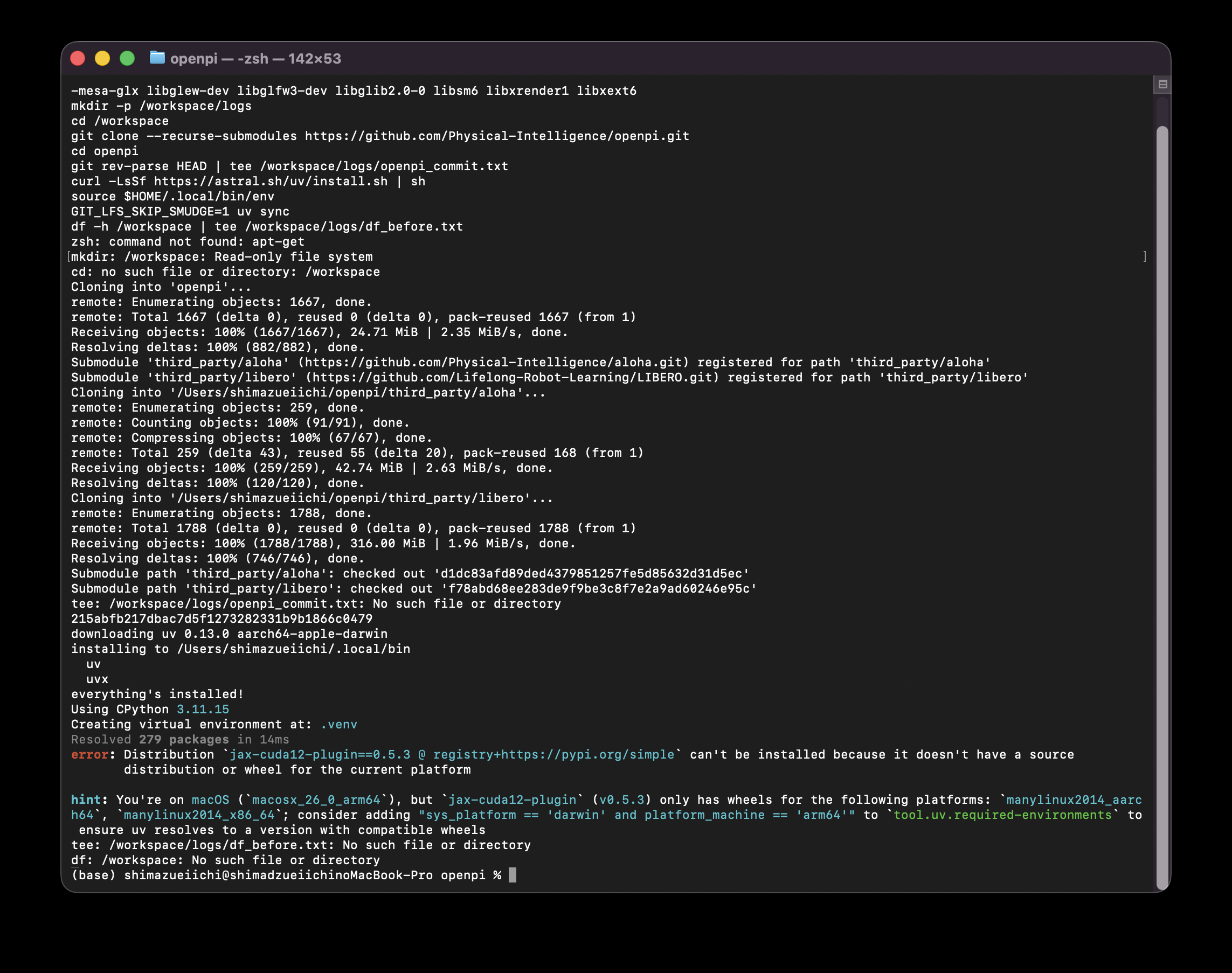
このときの出力です。画面の上の端で、最初の1行(apt-get で部品を入れるコマンド)の前半が切れています。
-mesa-glx libglew-dev libglfw3-dev libglib2.0-0 libsm6 libxrender1 libxext6
mkdir -p /workspace/logs
cd /workspace
git clone --recurse-submodules https://github.com/Physical-Intelligence/openpi.git
cd openpi
git rev-parse HEAD | tee /workspace/logs/openpi_commit.txt
curl -LsSf https://astral.sh/uv/install.sh | sh
source $HOME/.local/bin/env
GIT_LFS_SKIP_SMUDGE=1 uv sync
df -h /workspace | tee /workspace/logs/df_before.txt
zsh: command not found: apt-get
mkdir: /workspace: Read-only file system
cd: no such file or directory: /workspace
Cloning into 'openpi'...
remote: Enumerating objects: 1667, done.
remote: Total 1667 (delta 0), reused 0 (delta 0), pack-reused 1667 (from 1)
Receiving objects: 100% (1667/1667), 24.71 MiB | 2.35 MiB/s, done.
Resolving deltas: 100% (882/882), done.
Submodule 'third_party/aloha' (https://github.com/Physical-Intelligence/aloha.git) registered for path 'third_party/aloha'
Submodule 'third_party/libero' (https://github.com/Lifelong-Robot-Learning/LIBERO.git) registered for path 'third_party/libero'
Cloning into '/Users/shimazueiichi/openpi/third_party/aloha'...
remote: Enumerating objects: 259, done.
remote: Counting objects: 100% (91/91), done.
remote: Compressing objects: 100% (67/67), done.
remote: Total 259 (delta 43), reused 55 (delta 20), pack-reused 168 (from 1)
Receiving objects: 100% (259/259), 42.74 MiB | 2.63 MiB/s, done.
Resolving deltas: 100% (120/120), done.
Cloning into '/Users/shimazueiichi/openpi/third_party/libero'...
remote: Enumerating objects: 1788, done.
remote: Total 1788 (delta 0), reused 0 (delta 0), pack-reused 1788 (from 1)
Receiving objects: 100% (1788/1788), 316.00 MiB | 1.96 MiB/s, done.
Resolving deltas: 100% (746/746), done.
Submodule path 'third_party/aloha': checked out 'd1dc83afd89ded4379851257fe5d85632d31d5ec'
Submodule path 'third_party/libero': checked out 'f78abd68ee283de9f9be3c8f7e2a9ad60246e95c'
tee: /workspace/logs/openpi_commit.txt: No such file or directory
215abfb217dbac7d5f1273282331b9b1866c0479
downloading uv 0.13.0 aarch64-apple-darwin
installing to /Users/shimazueiichi/.local/bin
  uv
  uvx
everything's installed!
Using CPython 3.11.15
Creating virtual environment at: .venv
Resolved 279 packages in 14ms
error: Distribution `jax-cuda12-plugin==0.5.3 @ registry+https://pypi.org/simple` can't be installed because it doesn't have a source
       distribution or wheel for the current platform

hint: You're on macOS (`macosx_26_0_arm64`), but `jax-cuda12-plugin` (v0.5.3) only has wheels for the following platforms: `manylinux2014_aarch64`, `manylinux2014_x86_64`; consider adding "sys_platform == 'darwin' and platform_machine == 'arm64'" to `tool.uv.required-environments` to ensure uv resolves to a version with compatible wheels
tee: /workspace/logs/df_before.txt: No such file or directory
df: /workspace: No such file or directory
(base) shimazueiichi@shimadzueiichinoMacBook-Pro openpi %
Mac で起きたことを順に書きます。
apt-get(Ubuntu の部品を入れるコマンド)は Mac にはないので、command not foundになった/workspaceは Runpod の Pod の作業用フォルダで、Mac にはない。Mac のいちばん上の階層は書き込めないので、Read-only file systemで作れなかったcd /workspaceが失敗したので、git cloneはそのときいたフォルダ(Mac のホームフォルダ)で実行され、/Users/shimazueiichi/openpiに openpi がダウンロードされたuv(Python の環境を管理するツール)が Mac の
~/.local/binに入ったuv sync(openpi 本体に必要なライブラリを一式入れるコマンド)は、jax-cuda12-pluginが入れられずに止まった
最後の止まり方は、Log#2 で「π0.5 は NVIDIA の GPU を積んだ Linux でしか動かない」と書いたことを、エラーの形で確かめたものになっています。jax-cuda12-plugin は π0.5 の計算に使う JAX を NVIDIA の GPU で動かすための部品で、配布されているのは Linux 向け(manylinux2014_x86_64 と manylinux2014_aarch64)だけです。Mac(macosx_26_0_arm64)向けのものは存在しないので、入れようがありません。
なお、Mac 側でも git rev-parse HEAD は動き、openpi の最新のコミット 215abfb217dbac7d5f1273282331b9b1866c0479 が表示されています。後で Pod の中で取得したものも同じコミットでした。
続けて、π0.5 のサーバーを起動するコマンドも、別のウィンドウで Mac のまま実行していました。
Last login: Sun Oct 11 11:16:50 on ttys002
(base) shimazueiichi@shimadzueiichinoMacBook-Pro ~ % cd /workspace/openpi
uv run scripts/serve_policy.py --env LIBERO 2>&1 | tee /workspace/logs/server.log
cd: no such file or directory: /workspace/openpi
tee: /workspace/logs/server.log: No such file or directory
error: Failed to spawn: scripts/serve_policy.py
  cause: No such file or directory (os error 2)
(base) shimazueiichi@shimadzueiichinoMacBook-Pro ~ %
Mac に残ったのは ~/openpi(約380MB)と ~/.local/bin の uv の2つで、Mac の設定は何も変わっていません。どちらも残したままにしています。
行の先頭の表示が (base) shimazueiichi@...MacBook-Pro なら Mac、root@... なら Pod の中です。Log#2 でも、SSH の接続が切れたことに気づかず Mac でコマンドを打っていました。コマンドを打つ前に、どちらにいるかを確かめる手順を、手順書の側に入れておく必要があります。
SSH で Pod に入るときにも2回つまずきました。1回目は、手順書に書いた ssh root@<POD_IP> -p <SSH_PORT> -i ... の <POD_IP> などを、実際の値に置き換えずにそのまま打ったことです。< > で囲んだ部分は「ここに実際の値を入れる」という意味の印でしたが、手順書にそう書いていませんでした。2回目は、ターミナルに表示された内容をコピーして、そのままターミナルに貼り戻したことで、zsh: parse error が出ました。最終的には、Runpod の Pod の画面の「Connect」に出る「SSH over exposed TCP」のコマンドをコピーして貼ることで入れました。このコマンドには、IP アドレス・ポート番号・鍵のファイルの場所がすでに埋まっています。
Runpod の作成画面では L40 が選ばれていたので A40 に替えた
Pod の作成画面を開くと、GPU は L40(1時間0.83ドル)が選ばれた状態でした。Log#2 で使った A40 と速度を比べるために、GPU の検索欄に A40 と打って A40(1時間0.59ドル)に替えました。
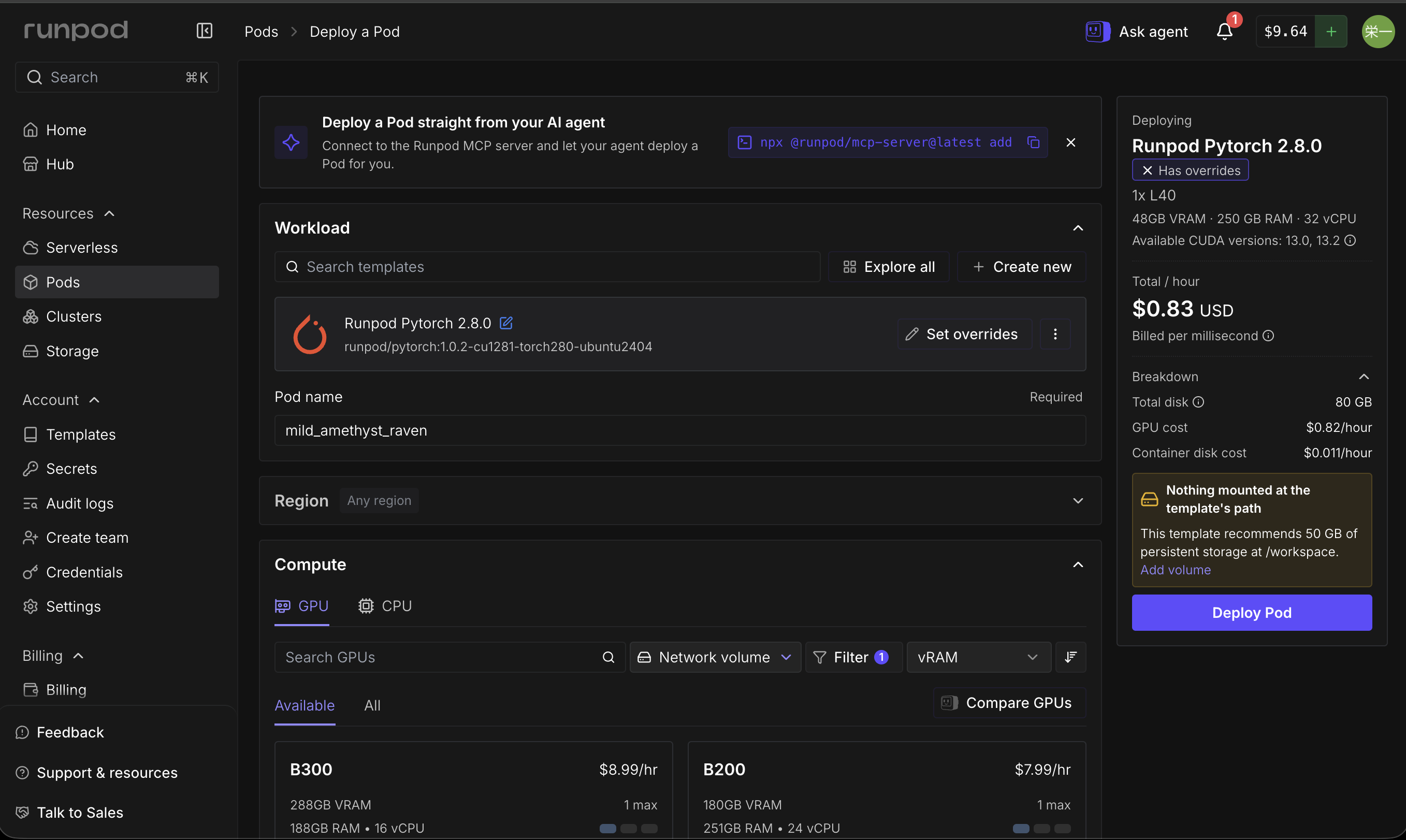
テンプレートとコンテナディスク(80GB)は、Log#2 で選んだものが残っていました。右側の欄に出ていた「Nothing mounted at the template's path」(/workspace に永続ストレージを付けることを推奨)という黄色い警告の「Add volume」は押していません。永続ストレージは Pod を消しても残る代わりに、使っていない間も料金がかかり続けます。
作成した Pod の内容です(Pod を止めた後の詳細画面から)。
項目 | 値 |
|---|---|
GPU | NVIDIA A40 × 1(GPU メモリ 46,068MiB) |
CPU | 9 vCPU(Intel Xeon Gold 6342 @ 2.80GHz) |
メモリ | 50GB |
コンテナディスク | 80GB |
テンプレート | Runpod Pytorch 2.8.0( |
OS | Ubuntu 24.04.3 LTS |
料金 | 1時間0.59ドル(GPU)+ディスクの分 |
このテンプレートは Ubuntu 24.04 です。LIBERO の画面描画に必要な部品は、openpi の LIBERO 用の Dockerfile(Ubuntu 22.04 用)に一覧があり、それをそのまま apt-get で入れるつもりでした。ただ、その一覧にある libgl1-mesa-glx は Ubuntu 24.04 では提供されておらず、libglib2.0-0 は24.04 では libglib2.0-0t64 という名前に変わっています。そこで、この2つを置き換えて入れました。元の名前のまま実行したらどうなるかは試していません。
apt-get update && apt-get install -y tmux libosmesa6-dev libegl1 libgles2-mesa-dev libgl1 libglx-mesa0 libglew-dev libglfw3-dev libglib2.0-0t64 libsm6 libxrender1 libxext6
mkdir -p /workspace/logs
tmux new -s lab
apt-get の出力は記録を残していません。最後の行の tmux については、次の節で書きます。
ターミナルが固まっても、tmux の中の作業は Pod 側で続いていた
tmux は、SSH の接続が切れても、Pod の中で動いているコマンドを止めずに残しておくためのツールです。Log#2 では、SSH の接続が切れたときと、ターミナルが固まって強制終了したときの2回、サーバーの起動をやり直しました。この回は最初から tmux の中で作業しました。
tmux に入ってから、openpi を取得して π0.5 のサーバーを起動するまでのコマンドをまとめて貼ったところ、Mac のターミナルが反応しなくなりました。ターミナルを再起動して、もう一度 SSH で Pod に入り、tmux の状態を確かめた出力です。
ここから先のログでは、Log#2 と同じく、Pod の IP アドレスを <POD_IP>、SSH のポート番号を <SSH_PORT>、Mac 側の回線の IP アドレスを <MAC_IP> に置き換えています。記事に載せた画面写真も、ウィンドウの上の端(接続先の IP アドレスが表示される部分)を切り落としています。この回の Pod はすでに削除しています。
Last login: Sun Oct 11 11:38:09 on ttys003
(base) shimazueiichi@shimadzueiichinoMacBook-Pro ~ % ssh root@<POD_IP> -p <SSH_PORT> -i ~/.ssh/id_ed25519
Welcome to Ubuntu 24.04.3 LTS (GNU/Linux 6.8.0-134-generic x86_64)

 * Documentation:  https://help.ubuntu.com
 * Management:     https://landscape.canonical.com
 * Support:        https://ubuntu.com/pro

This system has been minimized by removing packages and content that are
not required on a system that users do not log into.

To restore this content, you can run the 'unminimize' command.
Last login: Sun Oct 11 02:31:50 2026 from <MAC_IP>
 _____                           _
|  __ \                         | |
| |__) |   _ _ __  _ __   ___   __| |
|  _  / | | | '_ \| '_ \ / _ \ / _` |
| | \ \ |_| | | | | |_) | (_) | (_| |
|_|  \_\__,_|_| |_| .__/ \___/ \__,_|
                  | |
                  |_|
For detailed documentation and guides, please visit:
https://docs.runpod.io/ and https://blog.runpod.io/


root@b806288ea9d8:/# tmux ls
ls /workspace /workspace/logs
lab: 1 windows (created Sun Oct 11 02:32:32 2026)
/workspace:
logs  openpi

/workspace/logs:
df_before.txt  openpi_commit.txt  server.log
root@b806288ea9d8:/#
lab: 1 windows (created Sun Oct 11 02:32:32 2026) は、tmux の作業の場(セッション)が日本時間の11時32分に作られて、まだ残っていることを示しています。/workspace/logs には server.log までできていて、π0.5 のサーバーを起動するところまで進んでいました。tmux attach -t lab で元の画面に戻ると、サーバーは起動を終えて待ち受けていました(次の節)。固まったように見えたのは、ライブラリのインストールと π0.5 のダウンロードで、画面がしばらく動かない時間だったと考えています。
tmux の中では、1つの SSH 接続の中に複数の画面(ウィンドウ)を作って切り替えられます。キーの操作は2回に分けて押します。control を押しながら b を押し、両方の指を離してから、次のキー(新しい画面を作るなら c、1番の画面に移るなら 1)を押します。3つを同時に押すと動きません。また、画面を切り替えても、新しく作った画面はどれも同じ Runpod のロゴから始まるので、見た目では切り替わったことが分かりにくいです。今いる画面は、画面の下の緑の帯で * が付いている番号で見分けます。
この回では、操作に慣れる途中で画面を1つ多く作ったので、4つの画面を次のように使いました。
画面 | 使い方 |
|---|---|
0 | π0.5 のサーバー |
1 | GPU の状態の記録(5秒ごと) |
2 | シミュレータの準備と実行 |
3 | 途中で GPU のメモリをプロセスごとに確かめる |
π0.5-LIBERO のサーバーは 11.6GiB を18秒でダウンロードし、12.90秒で読み込んだ
0番の画面で実行したコマンドです。
cd /workspace
git clone --recurse-submodules https://github.com/Physical-Intelligence/openpi.git
cd openpi
git rev-parse HEAD | tee /workspace/logs/openpi_commit.txt
curl -LsSf https://astral.sh/uv/install.sh | sh
source $HOME/.local/bin/env
GIT_LFS_SKIP_SMUDGE=1 uv sync
df -h /workspace | tee /workspace/logs/df_before.txt
uv run scripts/serve_policy.py --env LIBERO 2>&1 | tee /workspace/logs/server.log
--env LIBERO を付けると、LIBERO 向けに追加学習した π0.5(gs://openpi-assets/checkpoints/pi05_libero、openpi の設定名は pi05_libero)を読み込んでサーバーを起動します。
openpi_commit.txt に残ったコミットです。
215abfb217dbac7d5f1273282331b9b1866c0479uv sync の出力のうち、画面に残っていた最後の部分と、df の結果です(それより前の出力は画面の外に流れて、記録が残っていません)。
 + typeguard==4.4.2
 + typing-extensions==4.13.2
 + typing-inspect==0.9.0
 + typing-inspection==0.4.1
 + tyro==0.9.22
 + tzdata==2025.2
 + urllib3==2.4.0
 + virtualenv==20.31.2
 + wadler-lindig==0.1.6
 + wandb==0.19.11
 + wcwidth==0.2.13
 + websockets==15.0.1
 + werkzeug==3.1.3
 + widgetsnbextension==4.0.14
 + wrapt==1.14.1
 + xxhash==3.5.0
 + yarl==1.20.0
 + zarr==3.0.8
 + zipp==3.22.0
Filesystem      Size  Used Avail Use% Mounted on
overlay          80G   17G   64G  21% /
π0.5 を入れる前の時点で、80GB のディスクのうち17GB を使っていました。
サーバーのログ(server.log)の全量です。最後の3行は、この後でシミュレータがつないで、20回の試行を終えて切れたときのものです。
INFO:openpi.shared.download:Downloading gs://openpi-assets/checkpoints/pi05_libero to /root/.cache/openpi/openpi-assets/checkpoints/pi05_libero
WARNING:openpi.shared.download:gsutil not found, falling back to gcsfs. This may fail if GCP credentials are not configured correctly.
INFO:tqdm_loggable.tqdm_logging:Progress on: -/12439085481 rate:- remaining:? elapsed:00:00 postfix:-
INFO:tqdm_loggable.tqdm_logging:Progress on: 6.78GiB/11.6GiB rate:791,004,701.3iB/s remaining:00:06 elapsed:00:10 postfix:-
INFO:tqdm_loggable.tqdm_logging:Progress on: 11.6GiB/11.6GiB rate:463,625,273.4iB/s remaining:00:00 elapsed:00:18 postfix:-
INFO:root:Loading model...
INFO:2026-10-11 02:34:26,810:jax._src.xla_bridge:925: Unable to initialize backend 'rocm': module 'jaxlib.xla_extension' has no attribute 'GpuAllocatorConfig'
INFO:jax._src.xla_bridge:Unable to initialize backend 'rocm': module 'jaxlib.xla_extension' has no attribute 'GpuAllocatorConfig'
INFO:2026-10-11 02:34:26,813:jax._src.xla_bridge:925: Unable to initialize backend 'tpu': INTERNAL: Failed to open libtpu.so: libtpu.so: cannot open shared object file: No such file or directory
INFO:jax._src.xla_bridge:Unable to initialize backend 'tpu': INTERNAL: Failed to open libtpu.so: libtpu.so: cannot open shared object file: No such file or directory
INFO:absl:orbax-checkpoint version: 0.11.13
INFO:absl:Created BasePyTreeCheckpointHandler: use_ocdbt=True, use_zarr3=False, pytree_metadata_options=PyTreeMetadataOptions(support_rich_types=False), array_metadata_store=<orbax.checkpoint._src.metadata.array_metadata_store.Store object at 0x734e8b67f790>
INFO:absl:Restoring checkpoint from /root/.cache/openpi/openpi-assets/checkpoints/pi05_libero/params.
INFO:absl:[thread=MainThread] Failed to get flag value for EXPERIMENTAL_ORBAX_USE_DISTRIBUTED_PROCESS_ID.
INFO:absl:[process=0] /jax/checkpoint/read/bytes_per_sec: 495.8 MiB/s (total bytes: 6.2 GiB) (time elapsed: 12 seconds) (per-host)
INFO:absl:Finished restoring checkpoint in 12.90 seconds from /root/.cache/openpi/openpi-assets/checkpoints/pi05_libero/params.
INFO:openpi.shared.download:Downloading gs://big_vision/paligemma_tokenizer.model to /root/.cache/openpi/big_vision/paligemma_tokenizer.model
INFO:tqdm_loggable.tqdm_logging:Progress on: -/4264023 rate:- remaining:? elapsed:00:00 postfix:-
INFO:tqdm_loggable.tqdm_logging:Progress on: 4.07MiB/4.07MiB rate:4,259,956.3iB/s remaining:00:00 elapsed:00:01 postfix:-
INFO:root:Norm stats not found in /workspace/openpi/assets/pi05_libero/physical-intelligence/libero, skipping.
INFO:root:Loaded norm stats from /root/.cache/openpi/openpi-assets/checkpoints/pi05_libero/assets/physical-intelligence/libero
INFO:root:Creating server (host: b806288ea9d8, ip: 172.16.96.2)
INFO:websockets.server:server listening on 0.0.0.0:8000
INFO:websockets.server:connection open
INFO:openpi.serving.websocket_policy_server:Connection from ('127.0.0.1', 60050) opened
INFO:openpi.serving.websocket_policy_server:Connection from ('127.0.0.1', 60050) closed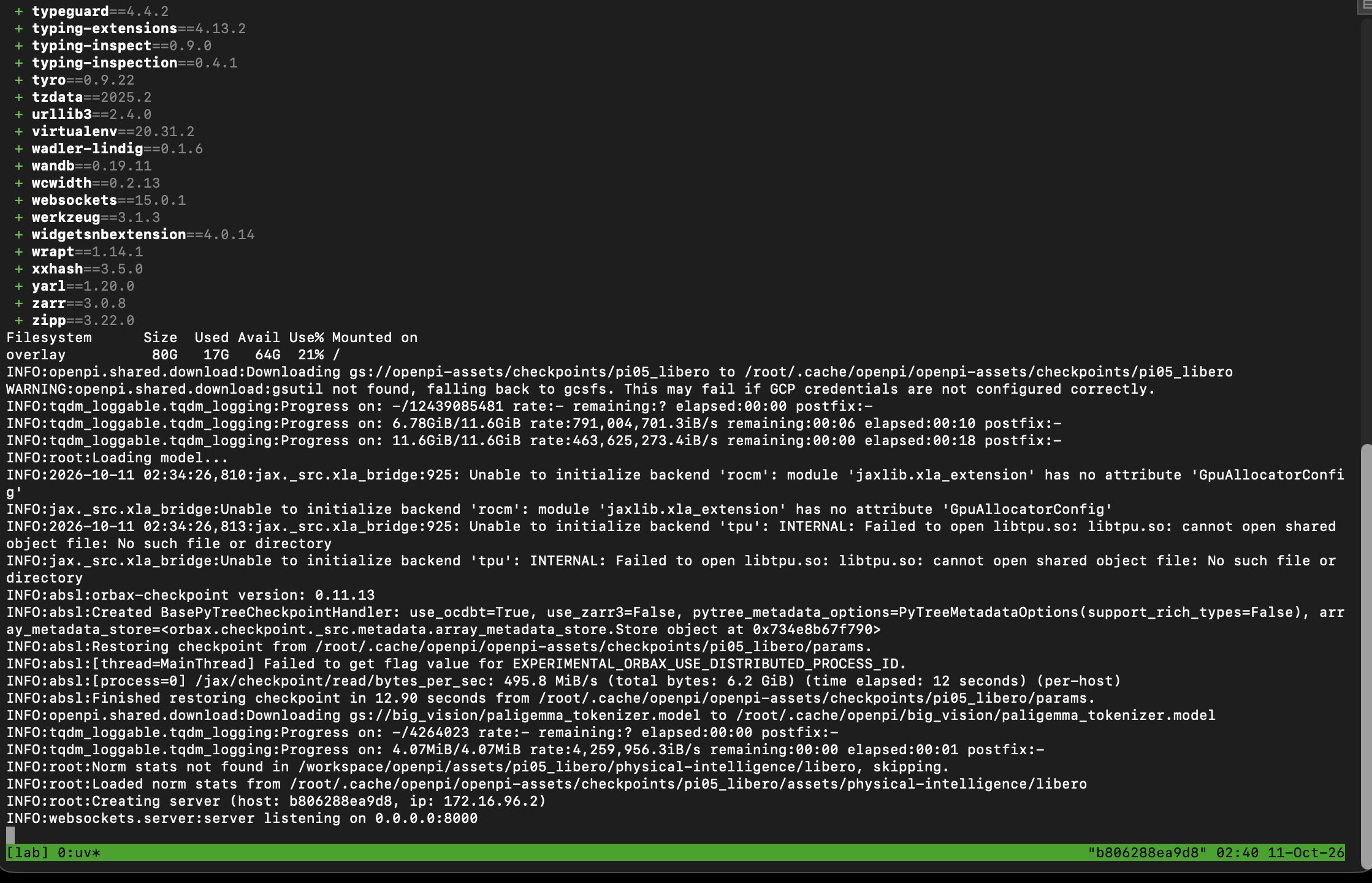
π0.5-LIBERO のダウンロードは11.6GiB を18秒、GPU への読み込み(6.2GiB)は12.90秒でした。Log#2 の π0.5-DROID は、同じ11.6GB のダウンロードに1分15秒かかっていました。Pod ごとにネットワークの速さが違うので、この差は Pod の違いと考えています。
Unable to initialize backend 'rocm' と 'tpu' は、AMD 製の GPU と Google の TPU(どちらも今回は使わない計算装置)が見つからなかったという通知で、エラーではありません。Norm stats not found in /workspace/openpi/assets/... も、手元に置いた正規化(値の大きさをそろえる処理)用の数値が見つからなかったので、ダウンロードした π0.5 に付いているものを使った、という通知です。
修正1:LIBERO は設定ファイルがないと、最初の起動で入力を求めて止まる
ここからは、2番の画面でシミュレータ側の準備をします。手順は README の「Without Docker」のとおりですが、2箇所を足しました。
1つ目は、LIBERO の設定ファイルを先に置くことです。LIBERO は、読み込まれた瞬間に設定ファイル(~/.libero/config.yaml)を探します。ファイルがないと、作業用データの保存先を自分で指定するかを (Y/N) で尋ねて、入力を待ちます。LIBERO のコード(third_party/libero/libero/libero/__init__.py)の該当部分です。
if not os.path.exists(config_file):
    # Create a default config file

    default_path_dict = get_default_path_dict()
    answer = input(
        "Do you want to specify a custom path for the dataset folder? (Y/N): "
    ).lower()
画面の前で手で動かしているときなら N と打てば進みますが、記録のために出力をファイルへ流しているときや、自動で動かすときには、ここで止まったまま気づきにくくなります。openpi の LIBERO 用の Dockerfile には # Create a default config file to avoid an input prompt from LIBERO's init script.(LIBERO の起動時の入力待ちを避けるため、設定ファイルを先に作る)というコメントがあり、設定ファイルを先に置いています。README の「Docker なし」の手順にはこれが書かれていないので、Dockerfile と同じ中身のファイルを手で置きました。設定ファイルを置かずに実行して、本当に止まるかは試していません。
export LIBERO_CONFIG_PATH=/tmp/libero
mkdir -p $LIBERO_CONFIG_PATH
L=$PWD/third_party/libero/libero/libero
cat > $LIBERO_CONFIG_PATH/config.yaml <<EOF
benchmark_root: $L
bddl_files: $L/bddl_files
init_states: $L/init_files
datasets: $L/../datasets
assets: $L/assets
EOF
LIBERO_CONFIG_PATH は、設定ファイルを探す場所を変えるための環境変数です。$L は LIBERO の作業の定義ファイルが入っているフォルダで、bddl_files(作業の内容を書いたファイル)、init_files(各作業の初期状態)、assets(机やボウルの3Dモデル)がこの下にあります。datasets は学習用のデータの置き場所ですが、この回は学習をしないので、フォルダは作っていません。後で出てくる datasets path ... does not exist! という警告はこのためで、結果には影響しません。
修正2:動画のファイル名に試行番号がなく、同じ作業の2回目が1回目を上書きする
2つ目は、main.py が保存する動画のファイル名です。main.py は、1回の試行が終わるたびに次の名前で動画を保存します。
            suffix = "success" if done else "failure"
            task_segment = task_description.replace(" ", "_")
            imageio.mimwrite(
                pathlib.Path(args.video_out_path) / f"rollout_{task_segment}_{suffix}.mp4",
名前に入るのは、指示文と、成功(success)か失敗(failure)かだけです。同じ作業を2回試して2回とも成功すると、2回目の動画が同じ名前で1回目を上書きし、1本しか残りません。公式の初期設定は1つの作業を50回試すので、成功した49本が上書きで消えて1本だけが残る、ということが起こります。
動画の名前に試行番号(episode_idx、0から始まる)を入れるように、1箇所だけ書き換えました。
sed -i 's|f"rollout_{task_segment}_{suffix}.mp4"|f"rollout_{task_segment}_ep{episode_idx}_{suffix}.mp4"|' examples/libero/main.py
git diff examples/libero/main.py | tee /workspace/logs/main_py.diff保存した差分(main_py.diff)です。
diff --git a/examples/libero/main.py b/examples/libero/main.py
index dc015a6..0685ca7 100644
--- a/examples/libero/main.py
+++ b/examples/libero/main.py
DAY327_ -168,7 +168,7 DAY327_ def eval_libero(args: Args) -> None:
             suffix = "success" if done else "failure"
             task_segment = task_description.replace(" ", "_")
             imageio.mimwrite(
-                pathlib.Path(args.video_out_path) / f"rollout_{task_segment}_{suffix}.mp4",
+                pathlib.Path(args.video_out_path) / f"rollout_{task_segment}_ep{episode_idx}_{suffix}.mp4",
                 [np.asarray(x) for x in replay_images],
                 fps=10,
             )
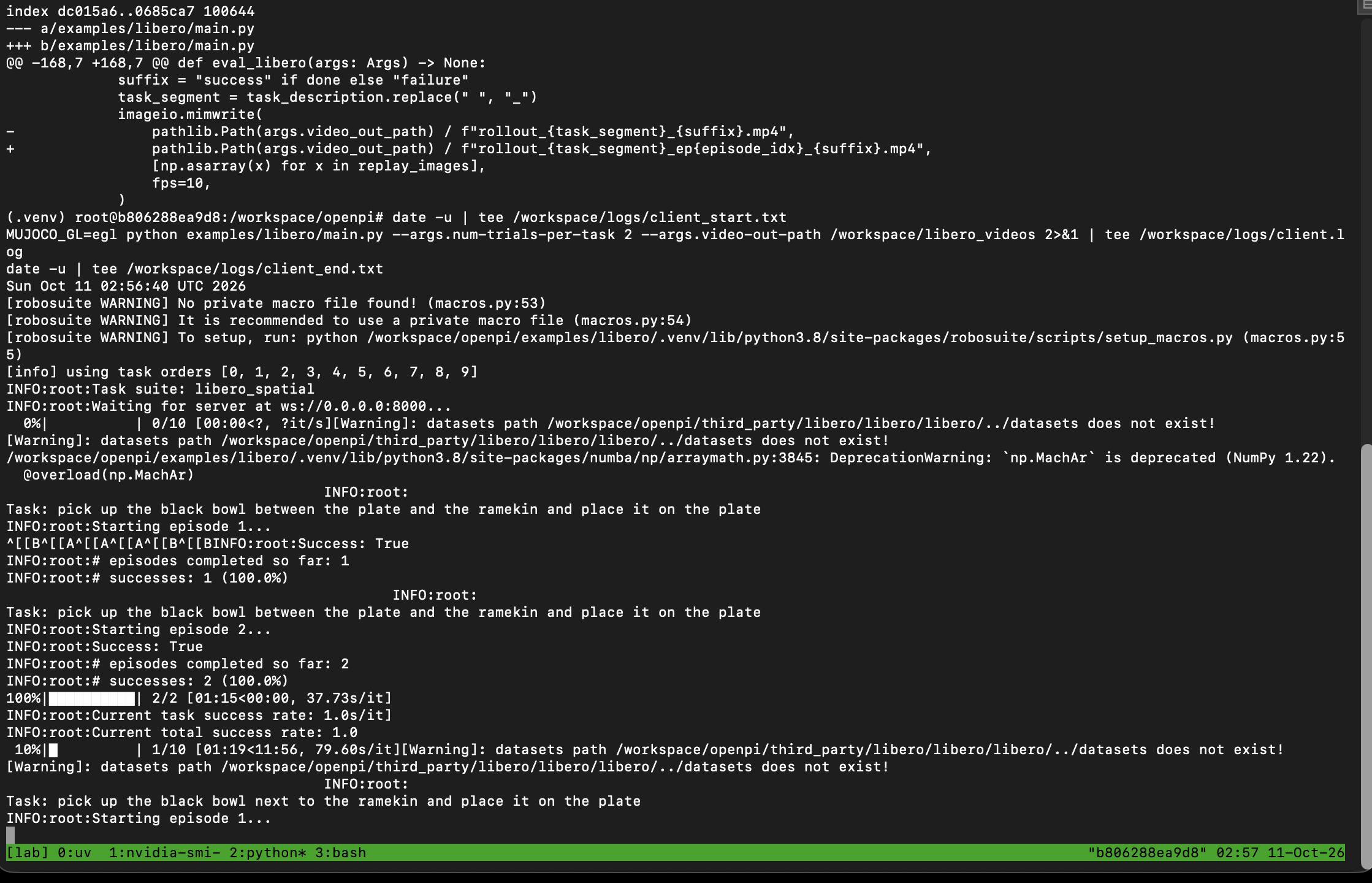
差分の2行目の dc015a6..0685ca7 は、書き換える前と後のファイルの識別番号です。Claude の作業環境で、コミット 215abfb の examples/libero/main.py を取得して同じ書き換えをしたところ、前後とも同じ番号(dc015a61740f2d3174152bebb60176fac52f3f40 → 0685ca7106e68dcdb8153c59cd61e2e0406f9160)になりました。書き換えた後の main.py の全文は、記事の後半に載せています。
シミュレータ側は Python 3.8 の別の環境に、PyTorch 1.11 と websockets 13.1 が入った
2番の画面で実行したコマンドの全体です(修正1・修正2を含む)。
cd /workspace/openpi
source $HOME/.local/bin/env
uv venv --python 3.8 examples/libero/.venv
source examples/libero/.venv/bin/activate
uv pip sync examples/libero/requirements.txt third_party/libero/requirements.txt --extra-index-url https://download.pytorch.org/whl/cu113 --index-strategy=unsafe-best-match
uv pip install -e packages/openpi-client
uv pip install -e third_party/libero
export PYTHONPATH=$PYTHONPATH:$PWD/third_party/libero
export LIBERO_CONFIG_PATH=/tmp/libero
mkdir -p $LIBERO_CONFIG_PATH
L=$PWD/third_party/libero/libero/libero
cat > $LIBERO_CONFIG_PATH/config.yaml <<EOF
benchmark_root: $L
bddl_files: $L/bddl_files
init_states: $L/init_files
datasets: $L/../datasets
assets: $L/assets
EOF
sed -i 's|f"rollout_{task_segment}_{suffix}.mp4"|f"rollout_{task_segment}_ep{episode_idx}_{suffix}.mp4"|' examples/libero/main.py
git diff examples/libero/main.py | tee /workspace/logs/main_py.diff
source $HOME/.local/bin/env は、0番の画面で入れた uv を、新しく作った2番の画面でも使えるようにするための行です。インストールの出力のうち、画面に残っていた最後の部分です(それより前の出力は記録が残っていません)。
 + rich==13.9.4
 + robomimic==0.2.0
 + robosuite==1.4.1
 + scipy==1.10.1
 + setuptools==75.3.0
 + shtab==1.7.1
 + six==1.17.0
 + termcolor==2.4.0
 + thop==0.1.1.post2209072238
 + torch==1.11.0+cu113
 + torchaudio==0.11.0+cu113
 + torchvision==0.12.0+cu113
 + tqdm==4.67.1
 + transformers==4.21.1
 + typeguard==4.4.0
 + typing-extensions==4.12.2
 + tyro==0.9.2
 + urllib3==2.2.3
 + wandb==0.13.1
 + zipp==3.20.2
Using Python 3.8.20 environment at: examples/libero/.venv
Resolved 6 packages in 281ms
      Built openpi-client @ file:///workspace/openpi/packages/openpi-client
Prepared 4 packages in 413ms
Installed 4 packages in 7ms
 + dm-tree==0.1.8
 + msgpack==1.1.1
 + openpi-client==0.1.0 (from file:///workspace/openpi/packages/openpi-client)
 + websockets==13.1
Using Python 3.8.20 environment at: examples/libero/.venv
Resolved 1 package in 535ms
      Built libero @ file:///workspace/openpi/third_party/libero
Prepared 1 package in 217ms
Installed 1 package in 3ms
 + libero==0.1.0 (from file:///workspace/openpi/third_party/libero)
シミュレータ側には、PyTorch 1.11.0(CUDA 11.3 版)、robosuite 1.4.1(LIBERO が使っているシミュレータの土台)、openpi-client、websockets 13.1 などが入りました。π0.5 のサーバー側の環境(websockets 15.0.1 など)とは、ライブラリの版がかなり違います。2つの環境を分けているのはこのためです。
libero_spatial の10種類の作業を2回ずつ試して、20回すべて成功した
0番の画面で server listening on 0.0.0.0:8000 が出ていることを確かめてから、2番の画面で実行しました。前後に date -u(世界標準時での現在時刻)を入れて、開始と終了の時刻を残しています。
date -u | tee /workspace/logs/client_start.txt
MUJOCO_GL=egl python examples/libero/main.py --args.num-trials-per-task 2 --args.video-out-path /workspace/libero_videos 2>&1 | tee /workspace/logs/client.log
date -u | tee /workspace/logs/client_end.txt
MUJOCO_GL=egl は、シミュレータの画面描画を GPU で行う指定です。Runpod の Pod で GPU での描画が使えるか分からなかったので、失敗したら CPU で描画する指定(MUJOCO_GL=osmesa)に切り替えるつもりでしたが、そのまま動きました。--args.num-trials-per-task 2 は、1つの作業を何回試すかの指定です。公式の初期設定は50回で、全部回すと10種類×50回=500回になります。この回は2回にして、20回にしました。
開始と終了の時刻です。
client_start.txt: Sun Oct 11 02:56:40 UTC 2026
client_end.txt:   Sun Oct 11 03:00:51 UTC 2026
シミュレータ側のログ(client.log)の全量です。途中の [A は、進み具合の表示を書き換えるための制御文字がファイルに残ったものです。記事に載せるにあたって、画面に表示されない2種類の制御文字(ESC と、行の先頭に戻る CR)だけを、それぞれ削除・改行に置き換えています。それ以外は client.log のままです。
[robosuite WARNING] No private macro file found! (macros.py:53)
[robosuite WARNING] It is recommended to use a private macro file (macros.py:54)
[robosuite WARNING] To setup, run: python /workspace/openpi/examples/libero/.venv/lib/python3.8/site-packages/robosuite/scripts/setup_macros.py (macros.py:55)
[info] using task orders [0, 1, 2, 3, 4, 5, 6, 7, 8, 9]
INFO:root:Task suite: libero_spatial
INFO:root:Waiting for server at ws://0.0.0.0:8000...

  0%|          | 0/10 [00:00<?, ?it/s][Warning]: datasets path /workspace/openpi/third_party/libero/libero/libero/../datasets does not exist!
[Warning]: datasets path /workspace/openpi/third_party/libero/libero/libero/../datasets does not exist!
/workspace/openpi/examples/libero/.venv/lib/python3.8/site-packages/numba/np/arraymath.py:3845: DeprecationWarning: `np.MachAr` is deprecated (NumPy 1.22).
  @overload(np.MachAr)


  0%|          | 0/2 [00:00<?, ?it/s][AINFO:root:
Task: pick up the black bowl between the plate and the ramekin and place it on the plate
INFO:root:Starting episode 1...
INFO:root:Success: True
INFO:root:# episodes completed so far: 1
INFO:root:# successes: 1 (100.0%)


 50%|█████     | 1/2 [01:08<01:08, 68.78s/it][AINFO:root:
Task: pick up the black bowl between the plate and the ramekin and place it on the plate
INFO:root:Starting episode 2...
INFO:root:Success: True
INFO:root:# episodes completed so far: 2
INFO:root:# successes: 2 (100.0%)


100%|██████████| 2/2 [01:15<00:00, 32.25s/it][A
100%|██████████| 2/2 [01:15<00:00, 37.73s/it]
INFO:root:Current task success rate: 1.0
INFO:root:Current total success rate: 1.0

 10%|█         | 1/10 [01:19<11:56, 79.60s/it][Warning]: datasets path /workspace/openpi/third_party/libero/libero/libero/../datasets does not exist!
[Warning]: datasets path /workspace/openpi/third_party/libero/libero/libero/../datasets does not exist!


  0%|          | 0/2 [00:00<?, ?it/s][AINFO:root:
Task: pick up the black bowl next to the ramekin and place it on the plate
INFO:root:Starting episode 1...
INFO:root:Success: True
INFO:root:# episodes completed so far: 3
INFO:root:# successes: 3 (100.0%)


 50%|█████     | 1/2 [00:08<00:08,  8.27s/it][AINFO:root:
Task: pick up the black bowl next to the ramekin and place it on the plate
INFO:root:Starting episode 2...
INFO:root:Success: True
INFO:root:# episodes completed so far: 4
INFO:root:# successes: 4 (100.0%)


100%|██████████| 2/2 [00:16<00:00,  8.19s/it][A
100%|██████████| 2/2 [00:16<00:00,  8.20s/it]
INFO:root:Current task success rate: 1.0
INFO:root:Current total success rate: 1.0

 20%|██        | 2/10 [01:37<05:45, 43.13s/it][Warning]: datasets path /workspace/openpi/third_party/libero/libero/libero/../datasets does not exist!
[Warning]: datasets path /workspace/openpi/third_party/libero/libero/libero/../datasets does not exist!


  0%|          | 0/2 [00:00<?, ?it/s][AINFO:root:
Task: pick up the black bowl from table center and place it on the plate
INFO:root:Starting episode 1...
INFO:root:Success: True
INFO:root:# episodes completed so far: 5
INFO:root:# successes: 5 (100.0%)


 50%|█████     | 1/2 [00:09<00:09,  9.06s/it][AINFO:root:
Task: pick up the black bowl from table center and place it on the plate
INFO:root:Starting episode 2...
INFO:root:Success: True
INFO:root:# episodes completed so far: 6
INFO:root:# successes: 6 (100.0%)


100%|██████████| 2/2 [00:17<00:00,  8.41s/it][A
100%|██████████| 2/2 [00:17<00:00,  8.50s/it]
INFO:root:Current task success rate: 1.0
INFO:root:Current total success rate: 1.0

 30%|███       | 3/10 [01:55<03:42, 31.74s/it][Warning]: datasets path /workspace/openpi/third_party/libero/libero/libero/../datasets does not exist!
[Warning]: datasets path /workspace/openpi/third_party/libero/libero/libero/../datasets does not exist!


  0%|          | 0/2 [00:00<?, ?it/s][AINFO:root:
Task: pick up the black bowl on the cookie box and place it on the plate
INFO:root:Starting episode 1...
INFO:root:Success: True
INFO:root:# episodes completed so far: 7
INFO:root:# successes: 7 (100.0%)


 50%|█████     | 1/2 [00:08<00:08,  8.16s/it][AINFO:root:
Task: pick up the black bowl on the cookie box and place it on the plate
INFO:root:Starting episode 2...
INFO:root:Success: True
INFO:root:# episodes completed so far: 8
INFO:root:# successes: 8 (100.0%)


100%|██████████| 2/2 [00:14<00:00,  7.12s/it][A
100%|██████████| 2/2 [00:14<00:00,  7.27s/it]
INFO:root:Current task success rate: 1.0
INFO:root:Current total success rate: 1.0

 40%|████      | 4/10 [02:11<02:32, 25.43s/it][Warning]: datasets path /workspace/openpi/third_party/libero/libero/libero/../datasets does not exist!
[Warning]: datasets path /workspace/openpi/third_party/libero/libero/libero/../datasets does not exist!


  0%|          | 0/2 [00:00<?, ?it/s][AINFO:root:
Task: pick up the black bowl in the top drawer of the wooden cabinet and place it on the plate
INFO:root:Starting episode 1...
INFO:root:Success: True
INFO:root:# episodes completed so far: 9
INFO:root:# successes: 9 (100.0%)


 50%|█████     | 1/2 [00:09<00:09,  9.35s/it][AINFO:root:
Task: pick up the black bowl in the top drawer of the wooden cabinet and place it on the plate
INFO:root:Starting episode 2...
INFO:root:Success: True
INFO:root:# episodes completed so far: 10
INFO:root:# successes: 10 (100.0%)


100%|██████████| 2/2 [00:19<00:00,  9.89s/it][A
100%|██████████| 2/2 [00:19<00:00,  9.81s/it]
INFO:root:Current task success rate: 1.0
INFO:root:Current total success rate: 1.0

 50%|█████     | 5/10 [02:31<01:58, 23.76s/it][Warning]: datasets path /workspace/openpi/third_party/libero/libero/libero/../datasets does not exist!
[Warning]: datasets path /workspace/openpi/third_party/libero/libero/libero/../datasets does not exist!


  0%|          | 0/2 [00:00<?, ?it/s][AINFO:root:
Task: pick up the black bowl on the ramekin and place it on the plate
INFO:root:Starting episode 1...
INFO:root:Success: True
INFO:root:# episodes completed so far: 11
INFO:root:# successes: 11 (100.0%)


 50%|█████     | 1/2 [00:08<00:08,  8.04s/it][AINFO:root:
Task: pick up the black bowl on the ramekin and place it on the plate
INFO:root:Starting episode 2...
INFO:root:Success: True
INFO:root:# episodes completed so far: 12
INFO:root:# successes: 12 (100.0%)


100%|██████████| 2/2 [00:15<00:00,  7.99s/it][A
100%|██████████| 2/2 [00:15<00:00,  8.00s/it]
INFO:root:Current task success rate: 1.0
INFO:root:Current total success rate: 1.0

 60%|██████    | 6/10 [02:49<01:25, 21.48s/it][Warning]: datasets path /workspace/openpi/third_party/libero/libero/libero/../datasets does not exist!
[Warning]: datasets path /workspace/openpi/third_party/libero/libero/libero/../datasets does not exist!


  0%|          | 0/2 [00:00<?, ?it/s][AINFO:root:
Task: pick up the black bowl next to the cookie box and place it on the plate
INFO:root:Starting episode 1...
INFO:root:Success: True
INFO:root:# episodes completed so far: 13
INFO:root:# successes: 13 (100.0%)


 50%|█████     | 1/2 [00:08<00:08,  8.20s/it][AINFO:root:
Task: pick up the black bowl next to the cookie box and place it on the plate
INFO:root:Starting episode 2...
INFO:root:Success: True
INFO:root:# episodes completed so far: 14
INFO:root:# successes: 14 (100.0%)


100%|██████████| 2/2 [00:16<00:00,  8.04s/it][A
100%|██████████| 2/2 [00:16<00:00,  8.06s/it]
INFO:root:Current task success rate: 1.0
INFO:root:Current total success rate: 1.0

 70%|███████   | 7/10 [03:06<01:00, 20.12s/it][Warning]: datasets path /workspace/openpi/third_party/libero/libero/libero/../datasets does not exist!
[Warning]: datasets path /workspace/openpi/third_party/libero/libero/libero/../datasets does not exist!


  0%|          | 0/2 [00:00<?, ?it/s][AINFO:root:
Task: pick up the black bowl on the stove and place it on the plate
INFO:root:Starting episode 1...
INFO:root:Success: True
INFO:root:# episodes completed so far: 15
INFO:root:# successes: 15 (100.0%)


 50%|█████     | 1/2 [00:09<00:09,  9.92s/it][AINFO:root:
Task: pick up the black bowl on the stove and place it on the plate
INFO:root:Starting episode 2...
INFO:root:Success: True
INFO:root:# episodes completed so far: 16
INFO:root:# successes: 16 (100.0%)


100%|██████████| 2/2 [00:19<00:00,  9.67s/it][A
100%|██████████| 2/2 [00:19<00:00,  9.71s/it]
INFO:root:Current task success rate: 1.0
INFO:root:Current total success rate: 1.0

 80%|████████  | 8/10 [03:26<00:40, 20.25s/it][Warning]: datasets path /workspace/openpi/third_party/libero/libero/libero/../datasets does not exist!
[Warning]: datasets path /workspace/openpi/third_party/libero/libero/libero/../datasets does not exist!


  0%|          | 0/2 [00:00<?, ?it/s][AINFO:root:
Task: pick up the black bowl next to the plate and place it on the plate
INFO:root:Starting episode 1...
INFO:root:Success: True
INFO:root:# episodes completed so far: 17
INFO:root:# successes: 17 (100.0%)


 50%|█████     | 1/2 [00:08<00:08,  8.55s/it][AINFO:root:
Task: pick up the black bowl next to the plate and place it on the plate
INFO:root:Starting episode 2...
INFO:root:Success: True
INFO:root:# episodes completed so far: 18
INFO:root:# successes: 18 (100.0%)


100%|██████████| 2/2 [00:16<00:00,  8.27s/it][A
100%|██████████| 2/2 [00:16<00:00,  8.31s/it]
INFO:root:Current task success rate: 1.0
INFO:root:Current total success rate: 1.0

 90%|█████████ | 9/10 [03:44<00:19, 19.47s/it][Warning]: datasets path /workspace/openpi/third_party/libero/libero/libero/../datasets does not exist!
[Warning]: datasets path /workspace/openpi/third_party/libero/libero/libero/../datasets does not exist!


  0%|          | 0/2 [00:00<?, ?it/s][AINFO:root:
Task: pick up the black bowl on the wooden cabinet and place it on the plate
INFO:root:Starting episode 1...
INFO:root:Success: True
INFO:root:# episodes completed so far: 19
INFO:root:# successes: 19 (100.0%)


 50%|█████     | 1/2 [00:09<00:09,  9.76s/it][AINFO:root:
Task: pick up the black bowl on the wooden cabinet and place it on the plate
INFO:root:Starting episode 2...
INFO:root:Success: True
INFO:root:# episodes completed so far: 20
INFO:root:# successes: 20 (100.0%)


100%|██████████| 2/2 [00:20<00:00, 10.25s/it][A
100%|██████████| 2/2 [00:20<00:00, 10.17s/it]
INFO:root:Current task success rate: 1.0
INFO:root:Current total success rate: 1.0

100%|██████████| 10/10 [04:06<00:00, 20.11s/it]
100%|██████████| 10/10 [04:06<00:00, 24.61s/it]
INFO:root:Total success rate: 1.0
INFO:root:Total episodes: 20
Exception ignored in: <function MjRenderContext.__del__ at 0x7fc981bde790>
Traceback (most recent call last):
  File "/workspace/openpi/examples/libero/.venv/lib/python3.8/site-packages/robosuite/utils/binding_utils.py", line 199, in __del__
    self.gl_ctx.free()
  File "/workspace/openpi/examples/libero/.venv/lib/python3.8/site-packages/robosuite/renderers/context/egl_context.py", line 149, in free
    EGL.eglMakeCurrent(EGL_DISPLAY, EGL.EGL_NO_SURFACE, EGL.EGL_NO_SURFACE, EGL.EGL_NO_CONTEXT)
  File "/workspace/openpi/examples/libero/.venv/lib/python3.8/site-packages/OpenGL/error.py", line 230, in glCheckError
    raise self._errorClass(
OpenGL.raw.EGL._errors.EGLError: EGLError(
	err = EGL_NOT_INITIALIZED,
	baseOperation = eglMakeCurrent,
	cArguments = (
		<OpenGL._opaque.EGLDisplay_pointer object at 0x7fc96fe95c40>,
		<OpenGL._opaque.EGLSurface_pointer object at 0x7fc984c4d6c0>,
		<OpenGL._opaque.EGLSurface_pointer object at 0x7fc984c4d6c0>,
		<OpenGL._opaque.EGLContext_pointer object at 0x7fc984c4d640>,
	),
	result = 0
)
Exception ignored in: <function EGLGLContext.__del__ at 0x7fc981bde5e0>
Traceback (most recent call last):
  File "/workspace/openpi/examples/libero/.venv/lib/python3.8/site-packages/robosuite/renderers/context/egl_context.py", line 155, in __del__
    self.free()
  File "/workspace/openpi/examples/libero/.venv/lib/python3.8/site-packages/robosuite/renderers/context/egl_context.py", line 149, in free
    EGL.eglMakeCurrent(EGL_DISPLAY, EGL.EGL_NO_SURFACE, EGL.EGL_NO_SURFACE, EGL.EGL_NO_CONTEXT)
  File "/workspace/openpi/examples/libero/.venv/lib/python3.8/site-packages/OpenGL/error.py", line 230, in glCheckError
    raise self._errorClass(
OpenGL.raw.EGL._errors.EGLError: EGLError(
	err = EGL_NOT_INITIALIZED,
	baseOperation = eglMakeCurrent,
	cArguments = (
		<OpenGL._opaque.EGLDisplay_pointer object at 0x7fc96fe95c40>,
		<OpenGL._opaque.EGLSurface_pointer object at 0x7fc984c4d6c0>,
		<OpenGL._opaque.EGLSurface_pointer object at 0x7fc984c4d6c0>,
		<OpenGL._opaque.EGLContext_pointer object at 0x7fc984c4d640>,
	),
	result = 0
)
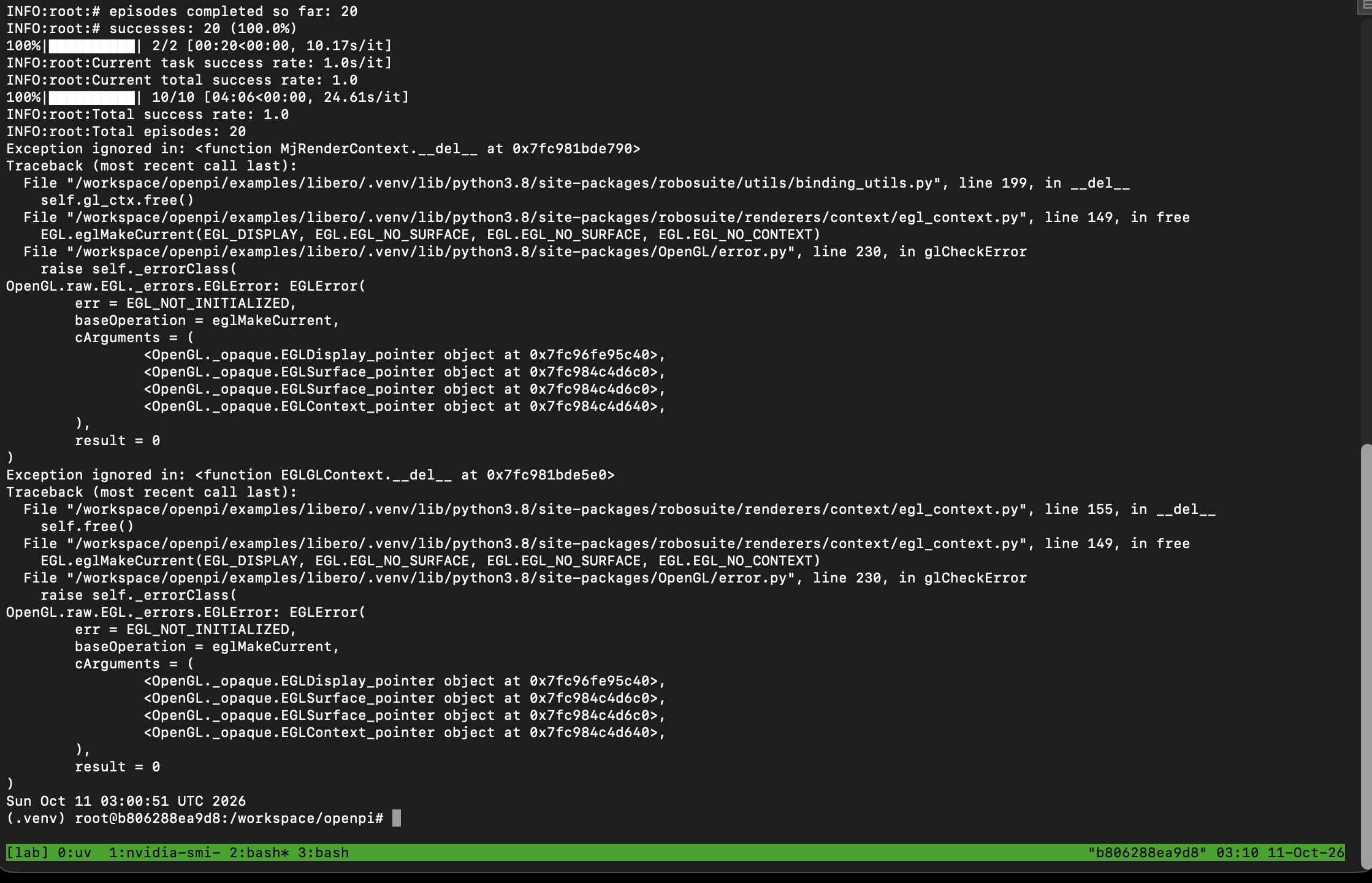
最後の Total success rate: 1.0 と Total episodes: 20 が、20回中20回の成功を示しています。作業ごとの結果と時間を、ログの値から表にしました。「1回目」は進み具合の表示が50%になったときの経過時間、「2回の合計」は100%になったときの経過時間です。
# | 指示文(ボウルの場所) | 結果 | 1回目 | 2回の合計 |
|---|---|---|---|---|
1 | between the plate and the ramekin(皿とラムカンの間) | 2/2 | 68.78秒 | 1分15秒 |
2 | next to the ramekin(ラムカンの隣) | 2/2 | 8.27秒 | 16秒 |
3 | from table center(机の中央) | 2/2 | 9.06秒 | 17秒 |
4 | on the cookie box(クッキーの箱の上) | 2/2 | 8.16秒 | 14秒 |
5 | in the top drawer of the wooden cabinet(木の棚の一番上の引き出しの中) | 2/2 | 9.35秒 | 19秒 |
6 | on the ramekin(ラムカンの上) | 2/2 | 8.04秒 | 15秒 |
7 | next to the cookie box(クッキーの箱の隣) | 2/2 | 8.20秒 | 16秒 |
8 | on the stove(コンロの上) | 2/2 | 9.92秒 | 19秒 |
9 | next to the plate(皿の隣) | 2/2 | 8.55秒 | 16秒 |
10 | on the wooden cabinet(木の棚の上) | 2/2 | 9.76秒 | 20秒 |
合計 | 20/20 | 4分06秒 |
20回が終わるまでの時間は、ログの表示で4分06秒、開始と終了の時刻の差で4分11秒でした。
最初の作業の1回目だけが68.78秒かかり、それ以外は1回あたりおよそ6〜10秒です(2回目の時間は、2回の合計から1回目を引いた値。合計が秒単位で丸められているので、1秒ほどの幅があります)。π0.5 は JAX という計算ライブラリで動いていて、最初の1回の計算の前に、モデルを GPU で実行できる形に変換する処理(コンパイル)が走ります。1回目が長いのは主にこのためと考えています。差の約60秒には、シミュレータ側の最初の準備も含まれているはずですが、分けては測っていません。
Log#2 では、このコンパイルの間に Mac 側のプログラムが「相手が応答しない」と判断して接続を切りました(openpi-client が使う websockets が、20秒ごとに生きているかの確認を送り、20秒以内に返事がなければ切る設定になっていたため)。この回のシミュレータ側では、それが起きていません。シミュレータ側に入った websockets は 13.1 です。Claude の作業環境で websockets の 13.1・14.2・15.0 のソースコードを取得して比べると、openpi-client が使っている同期版の接続(websockets.sync.client)に、この確認の設定(ping_interval: float | None = 20)が入ったのは 15.0 からで、13.1 と 14.2 にはありませんでした。Log#2 の Mac 側では、この確認が有効な版が入っていたことになります。同じ openpi-client でも、組み合わせる websockets の版によって、最初のコンパイルで接続が切れたり切れなかったりします。
ログの最後に出ている Exception ignored in: <function MjRenderContext.__del__ ...> と EGL_NOT_INITIALIZED は、20回の試行がすべて終わり、結果を書き出した後で、プログラムが終了するときに画面描画の後片付けで出たエラーです。Exception ignored は「このエラーは無視して終了した」という意味で、結果と動画には影響していません。
保存された動画は20本で、すべて名前の最後が _success.mp4 でした。そのうち3本から、5つの時点の画像を切り出して並べました。動画は1ステップ(アームに1回動きを指示する単位)につき1枚の画像でできていて、画像の下の数字はそのステップの番号です。最初の10ステップ(物が落ち着くのを待つ間)は動画に入っていません。
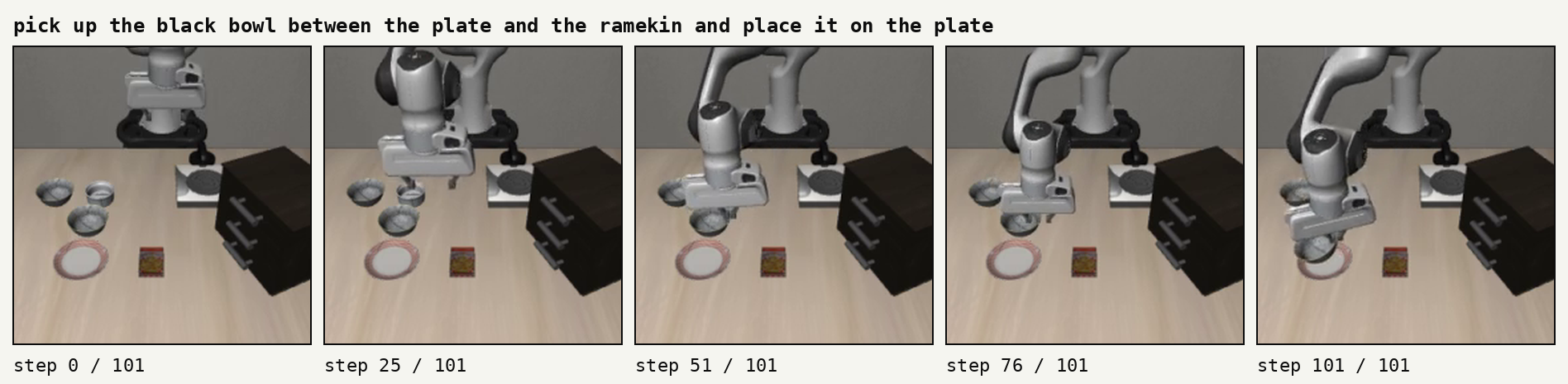
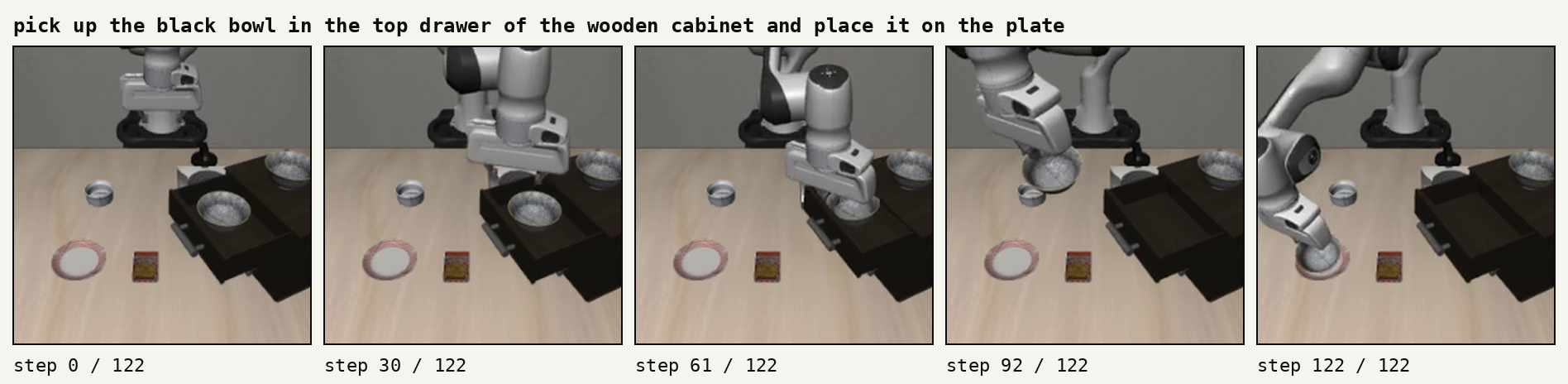
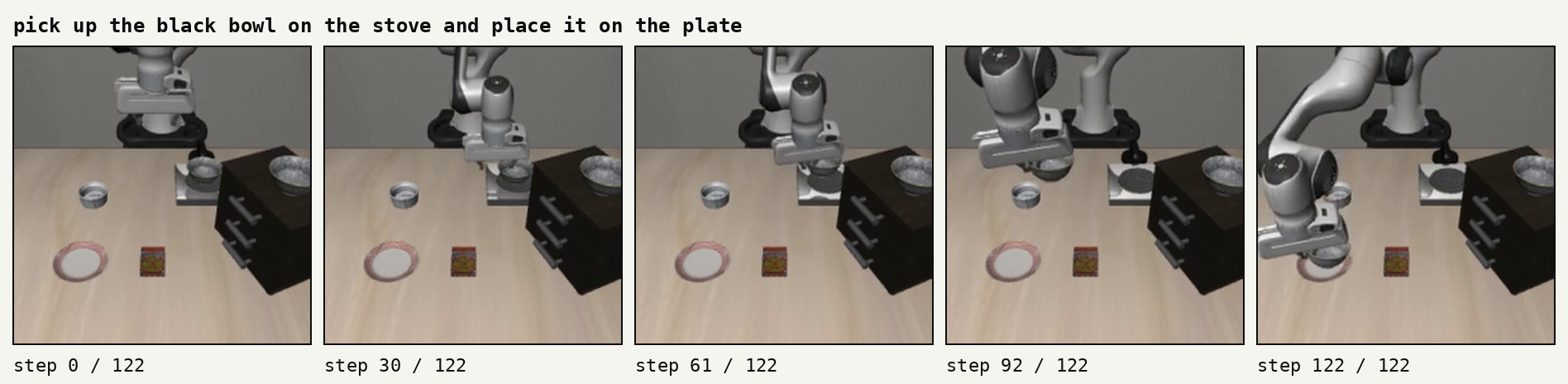
3本の長さは102ステップと123ステップ(2本)で、libero_spatial の上限の220ステップの半分ほどで皿に置き終えています。
この結果の扱いには、3つの前提があります。
試したのは各作業2回、合計20回だけです。README の98.8% は各作業50回、合計500回の結果で、20回で全部成功したことは、98.8% と矛盾しないという以上のことは言えません
各作業の初期状態(物の置き方)は、LIBERO があらかじめ用意している50通りのうち、最初の2通り(0番と1番)です。乱数の種(seed)も初期設定の7のままです。同じコマンドを実行すれば、同じ初期状態から試すことになります
GPU は A40 です。成功率は GPU の種類では変わらないはずですが、1回あたりの時間は変わります
初期設定の JAX は、起動した瞬間に A40 のメモリの75%を確保する
シミュレータを動かす前から、1番の画面で GPU の状態を5秒ごとに記録していました。
nvidia-smi --query-gpu=timestamp,name,memory.used,memory.total,utilization.gpu --format=csv -l 5 | tee /workspace/logs/gpu.csv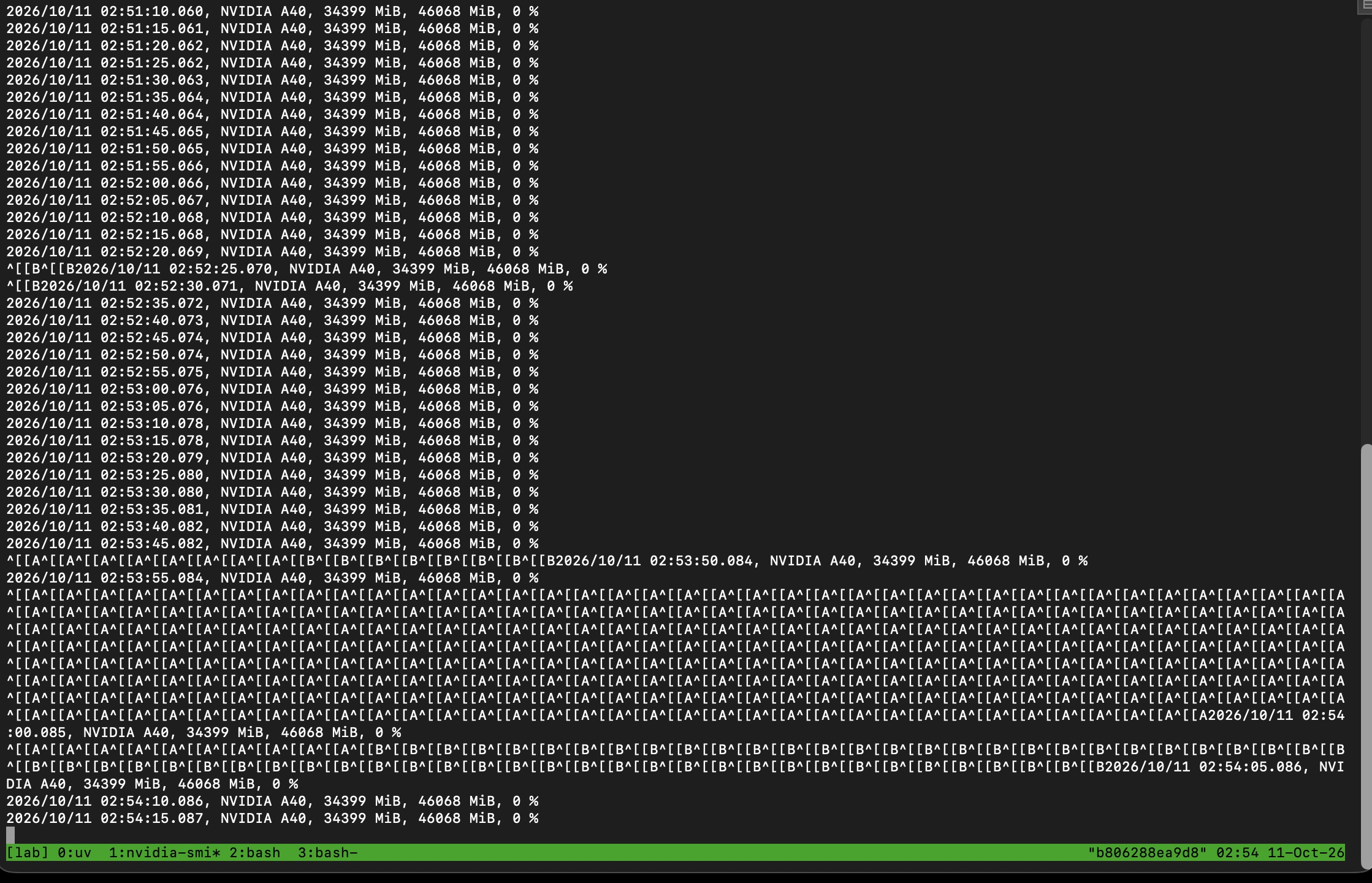
途中に混ざっている ^[[A^[[B は、記録している画面で矢印キーを押したときの文字が表示されたものです。ファイル(gpu.csv)には入っていません。
π0.5 を読み込んだだけで、何も計算していない状態で、GPU のメモリは 46,068MiB のうち 34,399MiB が使用中になっていました。これは π0.5 が必要とする量ではありません。π0.5 は JAX で動いていて、JAX は初期設定で、起動したときに GPU のメモリの75%をまとめて確保します(46,068MiB × 0.75 ≒ 34,551MiB)。後から少しずつ確保するより速いので、そうなっています。
この確保の仕方は、XLA_PYTHON_CLIENT_PREALLOCATE という環境変数で変えられます。false にすると、JAX は使う分だけをその都度確保します。この状態で π0.5 を動かせば、実際に使った量が見えます。
シミュレータが動いている間、GPU 全体の使用量は 34,399MiB から 35,573MiB の間を上下していました。JAX の分は75%で固定されているので、増えた最大約1,200MiB は、シミュレータの画面描画が使った分と考えています。
XLA_PYTHON_CLIENT_PREALLOCATE=false で測り直すと、π0.5 のサーバーは 8,486MiB だった
20回の試行が終わった後、0番の画面で π0.5 のサーバーを control + c で止め、先にまとめて確保しない設定で起動し直しました。
date -u | tee /workspace/logs/noprealloc_start.txt
XLA_PYTHON_CLIENT_PREALLOCATE=false uv run scripts/serve_policy.py --env LIBERO 2>&1 | tee /workspace/logs/server_noprealloc.log
Sun Oct 11 03:13:07 UTC 2026サーバーのログ(server_noprealloc.log)の全量です。π0.5 はダウンロード済みなので、ダウンロードの行はありません。読み込みには13.98秒かかりました。
INFO:root:Loading model...
INFO:2026-10-11 03:13:15,663:jax._src.xla_bridge:925: Unable to initialize backend 'rocm': module 'jaxlib.xla_extension' has no attribute 'GpuAllocatorConfig'
INFO:jax._src.xla_bridge:Unable to initialize backend 'rocm': module 'jaxlib.xla_extension' has no attribute 'GpuAllocatorConfig'
INFO:2026-10-11 03:13:15,664:jax._src.xla_bridge:925: Unable to initialize backend 'tpu': INTERNAL: Failed to open libtpu.so: libtpu.so: cannot open shared object file: No such file or directory
INFO:jax._src.xla_bridge:Unable to initialize backend 'tpu': INTERNAL: Failed to open libtpu.so: libtpu.so: cannot open shared object file: No such file or directory
INFO:absl:orbax-checkpoint version: 0.11.13
INFO:absl:Created BasePyTreeCheckpointHandler: use_ocdbt=True, use_zarr3=False, pytree_metadata_options=PyTreeMetadataOptions(support_rich_types=False), array_metadata_store=<orbax.checkpoint._src.metadata.array_metadata_store.Store object at 0x7189803e4650>
INFO:absl:Restoring checkpoint from /root/.cache/openpi/openpi-assets/checkpoints/pi05_libero/params.
INFO:absl:[thread=MainThread] Failed to get flag value for EXPERIMENTAL_ORBAX_USE_DISTRIBUTED_PROCESS_ID.
INFO:absl:[process=0] /jax/checkpoint/read/bytes_per_sec: 457.5 MiB/s (total bytes: 6.2 GiB) (time elapsed: 13 seconds) (per-host)
INFO:absl:Finished restoring checkpoint in 13.98 seconds from /root/.cache/openpi/openpi-assets/checkpoints/pi05_libero/params.
INFO:root:Norm stats not found in /workspace/openpi/assets/pi05_libero/physical-intelligence/libero, skipping.
INFO:root:Loaded norm stats from /root/.cache/openpi/openpi-assets/checkpoints/pi05_libero/assets/physical-intelligence/libero
INFO:root:Creating server (host: b806288ea9d8, ip: 172.16.96.2)
INFO:websockets.server:server listening on 0.0.0.0:8000
INFO:websockets.server:connection open
INFO:openpi.serving.websocket_policy_server:Connection from ('127.0.0.1', 43636) opened
INFO:openpi.serving.websocket_policy_server:Connection from ('127.0.0.1', 43636) closed
server listening が出てから、2番の画面で、各作業を1回ずつ試すように変えて実行しました。動画は先の20本と混ざらないように、別のフォルダに保存しています。
MUJOCO_GL=egl python examples/libero/main.py --args.num-trials-per-task 1 --args.video-out-path /workspace/libero_videos_noprealloc 2>&1 | tee /workspace/logs/client_noprealloc.log
シミュレータが6つ目の作業まで進んだところで、3番の画面で、GPU のメモリをプロセス(動いているプログラム)ごとに表示しました。
nvidia-smi --query-compute-apps=pid,process_name,used_memory --format=csv | tee /workspace/logs/gpu_apps_noprealloc.csvpid, process_name, used_gpu_memory [MiB]
8938, /workspace/openpi/.venv/bin/python, 8486 MiB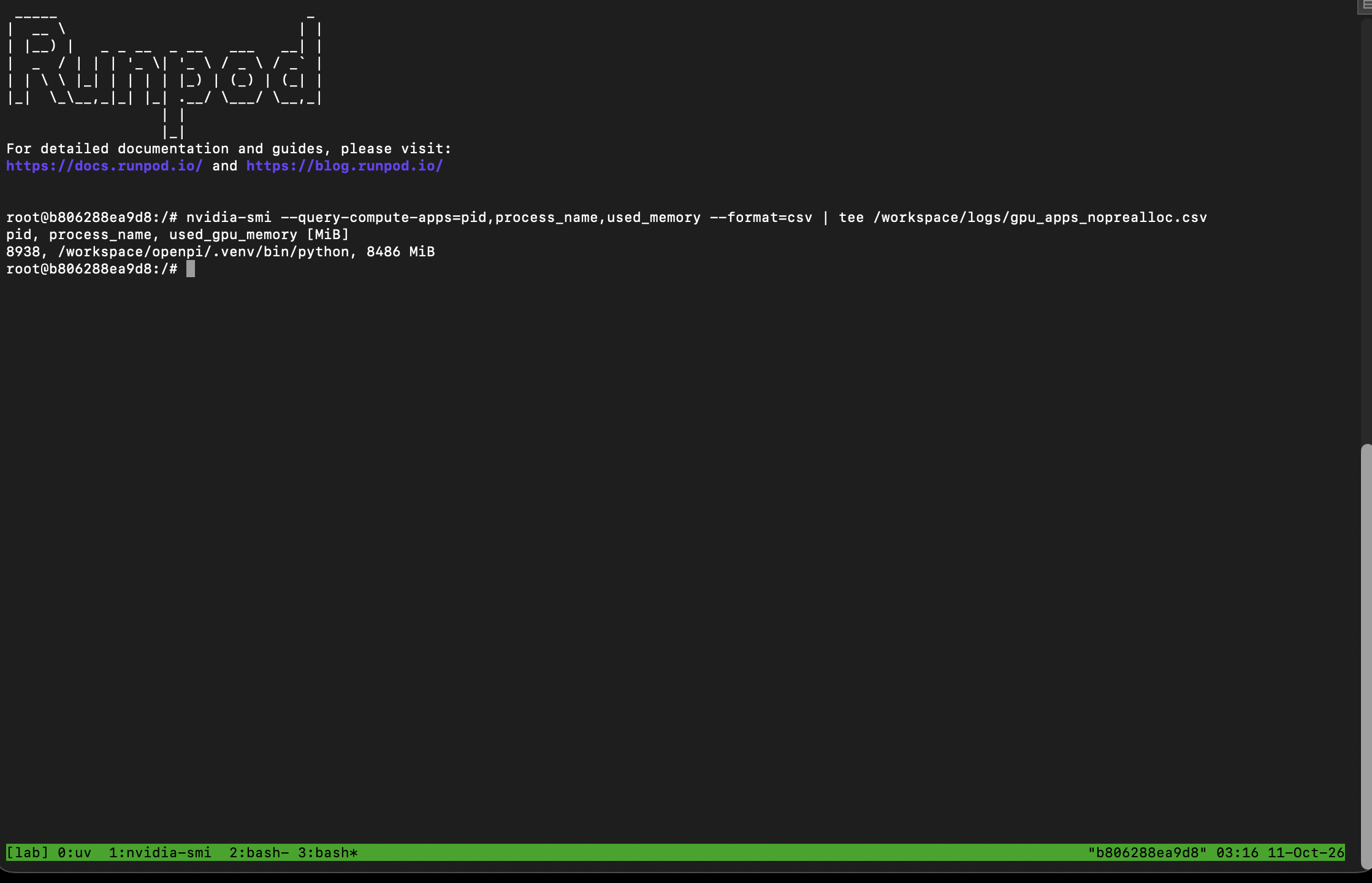
一覧に出たのは、/workspace/openpi/.venv/bin/python(π0.5 のサーバー。openpi 本体の環境の Python)の 8,486MiB だけでした。シミュレータのプロセスは、この一覧には出ていません。--query-compute-apps は計算に GPU を使っているプロセスを一覧にするもので、画面描画のために GPU を使っているシミュレータは対象に入らなかったと考えています。
JAX は、先にまとめて確保しない設定でも、一度確保したメモリは手放さずに持ち続けます。なので、何回も計算した後のこの値が、π0.5 のサーバーが使った最大の量にほぼあたります。
シミュレータ側のログ(client_noprealloc.log)の全量です(制御文字の扱いは client.log と同じです)。こちらも10回すべて成功しました。
[robosuite WARNING] No private macro file found! (macros.py:53)
[robosuite WARNING] It is recommended to use a private macro file (macros.py:54)
[robosuite WARNING] To setup, run: python /workspace/openpi/examples/libero/.venv/lib/python3.8/site-packages/robosuite/scripts/setup_macros.py (macros.py:55)
[info] using task orders [0, 1, 2, 3, 4, 5, 6, 7, 8, 9]
INFO:root:Task suite: libero_spatial
INFO:root:Waiting for server at ws://0.0.0.0:8000...

  0%|          | 0/10 [00:00<?, ?it/s][Warning]: datasets path /workspace/openpi/third_party/libero/libero/libero/../datasets does not exist!
[Warning]: datasets path /workspace/openpi/third_party/libero/libero/libero/../datasets does not exist!
/workspace/openpi/examples/libero/.venv/lib/python3.8/site-packages/numba/np/arraymath.py:3845: DeprecationWarning: `np.MachAr` is deprecated (NumPy 1.22).
  @overload(np.MachAr)


  0%|          | 0/1 [00:00<?, ?it/s][AINFO:root:
Task: pick up the black bowl between the plate and the ramekin and place it on the plate
INFO:root:Starting episode 1...
INFO:root:Success: True
INFO:root:# episodes completed so far: 1
INFO:root:# successes: 1 (100.0%)


100%|██████████| 1/1 [01:04<00:00, 64.31s/it][A
100%|██████████| 1/1 [01:04<00:00, 64.31s/it]
INFO:root:Current task success rate: 1.0
INFO:root:Current total success rate: 1.0

 10%|█         | 1/10 [01:06<10:01, 66.84s/it][Warning]: datasets path /workspace/openpi/third_party/libero/libero/libero/../datasets does not exist!
[Warning]: datasets path /workspace/openpi/third_party/libero/libero/libero/../datasets does not exist!


  0%|          | 0/1 [00:00<?, ?it/s][AINFO:root:
Task: pick up the black bowl next to the ramekin and place it on the plate
INFO:root:Starting episode 1...
INFO:root:Success: True
INFO:root:# episodes completed so far: 2
INFO:root:# successes: 2 (100.0%)


100%|██████████| 1/1 [00:08<00:00,  8.46s/it][A
100%|██████████| 1/1 [00:08<00:00,  8.46s/it]
INFO:root:Current task success rate: 1.0
INFO:root:Current total success rate: 1.0

 20%|██        | 2/10 [01:16<04:26, 33.37s/it][Warning]: datasets path /workspace/openpi/third_party/libero/libero/libero/../datasets does not exist!
[Warning]: datasets path /workspace/openpi/third_party/libero/libero/libero/../datasets does not exist!


  0%|          | 0/1 [00:00<?, ?it/s][AINFO:root:
Task: pick up the black bowl from table center and place it on the plate
INFO:root:Starting episode 1...
INFO:root:Success: True
INFO:root:# episodes completed so far: 3
INFO:root:# successes: 3 (100.0%)


100%|██████████| 1/1 [00:09<00:00,  9.48s/it][A
100%|██████████| 1/1 [00:09<00:00,  9.48s/it]
INFO:root:Current task success rate: 1.0
INFO:root:Current total success rate: 1.0

 30%|███       | 3/10 [01:27<02:41, 23.02s/it][Warning]: datasets path /workspace/openpi/third_party/libero/libero/libero/../datasets does not exist!
[Warning]: datasets path /workspace/openpi/third_party/libero/libero/libero/../datasets does not exist!


  0%|          | 0/1 [00:00<?, ?it/s][AINFO:root:
Task: pick up the black bowl on the cookie box and place it on the plate
INFO:root:Starting episode 1...
INFO:root:Success: True
INFO:root:# episodes completed so far: 4
INFO:root:# successes: 4 (100.0%)


100%|██████████| 1/1 [00:08<00:00,  8.10s/it][A
100%|██████████| 1/1 [00:08<00:00,  8.10s/it]
INFO:root:Current task success rate: 1.0
INFO:root:Current total success rate: 1.0

 40%|████      | 4/10 [01:37<01:46, 17.78s/it][Warning]: datasets path /workspace/openpi/third_party/libero/libero/libero/../datasets does not exist!
[Warning]: datasets path /workspace/openpi/third_party/libero/libero/libero/../datasets does not exist!


  0%|          | 0/1 [00:00<?, ?it/s][AINFO:root:
Task: pick up the black bowl in the top drawer of the wooden cabinet and place it on the plate
INFO:root:Starting episode 1...
INFO:root:Success: True
INFO:root:# episodes completed so far: 5
INFO:root:# successes: 5 (100.0%)


100%|██████████| 1/1 [00:10<00:00, 10.95s/it][A
100%|██████████| 1/1 [00:10<00:00, 10.95s/it]
INFO:root:Current task success rate: 1.0
INFO:root:Current total success rate: 1.0

 50%|█████     | 5/10 [01:49<01:19, 15.91s/it][Warning]: datasets path /workspace/openpi/third_party/libero/libero/libero/../datasets does not exist!
[Warning]: datasets path /workspace/openpi/third_party/libero/libero/libero/../datasets does not exist!


  0%|          | 0/1 [00:00<?, ?it/s][AINFO:root:
Task: pick up the black bowl on the ramekin and place it on the plate
INFO:root:Starting episode 1...
INFO:root:Success: True
INFO:root:# episodes completed so far: 6
INFO:root:# successes: 6 (100.0%)


100%|██████████| 1/1 [00:08<00:00,  8.33s/it][A
100%|██████████| 1/1 [00:08<00:00,  8.33s/it]
INFO:root:Current task success rate: 1.0
INFO:root:Current total success rate: 1.0

 60%|██████    | 6/10 [01:59<00:55, 13.78s/it][Warning]: datasets path /workspace/openpi/third_party/libero/libero/libero/../datasets does not exist!
[Warning]: datasets path /workspace/openpi/third_party/libero/libero/libero/../datasets does not exist!


  0%|          | 0/1 [00:00<?, ?it/s][AINFO:root:
Task: pick up the black bowl next to the cookie box and place it on the plate
INFO:root:Starting episode 1...
INFO:root:Success: True
INFO:root:# episodes completed so far: 7
INFO:root:# successes: 7 (100.0%)


100%|██████████| 1/1 [00:09<00:00,  9.05s/it][A
100%|██████████| 1/1 [00:09<00:00,  9.05s/it]
INFO:root:Current task success rate: 1.0
INFO:root:Current total success rate: 1.0

 70%|███████   | 7/10 [02:09<00:37, 12.66s/it][Warning]: datasets path /workspace/openpi/third_party/libero/libero/libero/../datasets does not exist!
[Warning]: datasets path /workspace/openpi/third_party/libero/libero/libero/../datasets does not exist!


  0%|          | 0/1 [00:00<?, ?it/s][AINFO:root:
Task: pick up the black bowl on the stove and place it on the plate
INFO:root:Starting episode 1...
INFO:root:Success: True
INFO:root:# episodes completed so far: 8
INFO:root:# successes: 8 (100.0%)


100%|██████████| 1/1 [00:10<00:00, 10.40s/it][A
100%|██████████| 1/1 [00:10<00:00, 10.40s/it]
INFO:root:Current task success rate: 1.0
INFO:root:Current total success rate: 1.0

 80%|████████  | 8/10 [02:21<00:24, 12.35s/it][Warning]: datasets path /workspace/openpi/third_party/libero/libero/libero/../datasets does not exist!
[Warning]: datasets path /workspace/openpi/third_party/libero/libero/libero/../datasets does not exist!


  0%|          | 0/1 [00:00<?, ?it/s][AINFO:root:
Task: pick up the black bowl next to the plate and place it on the plate
INFO:root:Starting episode 1...
INFO:root:Success: True
INFO:root:# episodes completed so far: 9
INFO:root:# successes: 9 (100.0%)


100%|██████████| 1/1 [00:08<00:00,  8.41s/it][A
100%|██████████| 1/1 [00:08<00:00,  8.42s/it]
INFO:root:Current task success rate: 1.0
INFO:root:Current total success rate: 1.0

 90%|█████████ | 9/10 [02:31<00:11, 11.57s/it][Warning]: datasets path /workspace/openpi/third_party/libero/libero/libero/../datasets does not exist!
[Warning]: datasets path /workspace/openpi/third_party/libero/libero/libero/../datasets does not exist!


  0%|          | 0/1 [00:00<?, ?it/s][AINFO:root:
Task: pick up the black bowl on the wooden cabinet and place it on the plate
INFO:root:Starting episode 1...
INFO:root:Success: True
INFO:root:# episodes completed so far: 10
INFO:root:# successes: 10 (100.0%)


100%|██████████| 1/1 [00:08<00:00,  8.65s/it][A
100%|██████████| 1/1 [00:08<00:00,  8.65s/it]
INFO:root:Current task success rate: 1.0
INFO:root:Current total success rate: 1.0

100%|██████████| 10/10 [02:41<00:00, 11.07s/it]
100%|██████████| 10/10 [02:41<00:00, 16.13s/it]
INFO:root:Total success rate: 1.0
INFO:root:Total episodes: 10
Exception ignored in: <function MjRenderContext.__del__ at 0x7011e9b7cc10>
Traceback (most recent call last):
  File "/workspace/openpi/examples/libero/.venv/lib/python3.8/site-packages/robosuite/utils/binding_utils.py", line 199, in __del__
    self.gl_ctx.free()
  File "/workspace/openpi/examples/libero/.venv/lib/python3.8/site-packages/robosuite/renderers/context/egl_context.py", line 149, in free
    EGL.eglMakeCurrent(EGL_DISPLAY, EGL.EGL_NO_SURFACE, EGL.EGL_NO_SURFACE, EGL.EGL_NO_CONTEXT)
  File "/workspace/openpi/examples/libero/.venv/lib/python3.8/site-packages/OpenGL/error.py", line 230, in glCheckError
    raise self._errorClass(
OpenGL.raw.EGL._errors.EGLError: EGLError(
	err = EGL_NOT_INITIALIZED,
	baseOperation = eglMakeCurrent,
	cArguments = (
		<OpenGL._opaque.EGLDisplay_pointer object at 0x7011dbc17940>,
		<OpenGL._opaque.EGLSurface_pointer object at 0x7011e9bd92c0>,
		<OpenGL._opaque.EGLSurface_pointer object at 0x7011e9bd92c0>,
		<OpenGL._opaque.EGLContext_pointer object at 0x7011e9bd9840>,
	),
	result = 0
)
Exception ignored in: <function EGLGLContext.__del__ at 0x7011e9b7ca60>
Traceback (most recent call last):
  File "/workspace/openpi/examples/libero/.venv/lib/python3.8/site-packages/robosuite/renderers/context/egl_context.py", line 155, in __del__
    self.free()
  File "/workspace/openpi/examples/libero/.venv/lib/python3.8/site-packages/robosuite/renderers/context/egl_context.py", line 149, in free
    EGL.eglMakeCurrent(EGL_DISPLAY, EGL.EGL_NO_SURFACE, EGL.EGL_NO_SURFACE, EGL.EGL_NO_CONTEXT)
  File "/workspace/openpi/examples/libero/.venv/lib/python3.8/site-packages/OpenGL/error.py", line 230, in glCheckError
    raise self._errorClass(
OpenGL.raw.EGL._errors.EGLError: EGLError(
	err = EGL_NOT_INITIALIZED,
	baseOperation = eglMakeCurrent,
	cArguments = (
		<OpenGL._opaque.EGLDisplay_pointer object at 0x7011dbc17940>,
		<OpenGL._opaque.EGLSurface_pointer object at 0x7011e9bd92c0>,
		<OpenGL._opaque.EGLSurface_pointer object at 0x7011e9bd92c0>,
		<OpenGL._opaque.EGLContext_pointer object at 0x7011e9bd9840>,
	),
	result = 0
)
GPU の記録(gpu.csv)から、測り直したときの GPU 全体の使用量の動きを抜き出しました。
時刻(UTC) | GPU 全体の使用量 | 状態 |
|---|---|---|
03:13:05 | 0MiB | 1つ目のサーバーを止めた直後 |
03:13:15 | 18MiB | 2つ目のサーバーが起動を始めた |
03:13:20 | 1,303MiB | π0.5 を読み込み中 |
03:13:25 | 4,377MiB | π0.5 を読み込み中 |
03:13:30 | 8,475MiB | π0.5 の読み込みが終わった(まだ計算していない) |
03:14:00 | 9,211MiB | シミュレータが動き始め、最初の計算をしている |
03:15:25 | 9,735MiB | 測り直しの間の最大値 |
03:16:40 | 8,499MiB | シミュレータが10回を終えて止まった後 |
π0.5 のサーバーは、読み込みが終わった時点で約8.3GiB を使い、何回計算した後も 8,486MiB でほとんど増えていません。シミュレータが動いている間の GPU 全体の使用量は 8,766MiB から 9,735MiB の間で、サーバーの分との差の0.3〜1.2GB ほどが、シミュレータの画面描画の分と考えています。シミュレータが止まると、8,499MiB に戻りました。
まとめると、次のとおりです。
測り方 | GPU のメモリ |
|---|---|
初期設定(JAX が75%を先に確保) | 34,399MiB(π0.5 のサーバーだけ) |
先に確保しない設定:π0.5 のサーバー | 8,486MiB |
先に確保しない設定:シミュレータを含む GPU 全体の最大 | 9,735MiB |
openpi の README は、推論に必要な GPU のメモリを「8GB 以上」としています。A40 で測った 8,486MiB(約8.3GiB)は、その値とほぼ同じです。
1回あたりの時間は、先にまとめて確保する設定(およそ6〜10秒)と、しない設定(8〜11秒)で、大きな差は出ていません。ただし、どちらも各作業1〜2回だけなので、差があるかないかを言える回数ではありません。
gpu.csv の全量(5秒ごとの GPU の記録)
1番の画面で記録した gpu.csv の全量です。日本時間の11時45分20秒(UTC 02:45:20)から、12時18分25秒(UTC 03:18:25)までの398行です。列は、時刻・GPU の型番・使用中のメモリ・メモリの総量・GPU の使用率(%)です。
timestamp, name, memory.used [MiB], memory.total [MiB], utilization.gpu [%]
2026/10/11 02:45:20.002, NVIDIA A40, 34399 MiB, 46068 MiB, 0 %
2026/10/11 02:45:25.007, NVIDIA A40, 34399 MiB, 46068 MiB, 0 %
2026/10/11 02:45:30.008, NVIDIA A40, 34399 MiB, 46068 MiB, 0 %
2026/10/11 02:45:35.009, NVIDIA A40, 34399 MiB, 46068 MiB, 0 %
2026/10/11 02:45:40.010, NVIDIA A40, 34399 MiB, 46068 MiB, 0 %
2026/10/11 02:45:45.011, NVIDIA A40, 34399 MiB, 46068 MiB, 0 %
2026/10/11 02:45:50.012, NVIDIA A40, 34399 MiB, 46068 MiB, 0 %
2026/10/11 02:45:55.012, NVIDIA A40, 34399 MiB, 46068 MiB, 0 %
2026/10/11 02:46:00.013, NVIDIA A40, 34399 MiB, 46068 MiB, 0 %
2026/10/11 02:46:05.014, NVIDIA A40, 34399 MiB, 46068 MiB, 0 %
2026/10/11 02:46:10.015, NVIDIA A40, 34399 MiB, 46068 MiB, 0 %
2026/10/11 02:46:15.016, NVIDIA A40, 34399 MiB, 46068 MiB, 0 %
2026/10/11 02:46:20.017, NVIDIA A40, 34399 MiB, 46068 MiB, 0 %
2026/10/11 02:46:25.017, NVIDIA A40, 34399 MiB, 46068 MiB, 0 %
2026/10/11 02:46:30.018, NVIDIA A40, 34399 MiB, 46068 MiB, 0 %
2026/10/11 02:46:35.019, NVIDIA A40, 34399 MiB, 46068 MiB, 0 %
2026/10/11 02:46:40.019, NVIDIA A40, 34399 MiB, 46068 MiB, 0 %
2026/10/11 02:46:45.020, NVIDIA A40, 34399 MiB, 46068 MiB, 0 %
2026/10/11 02:46:50.021, NVIDIA A40, 34399 MiB, 46068 MiB, 0 %
2026/10/11 02:46:55.022, NVIDIA A40, 34399 MiB, 46068 MiB, 0 %
2026/10/11 02:47:00.022, NVIDIA A40, 34399 MiB, 46068 MiB, 0 %
2026/10/11 02:47:05.024, NVIDIA A40, 34399 MiB, 46068 MiB, 0 %
2026/10/11 02:47:10.025, NVIDIA A40, 34399 MiB, 46068 MiB, 0 %
2026/10/11 02:47:15.025, NVIDIA A40, 34399 MiB, 46068 MiB, 0 %
2026/10/11 02:47:20.026, NVIDIA A40, 34399 MiB, 46068 MiB, 0 %
2026/10/11 02:47:25.027, NVIDIA A40, 34399 MiB, 46068 MiB, 0 %
2026/10/11 02:47:30.028, NVIDIA A40, 34399 MiB, 46068 MiB, 0 %
2026/10/11 02:47:35.028, NVIDIA A40, 34399 MiB, 46068 MiB, 0 %
2026/10/11 02:47:40.029, NVIDIA A40, 34399 MiB, 46068 MiB, 0 %
2026/10/11 02:47:45.030, NVIDIA A40, 34399 MiB, 46068 MiB, 0 %
2026/10/11 02:47:50.031, NVIDIA A40, 34399 MiB, 46068 MiB, 0 %
2026/10/11 02:47:55.032, NVIDIA A40, 34399 MiB, 46068 MiB, 0 %
2026/10/11 02:48:00.032, NVIDIA A40, 34399 MiB, 46068 MiB, 0 %
2026/10/11 02:48:05.033, NVIDIA A40, 34399 MiB, 46068 MiB, 0 %
2026/10/11 02:48:10.034, NVIDIA A40, 34399 MiB, 46068 MiB, 0 %
2026/10/11 02:48:15.035, NVIDIA A40, 34399 MiB, 46068 MiB, 0 %
2026/10/11 02:48:20.036, NVIDIA A40, 34399 MiB, 46068 MiB, 0 %
2026/10/11 02:48:25.037, NVIDIA A40, 34399 MiB, 46068 MiB, 0 %
2026/10/11 02:48:30.037, NVIDIA A40, 34399 MiB, 46068 MiB, 0 %
2026/10/11 02:48:35.038, NVIDIA A40, 34399 MiB, 46068 MiB, 0 %
2026/10/11 02:48:40.039, NVIDIA A40, 34399 MiB, 46068 MiB, 0 %
2026/10/11 02:48:45.040, NVIDIA A40, 34399 MiB, 46068 MiB, 0 %
2026/10/11 02:48:50.040, NVIDIA A40, 34399 MiB, 46068 MiB, 0 %
2026/10/11 02:48:55.041, NVIDIA A40, 34399 MiB, 46068 MiB, 0 %
2026/10/11 02:49:00.042, NVIDIA A40, 34399 MiB, 46068 MiB, 0 %
2026/10/11 02:49:05.043, NVIDIA A40, 34399 MiB, 46068 MiB, 0 %
2026/10/11 02:49:10.043, NVIDIA A40, 34399 MiB, 46068 MiB, 0 %
2026/10/11 02:49:15.044, NVIDIA A40, 34399 MiB, 46068 MiB, 0 %
2026/10/11 02:49:20.045, NVIDIA A40, 34399 MiB, 46068 MiB, 0 %
2026/10/11 02:49:25.046, NVIDIA A40, 34399 MiB, 46068 MiB, 0 %
2026/10/11 02:49:30.046, NVIDIA A40, 34399 MiB, 46068 MiB, 0 %
2026/10/11 02:49:35.047, NVIDIA A40, 34399 MiB, 46068 MiB, 0 %
2026/10/11 02:49:40.047, NVIDIA A40, 34399 MiB, 46068 MiB, 0 %
2026/10/11 02:49:45.048, NVIDIA A40, 34399 MiB, 46068 MiB, 0 %
2026/10/11 02:49:50.048, NVIDIA A40, 34399 MiB, 46068 MiB, 0 %
2026/10/11 02:49:55.049, NVIDIA A40, 34399 MiB, 46068 MiB, 0 %
2026/10/11 02:50:00.050, NVIDIA A40, 34399 MiB, 46068 MiB, 0 %
2026/10/11 02:50:05.050, NVIDIA A40, 34399 MiB, 46068 MiB, 0 %
2026/10/11 02:50:10.051, NVIDIA A40, 34399 MiB, 46068 MiB, 0 %
2026/10/11 02:50:15.052, NVIDIA A40, 34399 MiB, 46068 MiB, 0 %
2026/10/11 02:50:20.052, NVIDIA A40, 34399 MiB, 46068 MiB, 0 %
2026/10/11 02:50:25.053, NVIDIA A40, 34399 MiB, 46068 MiB, 0 %
2026/10/11 02:50:30.054, NVIDIA A40, 34399 MiB, 46068 MiB, 0 %
2026/10/11 02:50:35.055, NVIDIA A40, 34399 MiB, 46068 MiB, 0 %
2026/10/11 02:50:40.056, NVIDIA A40, 34399 MiB, 46068 MiB, 0 %
2026/10/11 02:50:45.056, NVIDIA A40, 34399 MiB, 46068 MiB, 0 %
2026/10/11 02:50:50.057, NVIDIA A40, 34399 MiB, 46068 MiB, 0 %
2026/10/11 02:50:55.058, NVIDIA A40, 34399 MiB, 46068 MiB, 0 %
2026/10/11 02:51:00.059, NVIDIA A40, 34399 MiB, 46068 MiB, 0 %
2026/10/11 02:51:05.060, NVIDIA A40, 34399 MiB, 46068 MiB, 0 %
2026/10/11 02:51:10.060, NVIDIA A40, 34399 MiB, 46068 MiB, 0 %
2026/10/11 02:51:15.061, NVIDIA A40, 34399 MiB, 46068 MiB, 0 %
2026/10/11 02:51:20.062, NVIDIA A40, 34399 MiB, 46068 MiB, 0 %
2026/10/11 02:51:25.062, NVIDIA A40, 34399 MiB, 46068 MiB, 0 %
2026/10/11 02:51:30.063, NVIDIA A40, 34399 MiB, 46068 MiB, 0 %
2026/10/11 02:51:35.064, NVIDIA A40, 34399 MiB, 46068 MiB, 0 %
2026/10/11 02:51:40.064, NVIDIA A40, 34399 MiB, 46068 MiB, 0 %
2026/10/11 02:51:45.065, NVIDIA A40, 34399 MiB, 46068 MiB, 0 %
2026/10/11 02:51:50.065, NVIDIA A40, 34399 MiB, 46068 MiB, 0 %
2026/10/11 02:51:55.066, NVIDIA A40, 34399 MiB, 46068 MiB, 0 %
2026/10/11 02:52:00.066, NVIDIA A40, 34399 MiB, 46068 MiB, 0 %
2026/10/11 02:52:05.067, NVIDIA A40, 34399 MiB, 46068 MiB, 0 %
2026/10/11 02:52:10.068, NVIDIA A40, 34399 MiB, 46068 MiB, 0 %
2026/10/11 02:52:15.068, NVIDIA A40, 34399 MiB, 46068 MiB, 0 %
2026/10/11 02:52:20.069, NVIDIA A40, 34399 MiB, 46068 MiB, 0 %
2026/10/11 02:52:25.070, NVIDIA A40, 34399 MiB, 46068 MiB, 0 %
2026/10/11 02:52:30.071, NVIDIA A40, 34399 MiB, 46068 MiB, 0 %
2026/10/11 02:52:35.072, NVIDIA A40, 34399 MiB, 46068 MiB, 0 %
2026/10/11 02:52:40.073, NVIDIA A40, 34399 MiB, 46068 MiB, 0 %
2026/10/11 02:52:45.074, NVIDIA A40, 34399 MiB, 46068 MiB, 0 %
2026/10/11 02:52:50.074, NVIDIA A40, 34399 MiB, 46068 MiB, 0 %
2026/10/11 02:52:55.075, NVIDIA A40, 34399 MiB, 46068 MiB, 0 %
2026/10/11 02:53:00.076, NVIDIA A40, 34399 MiB, 46068 MiB, 0 %
2026/10/11 02:53:05.076, NVIDIA A40, 34399 MiB, 46068 MiB, 0 %
2026/10/11 02:53:10.078, NVIDIA A40, 34399 MiB, 46068 MiB, 0 %
2026/10/11 02:53:15.078, NVIDIA A40, 34399 MiB, 46068 MiB, 0 %
2026/10/11 02:53:20.079, NVIDIA A40, 34399 MiB, 46068 MiB, 0 %
2026/10/11 02:53:25.080, NVIDIA A40, 34399 MiB, 46068 MiB, 0 %
2026/10/11 02:53:30.080, NVIDIA A40, 34399 MiB, 46068 MiB, 0 %
2026/10/11 02:53:35.081, NVIDIA A40, 34399 MiB, 46068 MiB, 0 %
2026/10/11 02:53:40.082, NVIDIA A40, 34399 MiB, 46068 MiB, 0 %
2026/10/11 02:53:45.082, NVIDIA A40, 34399 MiB, 46068 MiB, 0 %
2026/10/11 02:53:50.084, NVIDIA A40, 34399 MiB, 46068 MiB, 0 %
2026/10/11 02:53:55.084, NVIDIA A40, 34399 MiB, 46068 MiB, 0 %
2026/10/11 02:54:00.085, NVIDIA A40, 34399 MiB, 46068 MiB, 0 %
2026/10/11 02:54:05.086, NVIDIA A40, 34399 MiB, 46068 MiB, 0 %
2026/10/11 02:54:10.086, NVIDIA A40, 34399 MiB, 46068 MiB, 0 %
2026/10/11 02:54:15.087, NVIDIA A40, 34399 MiB, 46068 MiB, 0 %
2026/10/11 02:54:20.088, NVIDIA A40, 34399 MiB, 46068 MiB, 0 %
2026/10/11 02:54:25.088, NVIDIA A40, 34399 MiB, 46068 MiB, 0 %
2026/10/11 02:54:30.089, NVIDIA A40, 34399 MiB, 46068 MiB, 0 %
2026/10/11 02:54:35.090, NVIDIA A40, 34399 MiB, 46068 MiB, 0 %
2026/10/11 02:54:40.090, NVIDIA A40, 34399 MiB, 46068 MiB, 0 %
2026/10/11 02:54:45.091, NVIDIA A40, 34399 MiB, 46068 MiB, 0 %
2026/10/11 02:54:50.091, NVIDIA A40, 34399 MiB, 46068 MiB, 0 %
2026/10/11 02:54:55.092, NVIDIA A40, 34399 MiB, 46068 MiB, 0 %
2026/10/11 02:55:00.093, NVIDIA A40, 34399 MiB, 46068 MiB, 0 %
2026/10/11 02:55:05.093, NVIDIA A40, 34399 MiB, 46068 MiB, 0 %
2026/10/11 02:55:10.094, NVIDIA A40, 34399 MiB, 46068 MiB, 0 %
2026/10/11 02:55:15.095, NVIDIA A40, 34399 MiB, 46068 MiB, 0 %
2026/10/11 02:55:20.095, NVIDIA A40, 34399 MiB, 46068 MiB, 0 %
2026/10/11 02:55:25.096, NVIDIA A40, 34399 MiB, 46068 MiB, 0 %
2026/10/11 02:55:30.097, NVIDIA A40, 34399 MiB, 46068 MiB, 0 %
2026/10/11 02:55:35.098, NVIDIA A40, 34399 MiB, 46068 MiB, 0 %
2026/10/11 02:55:40.098, NVIDIA A40, 34399 MiB, 46068 MiB, 0 %
2026/10/11 02:55:45.099, NVIDIA A40, 34399 MiB, 46068 MiB, 0 %
2026/10/11 02:55:50.100, NVIDIA A40, 34399 MiB, 46068 MiB, 0 %
2026/10/11 02:55:55.100, NVIDIA A40, 34399 MiB, 46068 MiB, 0 %
2026/10/11 02:56:00.101, NVIDIA A40, 34399 MiB, 46068 MiB, 0 %
2026/10/11 02:56:05.102, NVIDIA A40, 34399 MiB, 46068 MiB, 0 %
2026/10/11 02:56:10.102, NVIDIA A40, 34399 MiB, 46068 MiB, 0 %
2026/10/11 02:56:15.103, NVIDIA A40, 34399 MiB, 46068 MiB, 0 %
2026/10/11 02:56:20.104, NVIDIA A40, 34399 MiB, 46068 MiB, 0 %
2026/10/11 02:56:25.105, NVIDIA A40, 34399 MiB, 46068 MiB, 0 %
2026/10/11 02:56:30.105, NVIDIA A40, 34399 MiB, 46068 MiB, 0 %
2026/10/11 02:56:35.106, NVIDIA A40, 34399 MiB, 46068 MiB, 0 %
2026/10/11 02:56:40.107, NVIDIA A40, 34399 MiB, 46068 MiB, 0 %
2026/10/11 02:56:45.108, NVIDIA A40, 34399 MiB, 46068 MiB, 0 %
2026/10/11 02:56:50.108, NVIDIA A40, 35135 MiB, 46068 MiB, 4 %
2026/10/11 02:56:55.109, NVIDIA A40, 35135 MiB, 46068 MiB, 1 %
2026/10/11 02:57:00.136, NVIDIA A40, 35135 MiB, 46068 MiB, 0 %
2026/10/11 02:57:05.136, NVIDIA A40, 35135 MiB, 46068 MiB, 0 %
2026/10/11 02:57:10.137, NVIDIA A40, 35135 MiB, 46068 MiB, 0 %
2026/10/11 02:57:15.137, NVIDIA A40, 35135 MiB, 46068 MiB, 0 %
2026/10/11 02:57:20.237, NVIDIA A40, 35135 MiB, 46068 MiB, 0 %
2026/10/11 02:57:25.237, NVIDIA A40, 35135 MiB, 46068 MiB, 0 %
2026/10/11 02:57:30.238, NVIDIA A40, 35135 MiB, 46068 MiB, 0 %
2026/10/11 02:57:35.239, NVIDIA A40, 35135 MiB, 46068 MiB, 0 %
2026/10/11 02:57:40.240, NVIDIA A40, 35153 MiB, 46068 MiB, 75 %
2026/10/11 02:57:45.240, NVIDIA A40, 35157 MiB, 46068 MiB, 0 %
2026/10/11 02:57:50.241, NVIDIA A40, 35157 MiB, 46068 MiB, 0 %
2026/10/11 02:57:55.242, NVIDIA A40, 35159 MiB, 46068 MiB, 1 %
2026/10/11 02:58:00.243, NVIDIA A40, 35159 MiB, 46068 MiB, 100 %
2026/10/11 02:58:05.244, NVIDIA A40, 35573 MiB, 46068 MiB, 6 %
2026/10/11 02:58:10.245, NVIDIA A40, 35159 MiB, 46068 MiB, 65 %
2026/10/11 02:58:15.246, NVIDIA A40, 35159 MiB, 46068 MiB, 12 %
2026/10/11 02:58:20.247, NVIDIA A40, 35159 MiB, 46068 MiB, 1 %
2026/10/11 02:58:25.247, NVIDIA A40, 35159 MiB, 46068 MiB, 8 %
2026/10/11 02:58:30.248, NVIDIA A40, 35159 MiB, 46068 MiB, 87 %
2026/10/11 02:58:35.249, NVIDIA A40, 35159 MiB, 46068 MiB, 46 %
2026/10/11 02:58:40.250, NVIDIA A40, 35159 MiB, 46068 MiB, 0 %
2026/10/11 02:58:45.250, NVIDIA A40, 35159 MiB, 46068 MiB, 1 %
2026/10/11 02:58:50.251, NVIDIA A40, 34685 MiB, 46068 MiB, 0 %
2026/10/11 02:58:55.251, NVIDIA A40, 35159 MiB, 46068 MiB, 1 %
2026/10/11 02:59:00.252, NVIDIA A40, 35159 MiB, 46068 MiB, 90 %
2026/10/11 02:59:05.253, NVIDIA A40, 35159 MiB, 46068 MiB, 7 %
2026/10/11 02:59:10.254, NVIDIA A40, 35159 MiB, 46068 MiB, 68 %
2026/10/11 02:59:15.254, NVIDIA A40, 35159 MiB, 46068 MiB, 97 %
2026/10/11 02:59:20.255, NVIDIA A40, 35159 MiB, 46068 MiB, 43 %
2026/10/11 02:59:25.256, NVIDIA A40, 35159 MiB, 46068 MiB, 78 %
2026/10/11 02:59:30.256, NVIDIA A40, 35159 MiB, 46068 MiB, 1 %
2026/10/11 02:59:35.257, NVIDIA A40, 34423 MiB, 46068 MiB, 0 %
2026/10/11 02:59:40.258, NVIDIA A40, 35159 MiB, 46068 MiB, 100 %
2026/10/11 02:59:45.258, NVIDIA A40, 35159 MiB, 46068 MiB, 1 %
2026/10/11 02:59:50.259, NVIDIA A40, 35159 MiB, 46068 MiB, 76 %
2026/10/11 02:59:55.259, NVIDIA A40, 35159 MiB, 46068 MiB, 1 %
2026/10/11 03:00:00.260, NVIDIA A40, 35159 MiB, 46068 MiB, 62 %
2026/10/11 03:00:05.261, NVIDIA A40, 35426 MiB, 46068 MiB, 76 %
2026/10/11 03:00:10.268, NVIDIA A40, 35158 MiB, 46068 MiB, 84 %
2026/10/11 03:00:15.269, NVIDIA A40, 35159 MiB, 46068 MiB, 1 %
2026/10/11 03:00:20.270, NVIDIA A40, 35159 MiB, 46068 MiB, 0 %
2026/10/11 03:00:25.270, NVIDIA A40, 35159 MiB, 46068 MiB, 2 %
2026/10/11 03:00:30.271, NVIDIA A40, 35573 MiB, 46068 MiB, 35 %
2026/10/11 03:00:35.273, NVIDIA A40, 35159 MiB, 46068 MiB, 1 %
2026/10/11 03:00:40.273, NVIDIA A40, 34423 MiB, 46068 MiB, 0 %
2026/10/11 03:00:45.274, NVIDIA A40, 35159 MiB, 46068 MiB, 38 %
2026/10/11 03:00:50.275, NVIDIA A40, 35159 MiB, 46068 MiB, 20 %
2026/10/11 03:00:55.275, NVIDIA A40, 34423 MiB, 46068 MiB, 0 %
2026/10/11 03:01:00.276, NVIDIA A40, 34423 MiB, 46068 MiB, 0 %
2026/10/11 03:01:05.277, NVIDIA A40, 34423 MiB, 46068 MiB, 0 %
2026/10/11 03:01:10.277, NVIDIA A40, 34423 MiB, 46068 MiB, 0 %
2026/10/11 03:01:15.278, NVIDIA A40, 34423 MiB, 46068 MiB, 0 %
2026/10/11 03:01:20.279, NVIDIA A40, 34423 MiB, 46068 MiB, 0 %
2026/10/11 03:01:25.279, NVIDIA A40, 34423 MiB, 46068 MiB, 0 %
2026/10/11 03:01:30.280, NVIDIA A40, 34423 MiB, 46068 MiB, 0 %
2026/10/11 03:01:35.281, NVIDIA A40, 34423 MiB, 46068 MiB, 0 %
2026/10/11 03:01:40.282, NVIDIA A40, 34423 MiB, 46068 MiB, 0 %
2026/10/11 03:01:45.283, NVIDIA A40, 34423 MiB, 46068 MiB, 0 %
2026/10/11 03:01:50.283, NVIDIA A40, 34423 MiB, 46068 MiB, 0 %
2026/10/11 03:01:55.284, NVIDIA A40, 34423 MiB, 46068 MiB, 0 %
2026/10/11 03:02:00.285, NVIDIA A40, 34423 MiB, 46068 MiB, 0 %
2026/10/11 03:02:05.286, NVIDIA A40, 34423 MiB, 46068 MiB, 0 %
2026/10/11 03:02:10.286, NVIDIA A40, 34423 MiB, 46068 MiB, 0 %
2026/10/11 03:02:15.287, NVIDIA A40, 34423 MiB, 46068 MiB, 0 %
2026/10/11 03:02:20.288, NVIDIA A40, 34423 MiB, 46068 MiB, 0 %
2026/10/11 03:02:25.289, NVIDIA A40, 34423 MiB, 46068 MiB, 0 %
2026/10/11 03:02:30.289, NVIDIA A40, 34423 MiB, 46068 MiB, 0 %
2026/10/11 03:02:35.290, NVIDIA A40, 34423 MiB, 46068 MiB, 0 %
2026/10/11 03:02:40.291, NVIDIA A40, 34423 MiB, 46068 MiB, 0 %
2026/10/11 03:02:45.291, NVIDIA A40, 34423 MiB, 46068 MiB, 0 %
2026/10/11 03:02:50.293, NVIDIA A40, 34423 MiB, 46068 MiB, 0 %
2026/10/11 03:02:55.293, NVIDIA A40, 34423 MiB, 46068 MiB, 0 %
2026/10/11 03:03:00.294, NVIDIA A40, 34423 MiB, 46068 MiB, 0 %
2026/10/11 03:03:05.296, NVIDIA A40, 34423 MiB, 46068 MiB, 0 %
2026/10/11 03:03:10.297, NVIDIA A40, 34423 MiB, 46068 MiB, 0 %
2026/10/11 03:03:15.297, NVIDIA A40, 34423 MiB, 46068 MiB, 0 %
2026/10/11 03:03:20.298, NVIDIA A40, 34423 MiB, 46068 MiB, 0 %
2026/10/11 03:03:25.299, NVIDIA A40, 34423 MiB, 46068 MiB, 0 %
2026/10/11 03:03:30.300, NVIDIA A40, 34423 MiB, 46068 MiB, 0 %
2026/10/11 03:03:35.300, NVIDIA A40, 34423 MiB, 46068 MiB, 0 %
2026/10/11 03:03:40.301, NVIDIA A40, 34423 MiB, 46068 MiB, 0 %
2026/10/11 03:03:45.302, NVIDIA A40, 34423 MiB, 46068 MiB, 0 %
2026/10/11 03:03:50.303, NVIDIA A40, 34423 MiB, 46068 MiB, 0 %
2026/10/11 03:03:55.304, NVIDIA A40, 34423 MiB, 46068 MiB, 0 %
2026/10/11 03:04:00.305, NVIDIA A40, 34423 MiB, 46068 MiB, 0 %
2026/10/11 03:04:05.305, NVIDIA A40, 34423 MiB, 46068 MiB, 0 %
2026/10/11 03:04:10.306, NVIDIA A40, 34423 MiB, 46068 MiB, 0 %
2026/10/11 03:04:15.307, NVIDIA A40, 34423 MiB, 46068 MiB, 0 %
2026/10/11 03:04:20.308, NVIDIA A40, 34423 MiB, 46068 MiB, 0 %
2026/10/11 03:04:25.308, NVIDIA A40, 34423 MiB, 46068 MiB, 0 %
2026/10/11 03:04:30.309, NVIDIA A40, 34423 MiB, 46068 MiB, 0 %
2026/10/11 03:04:35.310, NVIDIA A40, 34423 MiB, 46068 MiB, 0 %
2026/10/11 03:04:40.311, NVIDIA A40, 34423 MiB, 46068 MiB, 0 %
2026/10/11 03:04:45.312, NVIDIA A40, 34423 MiB, 46068 MiB, 0 %
2026/10/11 03:04:50.313, NVIDIA A40, 34423 MiB, 46068 MiB, 0 %
2026/10/11 03:04:55.313, NVIDIA A40, 34423 MiB, 46068 MiB, 0 %
2026/10/11 03:05:00.314, NVIDIA A40, 34423 MiB, 46068 MiB, 0 %
2026/10/11 03:05:05.315, NVIDIA A40, 34423 MiB, 46068 MiB, 0 %
2026/10/11 03:05:10.315, NVIDIA A40, 34423 MiB, 46068 MiB, 0 %
2026/10/11 03:05:15.316, NVIDIA A40, 34423 MiB, 46068 MiB, 0 %
2026/10/11 03:05:20.317, NVIDIA A40, 34423 MiB, 46068 MiB, 0 %
2026/10/11 03:05:25.317, NVIDIA A40, 34423 MiB, 46068 MiB, 0 %
2026/10/11 03:05:30.318, NVIDIA A40, 34423 MiB, 46068 MiB, 0 %
2026/10/11 03:05:35.320, NVIDIA A40, 34423 MiB, 46068 MiB, 0 %
2026/10/11 03:05:40.321, NVIDIA A40, 34423 MiB, 46068 MiB, 0 %
2026/10/11 03:05:45.322, NVIDIA A40, 34423 MiB, 46068 MiB, 0 %
2026/10/11 03:05:50.323, NVIDIA A40, 34423 MiB, 46068 MiB, 0 %
2026/10/11 03:05:55.323, NVIDIA A40, 34423 MiB, 46068 MiB, 0 %
2026/10/11 03:06:00.324, NVIDIA A40, 34423 MiB, 46068 MiB, 0 %
2026/10/11 03:06:05.325, NVIDIA A40, 34423 MiB, 46068 MiB, 0 %
2026/10/11 03:06:10.326, NVIDIA A40, 34423 MiB, 46068 MiB, 0 %
2026/10/11 03:06:15.326, NVIDIA A40, 34423 MiB, 46068 MiB, 0 %
2026/10/11 03:06:20.327, NVIDIA A40, 34423 MiB, 46068 MiB, 0 %
2026/10/11 03:06:25.328, NVIDIA A40, 34423 MiB, 46068 MiB, 0 %
2026/10/11 03:06:30.329, NVIDIA A40, 34423 MiB, 46068 MiB, 0 %
2026/10/11 03:06:35.329, NVIDIA A40, 34423 MiB, 46068 MiB, 0 %
2026/10/11 03:06:40.330, NVIDIA A40, 34423 MiB, 46068 MiB, 0 %
2026/10/11 03:06:45.331, NVIDIA A40, 34423 MiB, 46068 MiB, 0 %
2026/10/11 03:06:50.331, NVIDIA A40, 34423 MiB, 46068 MiB, 0 %
2026/10/11 03:06:55.332, NVIDIA A40, 34423 MiB, 46068 MiB, 0 %
2026/10/11 03:07:00.333, NVIDIA A40, 34423 MiB, 46068 MiB, 0 %
2026/10/11 03:07:05.334, NVIDIA A40, 34423 MiB, 46068 MiB, 0 %
2026/10/11 03:07:10.335, NVIDIA A40, 34423 MiB, 46068 MiB, 0 %
2026/10/11 03:07:15.336, NVIDIA A40, 34423 MiB, 46068 MiB, 0 %
2026/10/11 03:07:20.336, NVIDIA A40, 34423 MiB, 46068 MiB, 0 %
2026/10/11 03:07:25.337, NVIDIA A40, 34423 MiB, 46068 MiB, 0 %
2026/10/11 03:07:30.338, NVIDIA A40, 34423 MiB, 46068 MiB, 0 %
2026/10/11 03:07:35.338, NVIDIA A40, 34423 MiB, 46068 MiB, 0 %
2026/10/11 03:07:40.340, NVIDIA A40, 34423 MiB, 46068 MiB, 0 %
2026/10/11 03:07:45.341, NVIDIA A40, 34423 MiB, 46068 MiB, 0 %
2026/10/11 03:07:50.342, NVIDIA A40, 34423 MiB, 46068 MiB, 0 %
2026/10/11 03:07:55.342, NVIDIA A40, 34423 MiB, 46068 MiB, 0 %
2026/10/11 03:08:00.343, NVIDIA A40, 34423 MiB, 46068 MiB, 0 %
2026/10/11 03:08:05.344, NVIDIA A40, 34423 MiB, 46068 MiB, 0 %
2026/10/11 03:08:10.344, NVIDIA A40, 34423 MiB, 46068 MiB, 0 %
2026/10/11 03:08:15.345, NVIDIA A40, 34423 MiB, 46068 MiB, 0 %
2026/10/11 03:08:20.346, NVIDIA A40, 34423 MiB, 46068 MiB, 0 %
2026/10/11 03:08:25.347, NVIDIA A40, 34423 MiB, 46068 MiB, 0 %
2026/10/11 03:08:30.347, NVIDIA A40, 34423 MiB, 46068 MiB, 0 %
2026/10/11 03:08:35.348, NVIDIA A40, 34423 MiB, 46068 MiB, 0 %
2026/10/11 03:08:40.349, NVIDIA A40, 34423 MiB, 46068 MiB, 0 %
2026/10/11 03:08:45.350, NVIDIA A40, 34423 MiB, 46068 MiB, 0 %
2026/10/11 03:08:50.351, NVIDIA A40, 34423 MiB, 46068 MiB, 0 %
2026/10/11 03:08:55.352, NVIDIA A40, 34423 MiB, 46068 MiB, 0 %
2026/10/11 03:09:00.352, NVIDIA A40, 34423 MiB, 46068 MiB, 0 %
2026/10/11 03:09:05.353, NVIDIA A40, 34423 MiB, 46068 MiB, 0 %
2026/10/11 03:09:10.354, NVIDIA A40, 34423 MiB, 46068 MiB, 0 %
2026/10/11 03:09:15.355, NVIDIA A40, 34423 MiB, 46068 MiB, 0 %
2026/10/11 03:09:20.356, NVIDIA A40, 34423 MiB, 46068 MiB, 0 %
2026/10/11 03:09:25.357, NVIDIA A40, 34423 MiB, 46068 MiB, 0 %
2026/10/11 03:09:30.358, NVIDIA A40, 34423 MiB, 46068 MiB, 0 %
2026/10/11 03:09:35.358, NVIDIA A40, 34423 MiB, 46068 MiB, 0 %
2026/10/11 03:09:40.359, NVIDIA A40, 34423 MiB, 46068 MiB, 0 %
2026/10/11 03:09:45.360, NVIDIA A40, 34423 MiB, 46068 MiB, 0 %
2026/10/11 03:09:50.361, NVIDIA A40, 34423 MiB, 46068 MiB, 0 %
2026/10/11 03:09:55.361, NVIDIA A40, 34423 MiB, 46068 MiB, 0 %
2026/10/11 03:10:00.362, NVIDIA A40, 34423 MiB, 46068 MiB, 0 %
2026/10/11 03:10:05.363, NVIDIA A40, 34423 MiB, 46068 MiB, 0 %
2026/10/11 03:10:10.363, NVIDIA A40, 34423 MiB, 46068 MiB, 0 %
2026/10/11 03:10:15.364, NVIDIA A40, 34423 MiB, 46068 MiB, 0 %
2026/10/11 03:10:20.365, NVIDIA A40, 34423 MiB, 46068 MiB, 0 %
2026/10/11 03:10:25.366, NVIDIA A40, 34423 MiB, 46068 MiB, 0 %
2026/10/11 03:10:30.366, NVIDIA A40, 34423 MiB, 46068 MiB, 0 %
2026/10/11 03:10:35.367, NVIDIA A40, 34423 MiB, 46068 MiB, 0 %
2026/10/11 03:10:40.368, NVIDIA A40, 34423 MiB, 46068 MiB, 0 %
2026/10/11 03:10:45.369, NVIDIA A40, 34423 MiB, 46068 MiB, 0 %
2026/10/11 03:10:50.369, NVIDIA A40, 34423 MiB, 46068 MiB, 0 %
2026/10/11 03:10:55.370, NVIDIA A40, 34423 MiB, 46068 MiB, 0 %
2026/10/11 03:11:00.371, NVIDIA A40, 34423 MiB, 46068 MiB, 0 %
2026/10/11 03:11:05.372, NVIDIA A40, 34423 MiB, 46068 MiB, 0 %
2026/10/11 03:11:10.373, NVIDIA A40, 34423 MiB, 46068 MiB, 0 %
2026/10/11 03:11:15.374, NVIDIA A40, 34423 MiB, 46068 MiB, 0 %
2026/10/11 03:11:20.374, NVIDIA A40, 34423 MiB, 46068 MiB, 0 %
2026/10/11 03:11:25.375, NVIDIA A40, 34423 MiB, 46068 MiB, 0 %
2026/10/11 03:11:30.376, NVIDIA A40, 34423 MiB, 46068 MiB, 0 %
2026/10/11 03:11:35.376, NVIDIA A40, 34423 MiB, 46068 MiB, 0 %
2026/10/11 03:11:40.377, NVIDIA A40, 34423 MiB, 46068 MiB, 0 %
2026/10/11 03:11:45.378, NVIDIA A40, 34423 MiB, 46068 MiB, 0 %
2026/10/11 03:11:50.379, NVIDIA A40, 34423 MiB, 46068 MiB, 0 %
2026/10/11 03:11:55.380, NVIDIA A40, 34423 MiB, 46068 MiB, 0 %
2026/10/11 03:12:00.380, NVIDIA A40, 34423 MiB, 46068 MiB, 0 %
2026/10/11 03:12:05.381, NVIDIA A40, 34423 MiB, 46068 MiB, 0 %
2026/10/11 03:12:10.382, NVIDIA A40, 34423 MiB, 46068 MiB, 0 %
2026/10/11 03:12:15.382, NVIDIA A40, 34423 MiB, 46068 MiB, 0 %
2026/10/11 03:12:20.383, NVIDIA A40, 34423 MiB, 46068 MiB, 0 %
2026/10/11 03:12:25.384, NVIDIA A40, 34423 MiB, 46068 MiB, 0 %
2026/10/11 03:12:30.385, NVIDIA A40, 34423 MiB, 46068 MiB, 0 %
2026/10/11 03:12:35.385, NVIDIA A40, 34423 MiB, 46068 MiB, 0 %
2026/10/11 03:12:40.386, NVIDIA A40, 34423 MiB, 46068 MiB, 0 %
2026/10/11 03:12:45.387, NVIDIA A40, 34423 MiB, 46068 MiB, 0 %
2026/10/11 03:12:50.388, NVIDIA A40, 34423 MiB, 46068 MiB, 0 %
2026/10/11 03:12:55.389, NVIDIA A40, 34423 MiB, 46068 MiB, 0 %
2026/10/11 03:13:00.389, NVIDIA A40, 34423 MiB, 46068 MiB, 0 %
2026/10/11 03:13:05.390, NVIDIA A40, 0 MiB, 46068 MiB, 0 %
2026/10/11 03:13:10.391, NVIDIA A40, 0 MiB, 46068 MiB, 0 %
2026/10/11 03:13:15.391, NVIDIA A40, 18 MiB, 46068 MiB, 0 %
2026/10/11 03:13:20.399, NVIDIA A40, 1303 MiB, 46068 MiB, 0 %
2026/10/11 03:13:25.400, NVIDIA A40, 4377 MiB, 46068 MiB, 0 %
2026/10/11 03:13:30.401, NVIDIA A40, 8475 MiB, 46068 MiB, 0 %
2026/10/11 03:13:35.402, NVIDIA A40, 8475 MiB, 46068 MiB, 0 %
2026/10/11 03:13:40.403, NVIDIA A40, 8475 MiB, 46068 MiB, 0 %
2026/10/11 03:13:45.404, NVIDIA A40, 8475 MiB, 46068 MiB, 0 %
2026/10/11 03:13:50.404, NVIDIA A40, 8475 MiB, 46068 MiB, 0 %
2026/10/11 03:13:55.405, NVIDIA A40, 8475 MiB, 46068 MiB, 0 %
2026/10/11 03:14:00.406, NVIDIA A40, 9211 MiB, 46068 MiB, 28 %
2026/10/11 03:14:05.407, NVIDIA A40, 9211 MiB, 46068 MiB, 0 %
2026/10/11 03:14:10.437, NVIDIA A40, 9211 MiB, 46068 MiB, 0 %
2026/10/11 03:14:15.437, NVIDIA A40, 9211 MiB, 46068 MiB, 0 %
2026/10/11 03:14:20.438, NVIDIA A40, 9211 MiB, 46068 MiB, 0 %
2026/10/11 03:14:25.439, NVIDIA A40, 9211 MiB, 46068 MiB, 0 %
2026/10/11 03:14:30.440, NVIDIA A40, 9211 MiB, 46068 MiB, 0 %
2026/10/11 03:14:35.539, NVIDIA A40, 9211 MiB, 46068 MiB, 0 %
2026/10/11 03:14:40.540, NVIDIA A40, 9211 MiB, 46068 MiB, 0 %
2026/10/11 03:14:45.540, NVIDIA A40, 9229 MiB, 46068 MiB, 48 %
2026/10/11 03:14:50.541, NVIDIA A40, 9233 MiB, 46068 MiB, 0 %
2026/10/11 03:14:55.542, NVIDIA A40, 9233 MiB, 46068 MiB, 0 %
2026/10/11 03:15:00.543, NVIDIA A40, 9235 MiB, 46068 MiB, 1 %
2026/10/11 03:15:05.544, NVIDIA A40, 8766 MiB, 46068 MiB, 3 %
2026/10/11 03:15:10.545, NVIDIA A40, 9235 MiB, 46068 MiB, 16 %
2026/10/11 03:15:15.546, NVIDIA A40, 9113 MiB, 46068 MiB, 28 %
2026/10/11 03:15:20.546, NVIDIA A40, 9235 MiB, 46068 MiB, 5 %
2026/10/11 03:15:25.547, NVIDIA A40, 9735 MiB, 46068 MiB, 26 %
2026/10/11 03:15:30.548, NVIDIA A40, 9235 MiB, 46068 MiB, 14 %
2026/10/11 03:15:35.549, NVIDIA A40, 9036 MiB, 46068 MiB, 24 %
2026/10/11 03:15:40.549, NVIDIA A40, 9235 MiB, 46068 MiB, 75 %
2026/10/11 03:15:45.550, NVIDIA A40, 9235 MiB, 46068 MiB, 63 %
2026/10/11 03:15:50.551, NVIDIA A40, 9235 MiB, 46068 MiB, 11 %
2026/10/11 03:15:55.552, NVIDIA A40, 9235 MiB, 46068 MiB, 94 %
2026/10/11 03:16:00.552, NVIDIA A40, 9235 MiB, 46068 MiB, 21 %
2026/10/11 03:16:05.553, NVIDIA A40, 9235 MiB, 46068 MiB, 1 %
2026/10/11 03:16:10.554, NVIDIA A40, 9235 MiB, 46068 MiB, 6 %
2026/10/11 03:16:15.554, NVIDIA A40, 9235 MiB, 46068 MiB, 100 %
2026/10/11 03:16:20.555, NVIDIA A40, 9113 MiB, 46068 MiB, 22 %
2026/10/11 03:16:25.556, NVIDIA A40, 9235 MiB, 46068 MiB, 72 %
2026/10/11 03:16:30.557, NVIDIA A40, 9235 MiB, 46068 MiB, 5 %
2026/10/11 03:16:35.558, NVIDIA A40, 9235 MiB, 46068 MiB, 1 %
2026/10/11 03:16:40.558, NVIDIA A40, 8499 MiB, 46068 MiB, 0 %
2026/10/11 03:16:45.559, NVIDIA A40, 8499 MiB, 46068 MiB, 0 %
2026/10/11 03:16:50.560, NVIDIA A40, 8499 MiB, 46068 MiB, 0 %
2026/10/11 03:16:55.561, NVIDIA A40, 8499 MiB, 46068 MiB, 0 %
2026/10/11 03:17:00.561, NVIDIA A40, 8499 MiB, 46068 MiB, 0 %
2026/10/11 03:17:05.562, NVIDIA A40, 8499 MiB, 46068 MiB, 0 %
2026/10/11 03:17:10.563, NVIDIA A40, 8499 MiB, 46068 MiB, 0 %
2026/10/11 03:17:15.564, NVIDIA A40, 8499 MiB, 46068 MiB, 0 %
2026/10/11 03:17:20.564, NVIDIA A40, 8499 MiB, 46068 MiB, 0 %
2026/10/11 03:17:25.565, NVIDIA A40, 8499 MiB, 46068 MiB, 0 %
2026/10/11 03:17:30.566, NVIDIA A40, 8499 MiB, 46068 MiB, 0 %
2026/10/11 03:17:35.566, NVIDIA A40, 8499 MiB, 46068 MiB, 0 %
2026/10/11 03:17:40.567, NVIDIA A40, 8499 MiB, 46068 MiB, 0 %
2026/10/11 03:17:45.568, NVIDIA A40, 8499 MiB, 46068 MiB, 0 %
2026/10/11 03:17:50.569, NVIDIA A40, 8499 MiB, 46068 MiB, 0 %
2026/10/11 03:17:55.570, NVIDIA A40, 8499 MiB, 46068 MiB, 0 %
2026/10/11 03:18:00.571, NVIDIA A40, 8499 MiB, 46068 MiB, 0 %
2026/10/11 03:18:05.572, NVIDIA A40, 8499 MiB, 46068 MiB, 0 %
2026/10/11 03:18:10.572, NVIDIA A40, 8499 MiB, 46068 MiB, 0 %
2026/10/11 03:18:15.573, NVIDIA A40, 8499 MiB, 46068 MiB, 0 %
2026/10/11 03:18:20.574, NVIDIA A40, 8499 MiB, 46068 MiB, 0 %
2026/10/11 03:18:25.575, NVIDIA A40, 8499 MiB, 46068 MiB, 0 %
GPU の使用率は、ほとんどの時間が0〜5%で、ときどき65〜100%まで上がっています。5秒に1回の記録なので、細かい動きは分かりません。1回の試行(6〜11秒)の中で π0.5 が計算するのは、5ステップごとに1回です。100〜120ステップの試行なら20〜25回、Log#2 で測った1回約0.1秒(A40)で合わせて2〜3秒ほどで、残りの時間は CPU でのシミュレーションの計算と考えています。これは計算から出した見込みで、内訳は測っていません。
Pod は停止してから削除する。約52分で0.51ドル
終わった後のディスクの使用量です。
Filesystem      Size  Used Avail Use% Mounted on
overlay          80G   38G   43G  47% /
始める前の17GB から38GB に増えています。増えた21GB のうち11.6GiB が π0.5-LIBERO で、残りはシミュレータ側の環境(PyTorch など)です。80GB のディスクには、まだ43GB 空きがありました。
動画とログを Mac に取るために、Mac で新しいターミナルを開いて scp(SSH を使ってファイルをコピーするコマンド)を実行しました。接続に「SSH over exposed TCP」のほうを使っているのは、もう一方(ssh.runpod.io 経由)は scp に対応していないと、Runpod の Connect の画面に書かれているためです。
Last login: Sun Oct 11 11:38:33 on ttys000
(base) shimazueiichi@shimadzueiichinoMacBook-Pro ~ % mkdir -p ~/Downloads/lab_Log03
scp -P <SSH_PORT> -i ~/.ssh/id_ed25519 -r root@<POD_IP>:/workspace/logs root@<POD_IP>:/workspace/libero_videos root@<POD_IP>:/workspace/libero_videos_noprealloc ~/Downloads/lab_Log03/
ls ~/Downloads/lab_Log03/*
openpi_commit.txt                             100%   41     0.1KB/s   00:00
df_before.txt                                 100%   89     0.2KB/s   00:00
server.log                                    100% 3011     6.4KB/s   00:00
gpu.csv                                       100%   25KB  37.2KB/s   00:00
main_py.diff                                  100%  658     1.6KB/s   00:00
client_start.txt                              100%   29     0.1KB/s   00:00
client.log                                    100%   13KB  30.6KB/s   00:00
client_end.txt                                100%   29     0.1KB/s   00:00
noprealloc_start.txt                          100%   29     0.1KB/s   00:00
server_noprealloc.log                         100% 2020     4.9KB/s   00:00
client_noprealloc.log                         100%   10KB  24.7KB/s   00:00
gpu_apps_noprealloc.csv                                            100%   92     0.2KB/s   00:00
df_after.txt                                                           100%   89     0.2KB/s   00:00
rollout_pick_up_the_black_bowl_between_the_plate_and_the_ramekin_and_p 100%   49KB  67.6KB/s   00:00
rollout_pick_up_the_black_bowl_between_the_plate_and_the_ramekin_and_p 100%   40KB  79.6KB/s   00:00
rollout_pick_up_the_black_bowl_next_to_the_ramekin_and_place_it_on_the 100%   42KB  79.4KB/s   00:00
rollout_pick_up_the_black_bowl_next_to_the_ramekin_and_place_it_on_the 100%   42KB  82.4KB/s   00:00
rollout_pick_up_the_black_bowl_from_table_center_and_place_it_on_the_p 100%   55KB 103.8KB/s   00:00
rollout_pick_up_the_black_bowl_from_table_center_and_place_it_on_the_p 100%   50KB  94.2KB/s   00:00
rollout_pick_up_the_black_bowl_on_the_cookie_box_and_place_it_on_the_p 100%   56KB 107.2KB/s   00:00
rollout_pick_up_the_black_bowl_on_the_cookie_box_and_place_it_on_the_p 100%   45KB  85.0KB/s   00:00
rollout_pick_up_the_black_bowl_in_the_top_drawer_of_the_wooden_cabinet 100%   63KB 120.8KB/s   00:00
rollout_pick_up_the_black_bowl_in_the_top_drawer_of_the_wooden_cabinet 100%   68KB 130.8KB/s   00:00
rollout_pick_up_the_black_bowl_on_the_ramekin_and_place_it_on_the_plat 100%   45KB  76.4KB/s   00:00
rollout_pick_up_the_black_bowl_on_the_ramekin_and_place_it_on_the_plat 100%   44KB  82.4KB/s   00:00
rollout_pick_up_the_black_bowl_next_to_the_cookie_box_and_place_it_on_ 100%   60KB 121.5KB/s   00:00
rollout_pick_up_the_black_bowl_next_to_the_cookie_box_and_place_it_on_ 100%   59KB 112.8KB/s   00:00
rollout_pick_up_the_black_bowl_on_the_stove_and_place_it_on_the_plate_ 100%   53KB 108.6KB/s   00:00
rollout_pick_up_the_black_bowl_on_the_stove_and_place_it_on_the_plate_ 100%   51KB 106.6KB/s   00:00
rollout_pick_up_the_black_bowl_next_to_the_plate_and_place_it_on_the_p 100%   56KB 112.9KB/s   00:00
rollout_pick_up_the_black_bowl_next_to_the_plate_and_place_it_on_the_p 100%   54KB 102.5KB/s   00:00
rollout_pick_up_the_black_bowl_on_the_wooden_cabinet_and_place_it_on_t 100%   50KB 103.6KB/s   00:00
rollout_pick_up_the_black_bowl_on_the_wooden_cabinet_and_place_it_on_t 100%   60KB 120.5KB/s   00:00
rollout_pick_up_the_black_bowl_between_the_plate_and_the_ramekin_and_p 100%   49KB  69.8KB/s   00:00
rollout_pick_up_the_black_bowl_next_to_the_ramekin_and_place_it_on_the 100%   43KB  83.0KB/s   00:00
rollout_pick_up_the_black_bowl_from_table_center_and_place_it_on_the_p 100%   54KB 103.1KB/s   00:00
rollout_pick_up_the_black_bowl_on_the_cookie_box_and_place_it_on_the_p 100%   48KB  98.9KB/s   00:00
rollout_pick_up_the_black_bowl_in_the_top_drawer_of_the_wooden_cabinet 100%   64KB 122.4KB/s   00:00
rollout_pick_up_the_black_bowl_on_the_ramekin_and_place_it_on_the_plat 100%   42KB  89.8KB/s   00:00
rollout_pick_up_the_black_bowl_next_to_the_cookie_box_and_place_it_on_ 100%   63KB 120.4KB/s   00:00
rollout_pick_up_the_black_bowl_on_the_stove_and_place_it_on_the_plate_ 100%   55KB 112.8KB/s   00:00
rollout_pick_up_the_black_bowl_next_to_the_plate_and_place_it_on_the_p 100%   51KB 106.4KB/s   00:00
rollout_pick_up_the_black_bowl_on_the_wooden_cabinet_and_place_it_on_t 100%   49KB 104.2KB/s   00:00
/Users/shimazueiichi/Downloads/lab_Log03/libero_videos:
rollout_pick_up_the_black_bowl_between_the_plate_and_the_ramekin_and_place_it_on_the_plate_ep0_success.mp4
rollout_pick_up_the_black_bowl_between_the_plate_and_the_ramekin_and_place_it_on_the_plate_ep1_success.mp4
rollout_pick_up_the_black_bowl_from_table_center_and_place_it_on_the_plate_ep0_success.mp4
rollout_pick_up_the_black_bowl_from_table_center_and_place_it_on_the_plate_ep1_success.mp4
rollout_pick_up_the_black_bowl_in_the_top_drawer_of_the_wooden_cabinet_and_place_it_on_the_plate_ep0_success.mp4
rollout_pick_up_the_black_bowl_in_the_top_drawer_of_the_wooden_cabinet_and_place_it_on_the_plate_ep1_success.mp4
rollout_pick_up_the_black_bowl_next_to_the_cookie_box_and_place_it_on_the_plate_ep0_success.mp4
rollout_pick_up_the_black_bowl_next_to_the_cookie_box_and_place_it_on_the_plate_ep1_success.mp4
rollout_pick_up_the_black_bowl_next_to_the_plate_and_place_it_on_the_plate_ep0_success.mp4
rollout_pick_up_the_black_bowl_next_to_the_plate_and_place_it_on_the_plate_ep1_success.mp4
rollout_pick_up_the_black_bowl_next_to_the_ramekin_and_place_it_on_the_plate_ep0_success.mp4
rollout_pick_up_the_black_bowl_next_to_the_ramekin_and_place_it_on_the_plate_ep1_success.mp4
rollout_pick_up_the_black_bowl_on_the_cookie_box_and_place_it_on_the_plate_ep0_success.mp4
rollout_pick_up_the_black_bowl_on_the_cookie_box_and_place_it_on_the_plate_ep1_success.mp4
rollout_pick_up_the_black_bowl_on_the_ramekin_and_place_it_on_the_plate_ep0_success.mp4
rollout_pick_up_the_black_bowl_on_the_ramekin_and_place_it_on_the_plate_ep1_success.mp4
rollout_pick_up_the_black_bowl_on_the_stove_and_place_it_on_the_plate_ep0_success.mp4
rollout_pick_up_the_black_bowl_on_the_stove_and_place_it_on_the_plate_ep1_success.mp4
rollout_pick_up_the_black_bowl_on_the_wooden_cabinet_and_place_it_on_the_plate_ep0_success.mp4
rollout_pick_up_the_black_bowl_on_the_wooden_cabinet_and_place_it_on_the_plate_ep1_success.mp4

/Users/shimazueiichi/Downloads/lab_Log03/libero_videos_noprealloc:
rollout_pick_up_the_black_bowl_between_the_plate_and_the_ramekin_and_place_it_on_the_plate_ep0_success.mp4
rollout_pick_up_the_black_bowl_from_table_center_and_place_it_on_the_plate_ep0_success.mp4
rollout_pick_up_the_black_bowl_in_the_top_drawer_of_the_wooden_cabinet_and_place_it_on_the_plate_ep0_success.mp4
rollout_pick_up_the_black_bowl_next_to_the_cookie_box_and_place_it_on_the_plate_ep0_success.mp4
rollout_pick_up_the_black_bowl_next_to_the_plate_and_place_it_on_the_plate_ep0_success.mp4
rollout_pick_up_the_black_bowl_next_to_the_ramekin_and_place_it_on_the_plate_ep0_success.mp4
rollout_pick_up_the_black_bowl_on_the_cookie_box_and_place_it_on_the_plate_ep0_success.mp4
rollout_pick_up_the_black_bowl_on_the_ramekin_and_place_it_on_the_plate_ep0_success.mp4
rollout_pick_up_the_black_bowl_on_the_stove_and_place_it_on_the_plate_ep0_success.mp4
rollout_pick_up_the_black_bowl_on_the_wooden_cabinet_and_place_it_on_the_plate_ep0_success.mp4

/Users/shimazueiichi/Downloads/lab_Log03/logs:
client_end.txt		df_after.txt		main_py.diff		server.log
client_noprealloc.log	df_before.txt		noprealloc_start.txt
client_start.txt	gpu_apps_noprealloc.csv	openpi_commit.txt
client.log		gpu.csv			server_noprealloc.log
(base) shimazueiichi@shimadzueiichinoMacBook-Pro ~ % ls /Volumes/KIOXIA/r2r2r-data
mkdir -p /Volumes/KIOXIA/r2r2r-data/lab/Log03
cp -R ~/Downloads/lab_Log03/* /Volumes/KIOXIA/r2r2r-data/lab/Log03/
archive			diag			README.md		vision
checkpoints		fk_tables		recordings
datasets		mecharm_calibration	runs
logs に13ファイル、libero_videos に20本、libero_videos_noprealloc に10本の動画が届いています。動画は1本40〜70KB でした。その後、Mac から外付けの SSD(KIOXIA)の r2r2r-data/lab/Log03/ にコピーしました。
ここまで確かめてから、Runpod で Pod を削除しました。Log#2 と同じで、Pod が動いている間は「⋮」のメニューに削除の項目がありません。
【画像】DAY327_11_pod_menu_no_terminate.png
赤い「Stop」で Pod を止めると、ボタンの並びに「Terminate」(削除)が出てきます。同じメニューにある「Reset Pod」は、削除ではなく、中身を消して最初の状態で起動し直す操作です。
【画像】DAY327_12_pod_terminate_after_stop.png
Pod を作る前の残高は9.64ドル、削除した後は9.13ドルで、かかった費用は0.51ドルです。Pod を作ったのが日本時間の11時30分ごろ、削除したのが12時22分ごろなので、借りていた時間は約52分です。π0.5 のサーバーの準備が終わったのが11時35分ごろ(server.log の読み込みの時刻から)、シミュレータを動かし始めたのが11時56分40秒(client_start.txt)で、この約20分の間に、ターミナルの再起動、tmux の操作、シミュレータ側の環境の準備が入っています。Mac でコマンドを実行してしまったのは Pod を作る前(11時20分ごろ)だったので、そちらは費用に入っていません。
削除した後の作成画面には、Log#2 のときと同じく「$0.01 USD」と出ていますが、これは次に Pod を作るときの見積もりで、課金はされていません。
自宅のワークステーション選びに使える数字:推論とシミュレーションで GPU のメモリは約9.7GB
Log#1 では、自宅の研究用のマシンは、用途が動く最小の構成で組むと決めました。そのために、買う前にクラウドの GPU を借りて、処理時間・GPU のメモリの使用量・ディスクの使用量を測ることにしています。Log#2 と Log#3 で取れた数字をまとめます。速度の値は、すべて A40 で測ったものです。
項目 | 値 | 回 |
|---|---|---|
π0.5 のダウンロードサイズ(DROID 用・LIBERO 用とも) | 11.6GB / 11.6GiB | Log#2・Log#3 |
GPU に読み込んだモデルの大きさ | 6.2GiB | Log#2・Log#3 |
π0.5 の推論時間 | 平均97.1ms | Log#2 |
π0.5 のサーバーが使う GPU のメモリ | 8,486MiB | Log#3 |
シミュレータを含めた GPU 全体の最大 | 9,735MiB | Log#3 |
最初の1回の計算の待ち(コンパイルを含む) | 約1分(直接は測っていない) | Log#3 |
LIBERO の1回の試行(最初の1回を除く) | およそ6〜11秒 | Log#3 |
ディスク(openpi・π0.5・LIBERO の環境一式) | 38GB | Log#3 |
費用 | 約35分で0.34ドル / 約52分で0.51ドル | Log#2・Log#3 |
π0.5 の推論と LIBERO のシミュレーションを1台で回すだけなら、GPU のメモリは約9.7GB で足りていました。GPU のメモリが12GB のものでも、この用途は動く計算です。ただ、実際に12GB の GPU で動かしたわけではありません。
一方で、この回で測ったのは「学習済みの π0.5 に動きを出させる」ところまでです。π0.5 を自分のロボットのデータで追加学習させるときに必要なメモリは測っていません。openpi の README は、モデルの一部だけを学習し直す方法(LoRA)で22.5GB 以上、全体を学習し直すなら70GB 以上としています。研究室で何をするかの中心が推論なのか追加学習なのかで、必要な GPU は大きく変わります。追加学習のときのメモリも、同じように借りた GPU で測ってから決める必要があります。
修正後の examples/libero/main.py の全文
修正2を当てた後の examples/libero/main.py です(コミット 215abfb)。変更したのは、動画のファイル名を決める1行(171行目)だけです。
import collections
import dataclasses
import logging
import math
import pathlib

import imageio
from libero.libero import benchmark
from libero.libero import get_libero_path
from libero.libero.envs import OffScreenRenderEnv
import numpy as np
from openpi_client import image_tools
from openpi_client import websocket_client_policy as _websocket_client_policy
import tqdm
import tyro

LIBERO_DUMMY_ACTION = [0.0] * 6 + [-1.0]
LIBERO_ENV_RESOLUTION = 256  # resolution used to render training data


@dataclasses.dataclass
class Args:
    #################################################################################################################
    # Model server parameters
    #################################################################################################################
    host: str = "0.0.0.0"
    port: int = 8000
    resize_size: int = 224
    replan_steps: int = 5

    #################################################################################################################
    # LIBERO environment-specific parameters
    #################################################################################################################
    task_suite_name: str = (
        "libero_spatial"  # Task suite. Options: libero_spatial, libero_object, libero_goal, libero_10, libero_90
    )
    num_steps_wait: int = 10  # Number of steps to wait for objects to stabilize i n sim
    num_trials_per_task: int = 50  # Number of rollouts per task

    #################################################################################################################
    # Utils
    #################################################################################################################
    video_out_path: str = "data/libero/videos"  # Path to save videos

    seed: int = 7  # Random Seed (for reproducibility)


def eval_libero(args: Args) -> None:
    # Set random seed
    np.random.seed(args.seed)

    # Initialize LIBERO task suite
    benchmark_dict = benchmark.get_benchmark_dict()
    task_suite = benchmark_dict[args.task_suite_name]()
    num_tasks_in_suite = task_suite.n_tasks
    logging.info(f"Task suite: {args.task_suite_name}")

    pathlib.Path(args.video_out_path).mkdir(parents=True, exist_ok=True)

    if args.task_suite_name == "libero_spatial":
        max_steps = 220  # longest training demo has 193 steps
    elif args.task_suite_name == "libero_object":
        max_steps = 280  # longest training demo has 254 steps
    elif args.task_suite_name == "libero_goal":
        max_steps = 300  # longest training demo has 270 steps
    elif args.task_suite_name == "libero_10":
        max_steps = 520  # longest training demo has 505 steps
    elif args.task_suite_name == "libero_90":
        max_steps = 400  # longest training demo has 373 steps
    else:
        raise ValueError(f"Unknown task suite: {args.task_suite_name}")

    client = _websocket_client_policy.WebsocketClientPolicy(args.host, args.port)

    # Start evaluation
    total_episodes, total_successes = 0, 0
    for task_id in tqdm.tqdm(range(num_tasks_in_suite)):
        # Get task
        task = task_suite.get_task(task_id)

        # Get default LIBERO initial states
        initial_states = task_suite.get_task_init_states(task_id)

        # Initialize LIBERO environment and task description
        env, task_description = _get_libero_env(task, LIBERO_ENV_RESOLUTION, args.seed)

        # Start episodes
        task_episodes, task_successes = 0, 0
        for episode_idx in tqdm.tqdm(range(args.num_trials_per_task)):
            logging.info(f"\nTask: {task_description}")

            # Reset environment
            env.reset()
            action_plan = collections.deque()

            # Set initial states
            obs = env.set_init_state(initial_states[episode_idx])

            # Setup
            t = 0
            replay_images = []

            logging.info(f"Starting episode {task_episodes+1}...")
            while t < max_steps + args.num_steps_wait:
                try:
                    # IMPORTANT: Do nothing for the first few timesteps because the simulator drops objects
                    # and we need to wait for them to fall
                    if t < args.num_steps_wait:
                        obs, reward, done, info = env.step(LIBERO_DUMMY_ACTION)
                        t += 1
                        continue

                    # Get preprocessed image
                    # IMPORTANT: rotate 180 degrees to match train preprocessing
                    img = np.ascontiguousarray(obs["agentview_image"][::-1, ::-1])
                    wrist_img = np.ascontiguousarray(obs["robot0_eye_in_hand_image"][::-1, ::-1])
                    img = image_tools.convert_to_uint8(
                        image_tools.resize_with_pad(img, args.resize_size, args.resize_size)
                    )
                    wrist_img = image_tools.convert_to_uint8(
                        image_tools.resize_with_pad(wrist_img, args.resize_size, args.resize_size)
                    )

                    # Save preprocessed image for replay video
                    replay_images.append(img)

                    if not action_plan:
                        # Finished executing previous action chunk -- compute new chunk
                        # Prepare observations dict
                        element = {
                            "observation/image": img,
                            "observation/wrist_image": wrist_img,
                            "observation/state": np.concatenate(
                                (
                                    obs["robot0_eef_pos"],
                                    _quat2axisangle(obs["robot0_eef_quat"]),
                                    obs["robot0_gripper_qpos"],
                                )
                            ),
                            "prompt": str(task_description),
                        }

                        # Query model to get action
                        action_chunk = client.infer(element)["actions"]
                        assert (
                            len(action_chunk) >= args.replan_steps
                        ), f"We want to replan every {args.replan_steps} steps, but policy only predicts {len(action_chunk)} steps."
                        action_plan.extend(action_chunk[: args.replan_steps])

                    action = action_plan.popleft()

                    # Execute action in environment
                    obs, reward, done, info = env.step(action.tolist())
                    if done:
                        task_successes += 1
                        total_successes += 1
                        break
                    t += 1

                except Exception as e:
                    logging.error(f"Caught exception: {e}")
                    break

            task_episodes += 1
            total_episodes += 1

            # Save a replay video of the episode
            suffix = "success" if done else "failure"
            task_segment = task_description.replace(" ", "_")
            imageio.mimwrite(
                pathlib.Path(args.video_out_path) / f"rollout_{task_segment}_ep{episode_idx}_{suffix}.mp4",
                [np.asarray(x) for x in replay_images],
                fps=10,
            )

            # Log current results
            logging.info(f"Success: {done}")
            logging.info(f"# episodes completed so far: {total_episodes}")
            logging.info(f"# successes: {total_successes} ({total_successes / total_episodes * 100:.1f}%)")

        # Log final results
        logging.info(f"Current task success rate: {float(task_successes) / float(task_episodes)}")
        logging.info(f"Current total success rate: {float(total_successes) / float(total_episodes)}")

    logging.info(f"Total success rate: {float(total_successes) / float(total_episodes)}")
    logging.info(f"Total episodes: {total_episodes}")


def _get_libero_env(task, resolution, seed):
    """Initializes and returns the LIBERO environment, along with the task description."""
    task_description = task.language
    task_bddl_file = pathlib.Path(get_libero_path("bddl_files")) / task.problem_folder / task.bddl_file
    env_args = {"bddl_file_name": task_bddl_file, "camera_heights": resolution, "camera_widths": resolution}
    env = OffScreenRenderEnv(**env_args)
    env.seed(seed)  # IMPORTANT: seed seems to affect object positions even when using fixed initial state
    return env, task_description


def _quat2axisangle(quat):
    """
    Copied from robosuite: https://github.com/ARISE-Initiative/robosuite/blob/eafb81f54ffc104f905ee48a16bb15f059176ad3/robosuite/utils/transform_utils.py#L490C1-L512C55
    """
    # clip quaternion
    if quat[3] > 1.0:
        quat[3] = 1.0
    elif quat[3] < -1.0:
        quat[3] = -1.0

    den = np.sqrt(1.0 - quat[3] * quat[3])
    if math.isclose(den, 0.0):
        # This is (close to) a zero degree rotation, immediately return
        return np.zeros(3)

    return (quat[:3] * 2.0 * math.acos(quat[3])) / den


if __name__ == "__main__":
    logging.basicConfig(level=logging.INFO)
    tyro.cli(eval_libero)
再現手順(openpi 215abfb・LIBERO f78abd6・Runpod A40)
この回の手順を、つまずいた箇所を直した形でまとめます。openpi のコミットは 215abfb217dbac7d5f1273282331b9b1866c0479、LIBERO(openpi の中のサブモジュール)のコミットは f78abd68ee283de9f9be3c8f7e2a9ad60246e95c です。SSH 鍵の作り方と Runpod への登録は、Log#2 に書いています。
Runpod 側(ブラウザで)
Pod を作る:テンプレート Runpod Pytorch 2.8.0、GPU A40 × 1(初期状態で別の GPU が選ばれていたら替える)、On-Demand、コンテナディスク 80GB、永続ストレージは付けない
Pod の画面の「Connect」で、「SSH over exposed TCP」のコマンドをコピーする
Mac のターミナル
ssh -o ServerAliveInterval=30 root@<POD_IP> -p <SSH_PORT> -i ~/.ssh/id_ed25519<POD_IP> と <SSH_PORT> は、Connect の画面に出る値です。行の先頭が root@... に変わったことを確かめてから、ここから先を Pod の中で打ちます。
Pod の中(tmux を入れて、0番の画面で π0.5 のサーバーを起動)
apt-get update && apt-get install -y tmux libosmesa6-dev libegl1 libgles2-mesa-dev libgl1 libglx-mesa0 libglew-dev libglfw3-dev libglib2.0-0t64 libsm6 libxrender1 libxext6
mkdir -p /workspace/logs
tmux new -s lab
cd /workspace
git clone --recurse-submodules https://github.com/Physical-Intelligence/openpi.git
cd openpi
curl -LsSf https://astral.sh/uv/install.sh | sh
source $HOME/.local/bin/env
GIT_LFS_SKIP_SMUDGE=1 uv sync
XLA_PYTHON_CLIENT_PREALLOCATE=false uv run scripts/serve_policy.py --env LIBERO 2>&1 | tee /workspace/logs/server.log
XLA_PYTHON_CLIENT_PREALLOCATE=false は、GPU のメモリを使う分だけ確保する指定です。GPU のメモリを測らないなら、外しても動きます。server listening on 0.0.0.0:8000 が出るまで待ちます。
1番の画面(control+b を押して離し、c)で GPU を記録
nvidia-smi --query-gpu=timestamp,name,memory.used,memory.total,utilization.gpu --format=csv -l 5 | tee /workspace/logs/gpu.csv2番の画面(control+b を押して離し、c)でシミュレータを準備して実行
cd /workspace/openpi
source $HOME/.local/bin/env
uv venv --python 3.8 examples/libero/.venv
source examples/libero/.venv/bin/activate
uv pip sync examples/libero/requirements.txt third_party/libero/requirements.txt --extra-index-url https://download.pytorch.org/whl/cu113 --index-strategy=unsafe-best-match
uv pip install -e packages/openpi-client
uv pip install -e third_party/libero
export PYTHONPATH=$PYTHONPATH:$PWD/third_party/libero
export LIBERO_CONFIG_PATH=/tmp/libero
mkdir -p $LIBERO_CONFIG_PATH
L=$PWD/third_party/libero/libero/libero
cat > $LIBERO_CONFIG_PATH/config.yaml <<EOF
benchmark_root: $L
bddl_files: $L/bddl_files
init_states: $L/init_files
datasets: $L/../datasets
assets: $L/assets
EOF
sed -i 's|f"rollout_{task_segment}_{suffix}.mp4"|f"rollout_{task_segment}_ep{episode_idx}_{suffix}.mp4"|' examples/libero/main.py
MUJOCO_GL=egl python examples/libero/main.py --args.num-trials-per-task 2 --args.video-out-path /workspace/libero_videos 2>&1 | tee /workspace/logs/client.log
GPU での描画のエラー(EGL を含むもの)で止まる場合は、最後の行の MUJOCO_GL=egl を MUJOCO_GL=osmesa PYOPENGL_PLATFORM=osmesa に替えます(この回では必要ありませんでした)。最後に Total success rate が出たら終わりです。その後に出る Exception ignored ... EGL_NOT_INITIALIZED は無視して構いません。
GPU のメモリをプロセスごとに見る(シミュレータが動いている間に、3番の画面で)
nvidia-smi --query-compute-apps=pid,process_name,used_memory --format=csvMac の別のターミナルで、結果を取ってくる
mkdir -p ~/Downloads/lab_Log03
scp -P <SSH_PORT> -i ~/.ssh/id_ed25519 -r root@<POD_IP>:/workspace/logs root@<POD_IP>:/workspace/libero_videos ~/Downloads/lab_Log03/
取れたことを確かめてから、Runpod で Pod を「Stop」→「Terminate」の順に操作し、Pod の一覧から消えたことを確かめます。